Qwen-Rapid-AIO-NSFW-v11 11.9K
11.9K 8
8 81
81
11.9K 8 81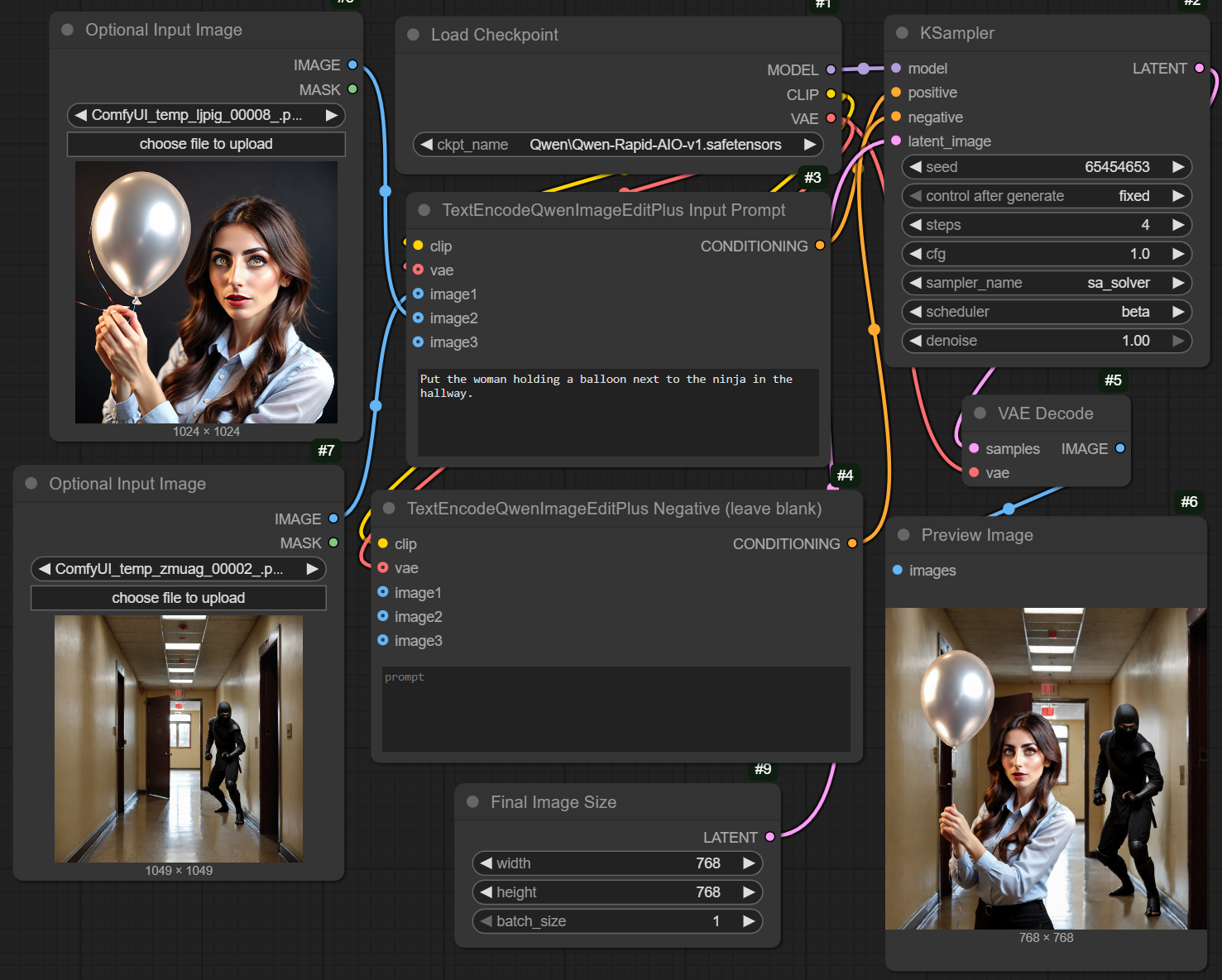
Combine accelerators, VAE, and CLIP to easily and quickly support Qwen image editing (and text-to-image) functionality.
Use the "Load Checkpoint" node. 1 CFG, 4 steps. Use the "TextEncodeQwenImageEditPlus" node to process input images (optional) and prompts. If no image is provided, it performs pure text-to-image conversion. FP8 precision.
Both NSFW and SFW models are provided! v4 and earlier versions combine NSFW and SFW purposes into one model, but with poorer performance. Starting from v5, NSFW and SFW versions are separated. Please choose the appropriate model based on your use case.
Having issues with scaling, cropping, or resizing? The problem lies in scaling images within the TextEncoderQwenEditPlus node. There are many solutions, but I prefer directly fixing the node, and I have provided my version in the file section. It also supports up to 4 input images. Set the "target_size" to slightly smaller than the maximum output size (e.g., set to 896 when creating a 1024x1024 image). I found this improves quality better than skipping scaling entirely, as the input images better match the output resolution.
Model Information
'%3e%3cg%3e%3cpath d='M6.9375%2c1.875L14.8125%2c1.875C15.5374%2c1.875000858307%2c16.125%2c2.462627%2c16.125%2c3.1875L16.125%2c11.0625C16.125%2c11.78737%2c15.5374%2c12.375%2c14.8125%2c12.375L6.9375%2c12.375C6.21263%2c12.375%2c5.625%2c11.78737%2c5.625%2c11.0625L5.625%2c3.1875C5.625%2c2.462626%2c6.21263%2c1.875000343323%2c6.9375%2c1.875ZM6.9375%2c3C6.83395%2c3%2c6.75%2c3.0839499999999997%2c6.75%2c3.1875L6.75%2c11.0625C6.75%2c11.16605%2c6.83395%2c11.25%2c6.9375%2c11.25L14.8125%2c11.25C14.9161%2c11.25%2c15%2c11.16605%2c15%2c11.0625L15%2c3.1875C15%2c3.0839499999999997%2c14.9161%2c3%2c14.8125%2c3L6.9375%2c3ZM11.25%2c13.5C11.25%2c13.1893%2c11.50184%2c12.9375%2c11.8125%2c12.9375C12.1232%2c12.9375%2c12.375%2c13.1893%2c12.375%2c13.5L12.375%2c14.8125C12.375%2c15.5374%2c11.78737%2c16.125%2c11.0625%2c16.125L3.1875%2c16.125C2.462626%2c16.125%2c1.875000171661%2c15.5374%2c1.875%2c14.8125L1.875%2c6.9375C1.875%2c6.21263%2c2.462626%2c5.625%2c3.1875%2c5.625L4.5%2c5.625C4.81066%2c5.625%2c5.0625%2c5.87684%2c5.0625%2c6.1875C5.0625%2c6.49816%2c4.81066%2c6.75%2c4.5%2c6.75L3.1875%2c6.75C3.0839499999999997%2c6.75%2c3%2c6.83395%2c3%2c6.9375L3%2c14.8125C3%2c14.9161%2c3.0839499999999997%2c15%2c3.1875%2c15L11.0625%2c15C11.16605%2c15%2c11.25%2c14.9161%2c11.25%2c14.8125L11.25%2c13.5Z' fill='%239DA2A8' fill-opacity='1' style='mix-blend-mode:passthrough'/%3e%3c/g%3e%3c/g%3e%3c/svg%3e)
Combine accelerators, VAE, and CLIP to easily and quickly support Qwen image editing (and text-to-image) functionality.
Use the "Load Checkpoint" node. 1 CFG, 4 steps. Use the "TextEncodeQwenImageEditPlus" node to process input images (optional) and prompts. If no image is provided, it performs pure text-to-image conversion. FP8 precision.
Both NSFW and SFW models are provided! v4 and earlier versions combine NSFW and SFW purposes into one model, but with poorer performance. Starting from v5, NSFW and SFW versions are separated. Please choose the appropriate model based on your use case.
Having issues with scaling, cropping, or resizing? The problem lies in scaling images within the TextEncoderQwenEditPlus node. There are many solutions, but I prefer directly fixing the node, and I have provided my version in the file section. It also supports up to 4 input images. Set the "target_size" to slightly smaller than the maximum output size (e.g., set to 896 when creating a 1024x1024 image). I found this improves quality better than skipping scaling entirely, as the input images better match the output resolution.