

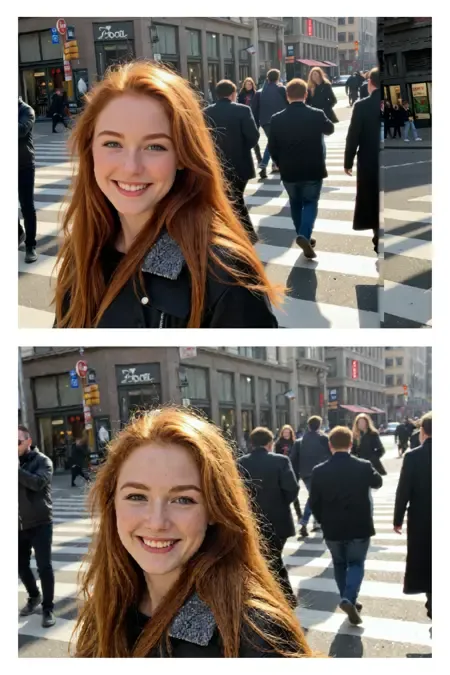
qwen edit realistic skin texture lora
Model Information
Finetuned LoRA for Enhanced Skin Realism in Qwen-Image-Edit-2509
This repository contains a finetuned Low-Rank Adaptation (LoRA) model designed to enhance the realism and detail of human skin in images. The LoRA has been trained on top of the powerful Qwen/Qwen-Image-Edit-2509 model, leveraging its advanced image editing capabilities to focus specifically on generating more natural and detailed skin textures.
This model was trained for 5000 steps on a local RTX 5090 using the AI-Toolkit. The resulting LoRA is ideal for photographers, digital artists, and anyone looking to improve the quality of human subjects in their generated or edited images.
Model Description
The qwen-edit-skin LoRA is a specialized finetuning of the Qwen/Qwen-Image-Edit-2509 base model. The base model is a versatile image editor with strong capabilities in multi-image editing and maintaining single-image consistency, particularly in preserving personal identity. This LoRA builds upon that foundation to specifically address the nuances of human skin, adding detail and realism that may not be present in the original generations.
The training was conducted using this fork of AI ToolKit, a comprehensive suite for finetuning diffusion models. The process for curating the dataset involved reverse modification of subject skin details as follows:
Taking real images of versatile subject portraits with skin exposed
Captioning each of these as our “Target” (THE AFTER) images for the final outcome expected in a standard Qwen Edit workflow
Editing the image in Photoshop to add more gaussian blur and smoother skin tones, to make the skin texture, tone and pores less visible
These became our “Control” (The BEFORE) images for Qwen Edit training.
Training Details
The model was finetuned with the following key parameters, which can be found in the accompanying config.yaml file:
Hardware:
GPU: NVIDIA RTX 5090
Training Configuration:
Training Steps: 5000
Batch Size: 1
Gradient Accumulation: 1
Learning Rate: 1.0e-04
Optimizer: adamw8bit
Noise Scheduler: flowmatch
Resolution: The model was trained on a dataset with resolutions of 512, 768, and 1024 pixels.
Precision: bf16
Network Architecture:
Type: LoRA
Linear Rank & Alpha: 16
Convolutional Rank & Alpha: 16
The choice of adamw8bit as the optimizer is significant as it reduces the memory footprint of the training process, allowing for more efficient finetuning on consumer-grade hardware without sacrificing performance. The flowmatch noise scheduler is a modern approach that can lead to more efficient training and high-quality image generation.
A notable aspect of the LoRA architecture is that the alpha values for both linear and convolutional layers are set to be equal to their respective rank (16). This balanced approach is a common starting point for LoRA training, ensuring that the learned adaptations are applied with a proportional scaling factor, which can help in preventing overfitting while allowing the model to learn the desired new features effectively.
How to Use
To use this LoRA, you will need to load the base model Qwen/Qwen-Image-Edit-2509 and then apply the finetuned LoRA weights loaded as qwen-edit-skin.safetensors. Previous step versions of the weights are uploaded for reference but the final version is qwen-edit-skin.safetensors. You can also leverage the example workflow attached in the repo for ComfyUI to compare the results across different weights.
The recommended weight is between 1 and 1.5, the examples provided show weights up to 2 only
Finetuned LoRA for Enhanced Skin Realism in Qwen-Image-Edit-2509
This repository contains a finetuned Low-Rank Adaptation (LoRA) model designed to enhance the realism and detail of human skin in images. The LoRA has been trained on top of the powerful Qwen/Qwen-Image-Edit-2509 model, leveraging its advanced image editing capabilities to focus specifically on generating more natural and detailed skin textures.
This model was trained for 5000 steps on a local RTX 5090 using the AI-Toolkit. The resulting LoRA is ideal for photographers, digital artists, and anyone looking to improve the quality of human subjects in their generated or edited images.
Model Description
The qwen-edit-skin LoRA is a specialized finetuning of the Qwen/Qwen-Image-Edit-2509 base model. The base model is a versatile image editor with strong capabilities in multi-image editing and maintaining single-image consistency, particularly in preserving personal identity. This LoRA builds upon that foundation to specifically address the nuances of human skin, adding detail and realism that may not be present in the original generations.
The training was conducted using this fork of AI ToolKit, a comprehensive suite for finetuning diffusion models. The process for curating the dataset involved reverse modification of subject skin details as follows:
Taking real images of versatile subject portraits with skin exposed
Captioning each of these as our “Target” (THE AFTER) images for the final outcome expected in a standard Qwen Edit workflow
Editing the image in Photoshop to add more gaussian blur and smoother skin tones, to make the skin texture, tone and pores less visible
These became our “Control” (The BEFORE) images for Qwen Edit training.
Training Details
The model was finetuned with the following key parameters, which can be found in the accompanying config.yaml file:
Hardware:
GPU: NVIDIA RTX 5090
Training Configuration:
Training Steps: 5000
Batch Size: 1
Gradient Accumulation: 1
Learning Rate: 1.0e-04
Optimizer: adamw8bit
Noise Scheduler: flowmatch
Resolution: The model was trained on a dataset with resolutions of 512, 768, and 1024 pixels.
Precision: bf16
Network Architecture:
Type: LoRA
Linear Rank & Alpha: 16
Convolutional Rank & Alpha: 16
The choice of adamw8bit as the optimizer is significant as it reduces the memory footprint of the training process, allowing for more efficient finetuning on consumer-grade hardware without sacrificing performance. The flowmatch noise scheduler is a modern approach that can lead to more efficient training and high-quality image generation.
A notable aspect of the LoRA architecture is that the alpha values for both linear and convolutional layers are set to be equal to their respective rank (16). This balanced approach is a common starting point for LoRA training, ensuring that the learned adaptations are applied with a proportional scaling factor, which can help in preventing overfitting while allowing the model to learn the desired new features effectively.
How to Use
To use this LoRA, you will need to load the base model Qwen/Qwen-Image-Edit-2509 and then apply the finetuned LoRA weights loaded as qwen-edit-skin.safetensors. Previous step versions of the weights are uploaded for reference but the final version is qwen-edit-skin.safetensors. You can also leverage the example workflow attached in the repo for ComfyUI to compare the results across different weights.
The recommended weight is between 1 and 1.5, the examples provided show weights up to 2 only