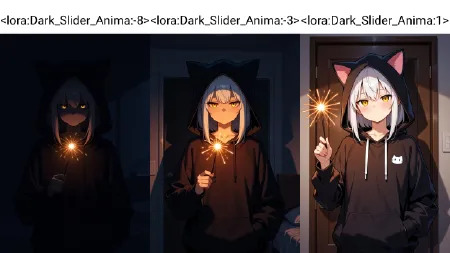
Anima Lighting / darkness slider Brightness/Darkness slider
Back
Anima Lighting / darkness slider Brightness/Darkness slider

Anima Lighting / darkness slider Brightness/Darkness slider

11 Views1 Likes7 Favorites
MangaIllustration2DFantasyClassicHand-Drawn

xiao_2025

xiao_2025

MangaIllustration2DFantasyClassicHand-Drawn

Model Information

Active
Model Type:
LoRA
Basic Model:
anima
Resource Name:
models/loras/Dark_Slider_Anima.safetensors
MD5:
758712689cf8b95ff632421e2b5d55e7

If used properly, this Lora effect is very significant.

Add any description related to lighting (highly recommend "blue hour" or "late night"), but words like "dark" or "dimly lit" are also completely applicable.

Any keywords related to darkness will make the image darker. Try adding the word "dark" to the prompt and set the value to 0.5 to 1.
Blue eyes may appear in dark scenes; simply specify the eye color.

This model is sourced from an external transfer (transfer address: c ),if the original author has objections to this transfer, you can click,
Appeal
We will, within 24 hours, edit, delete, or transfer the model to the original author according to the original author's request

If used properly, this Lora effect is very significant.

Add any description related to lighting (highly recommend "blue hour" or "late night"), but words like "dark" or "dimly lit" are also completely applicable.

Any keywords related to darkness will make the image darker. Try adding the word "dark" to the prompt and set the value to 0.5 to 1.
Blue eyes may appear in dark scenes; simply specify the eye color.

This model is sourced from an external transfer (transfer address: c ),if the original author has objections to this transfer, you can click,
Appeal
We will, within 24 hours, edit, delete, or transfer the model to the original author according to the original author's request