

Seedream 5.0 Pro vs GPT Image 2: Key Differences and Model Comparison
This article compares Seedream 5.0 Pro and GPT Image 2, focusing on Seedream 5.0 Pro’s advantages in composition, material and lighting realism, and controllable image editing. It also explains how to use the model through the RunningHub API.
Seedream 5.0 Pro vs GPT Image 2: What Are the Key Differences?
Quick Answer: What Is Seedream 5.0 Pro?
Seedream 5.0 Pro is an AI image model designed for high-quality image generation and editing. It supports text-to-image generation, reference-image editing, multi-image composition, and localized modifications.
Compared with GPT Image 2, Seedream 5.0 Pro places greater emphasis on the overall visual quality of an image. Beyond understanding the subjects and elements described in a prompt, it also handles composition, spatial relationships, materials, lighting, and visual hierarchy.
In simple terms, GPT Image 2 focuses more on information logic and structural accuracy, while Seedream 5.0 Pro is more oriented toward complete visual creation and an editable image workflow.
The two models are already relatively close in text generation and multilingual layout. The more noticeable advantages of Seedream 5.0 Pro lie in composition and space utilization, material and lighting quality, and controllable image editing after generation.
Where Can You Use Seedream 5.0 Pro?
To integrate Seedream 5.0 Pro into a product, platform, or enterprise content-production system, you can choose the appropriate API based on your task:
Seedream 5.0 Pro Text-to-Image API: seedream-v5-pro/text-to-image, suitable for generating images from text prompts.
Seedream 5.0 Pro Image-to-Image API: seedream-v5-pro/image-to-image, suitable for editing existing images, combining multiple references, and adjusting visual styles.
GPT Image 2 API: GPT Image 2, suitable for integrating the image-generation and editing capabilities of GPT Image 2.
For developers and enterprise teams, APIs are better suited to batch image generation, automated content-production workflows, and the integration of image generation and editing into existing business systems.
Before正式 integration, review the documentation on the relevant API page. Pay particular attention to input formats, image sizes, parameter settings, response formats, pricing, and usage limits.
If API integration is not required, you can also open Quick Create, select Seedream 5.0 Pro, and start creating with a prompt or reference image.
Seedream 5.0 Pro vs GPT Image 2: Key Differences at a Glance
In terms of model positioning, GPT Image 2 focuses more on structures, data, and information relationships within an image. Seedream 5.0 Pro further strengthens overall composition, material rendering, and editing control.
For users who care more about final visual quality and the ability to continue editing after generation, Seedream 5.0 Pro has a clearer advantage. The comparison table below can help users quickly understand the differences between the two models across three core dimensions.
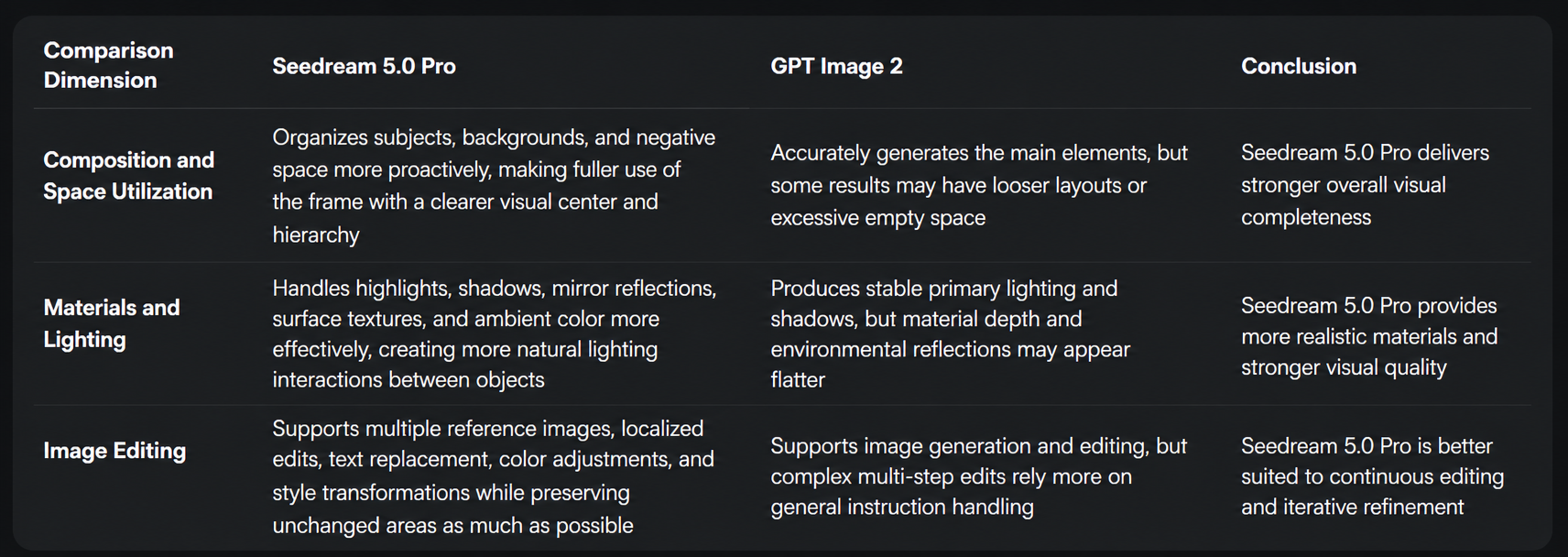
A quick comparison of Seedream 5.0 Pro and GPT Image 2 across composition, material and lighting quality, and image-editing control.
To compare the output of the two models, open the Seedream 5.0 Pro Text-to-Image API and the GPT Image 2 API, then test them with the same or similar prompts.
3 Key Advantages of Seedream 5.0 Pro over GPT Image 2
The value of Seedream 5.0 Pro is not limited to improving the quality of a single generated image. It moves image generation toward a more complete, controllable, and continuously editable creative workflow.
1. More Complete Composition and Better Use of Space
AI image generation is not only about recognizing which elements should appear in an image. The model must also understand how those elements should be arranged. The size and position of the main subject, the proportion of the background, the visual center, and the distance between different elements all affect whether the final result feels complete and natural.
Under the same or similar scene and aspect-ratio conditions, Seedream 5.0 Pro generally organizes the frame more actively. It considers subject scale, visual hierarchy, and negative space together, creating a clearer relationship between the subject, background, and surrounding space.

Coastal tram scene generated by Seedream 5.0 Pro, used to test composition, subject scale, and space utilization.

Coastal tram scene generated by GPT Image 2 using the same scene requirements.
Comparison: Both images successfully include the main requested elements, including a vintage red tram, a coastal street, a café table, pedestrians, and a distant bay. However, the way these elements are organized differs noticeably.
In the Seedream 5.0 Pro result, the tram occupies a clearer and more prominent position. The café table in the foreground, the street and people in the middle ground, and the sea and buildings in the background form a distinct spatial hierarchy. The buildings, plants, and road on both sides of the frame are also used effectively, making the composition feel tighter and more complete.
GPT Image 2 also reproduces the main scene accurately, but the sky and sea occupy a larger area on the left side. Although the sunset atmosphere is more prominent, the relationship between the tram, pedestrians, and background feels relatively loose, and the visual center is shifted further toward the right side of the frame.
The compositional advantages of Seedream 5.0 Pro are mainly reflected in three areas:
First, the main subject is more prominent. The central object is more likely to become the first visual focus and is less likely to be weakened by buildings, the sky, or other background elements.
Second, the available space is used more effectively. Within the same aspect ratio, Seedream 5.0 Pro is more likely to reduce unnecessary empty areas and involve the foreground, middle ground, and background in the overall composition.
Third, the relationships between elements are more coordinated. The proportions, placement, and visual hierarchy of different objects feel more natural, making the final image look closer to a fully designed composition.
GPT Image 2 can usually generate the subjects and scene elements requested in a prompt accurately. However, some results focus more on the correctness of individual elements than on making full use of the requested aspect ratio.
Seedream 5.0 Pro goes further by considering subject scale, visual focus, and overall balance. Its outputs therefore tend to feel more like complete, designed images and often require less cropping, repositioning, or layout adjustment afterward.
2. More Refined Materials and Lighting
The realism of an image depends not only on whether object shapes are accurate, but also on the relationship between materials and lighting. Glass, metal, mirrors, fabrics, and matte surfaces respond to light differently. A model must handle highlights, shadows, reflections, transparency, and ambient color together to make objects appear natural.
Compared with GPT Image 2, Seedream 5.0 Pro generally produces richer material and lighting details. In addition to basic highlights and shadows, it also handles color reflections and ambient-light interactions between different objects.

Perfume still-life scene generated by Seedream 5.0 Pro, used to test the rendering of glass, metal, ceramic, velvet, and reflective surfaces.

Perfume still-life scene generated by GPT Image 2 using the same material and lighting requirements.
Comparison: Both images accurately include an amber glass perfume bottle, a silver metal cap, a blue ceramic sphere, red velvet fabric, an engraved metal panel, and a reflective tabletop. However, their material depth and lighting relationships differ.
The Seedream 5.0 Pro result has richer tonal variation. The refraction around the edges of the glass bottle, the transparency of the liquid, and the reflection on the tabletop are clearer. The metal cap retains both its metallic texture and soft highlights, while the velvet surface and folds of the red fabric appear more refined. The frosted acrylic panel and engraved brass plate in the background also respond to light differently, adding greater depth to the scene.
GPT Image 2 can also distinguish between glass, metal, ceramic, and fabric. However, the lighting is more even overall. The interactions between glass refraction, mirror reflections, and ambient color are more simplified, which makes the image feel slightly flatter and less layered.
For example, when objects of different colors appear under the same lighting conditions, reflected light can influence nearby surfaces. A blue object may create a subtle blue cast on adjacent glass, metal, or glossy materials. Seedream 5.0 Pro is more likely to preserve these details and create a more natural lighting relationship between objects.
Seedream 5.0 Pro generally provides richer results in the following areas:
First, transitions between highlights and shadows are smoother. The lighting feels less abrupt, making surfaces appear more natural and three-dimensional.
Second, reflections on glass, mirrors, and transparent materials are more realistic. The model handles refraction, reflections, liquid transparency, and edge highlights with greater detail.
Third, ambient-color interaction is clearer. Reflected colors and subtle color casts between nearby objects are more likely to be preserved.
Fourth, surface textures and material details have greater depth. Details such as brushed metal, fabric folds, velvet texture, and engraved patterns appear more clearly defined.
Fifth, lighting between the subject and background is more consistent. The direction of light, shadow distribution, and overall color temperature are more likely to remain unified across the scene.
This means that Seedream 5.0 Pro does more than generate the objects in a scene. It also handles the relationship between the light source, materials, and surrounding environment, helping reduce flatness and the artificial plastic-like appearance often found in AI-generated images.
3. More Controllable Image Editing
One of the most notable advantages of Seedream 5.0 Pro over GPT Image 2 is its ability to support continued editing of existing images.
In real creative workflows, an image usually requires several rounds of adjustment. Users may need to replace the background, revise text, adjust colors, add or remove objects, or combine multiple reference images.
If every change requires regenerating the entire image, subjects, composition, and details that were already satisfactory may also change. Seedream 5.0 Pro places greater emphasis on modifying specified areas while preserving the parts that should remain unchanged.
Its editing capabilities mainly include:
First, combining multiple reference images to create a new composition.
Second, modifying localized elements while preserving the overall composition and other details.
Third, replacing text in an image while maintaining the original typeface, material, and layout relationships.
Fourth, independently adjusting the color, lighting, or material of a specified region.
Fifth, changing the overall visual style while preserving the main characteristics of a person or product.
Sixth, rematching the scale, lighting, shadows, and ambient reflections between a subject and its background.
Multi-image composition is not simply a matter of placing one object into another image. The model must also recalculate the subject’s scale, lighting, shadows, and environmental reflections so that the newly added content remains visually consistent with the original scene.
Seedream 5.0 Pro connects image generation with subsequent editing. Users can complete the overall image first and then continue refining specific areas without regenerating the entire result because of one small issue.
This editing approach improves image reusability and is better suited to content-production workflows that require repeated revisions and continuous iteration.
To edit images with references, open the Seedream 5.0 Pro Image-to-Image API and review its available capabilities.
Seedream 5.0 Pro or GPT Image 2: Which Should You Choose?
Seedream 5.0 Pro and GPT Image 2 both offer strong image-generation capabilities, but they are better suited to different types of tasks.
If an image contains complex data, charts, or numerical relationships that must remain accurate, GPT Image 2 may be the better choice.
If you care more about overall composition, material realism, lighting quality, and continued editing after generation, Seedream 5.0 Pro may be more suitable.
The two models are already relatively close in text generation and multilingual layout, so the choice should not be based on text capability alone. The more important question is whether the final image prioritizes information logic or visual quality and editing efficiency.
Conclusion: Seedream 5.0 Pro Is Closer to a Complete AI Image Workflow
The differences between Seedream 5.0 Pro and GPT Image 2 are not limited to visual style.
GPT Image 2 focuses more on information structure and logical relationships. Seedream 5.0 Pro places greater emphasis on final visual quality and the ability to continue editing after generation.
Compared with GPT Image 2, the main advantages of Seedream 5.0 Pro lie in more complete composition and space utilization, more refined materials and lighting, and more controllable image editing.
It moves AI image creation beyond generating a single image in one step and toward a workflow based on reference materials, editing, and continuous iteration.
To integrate the model into a product or automated content-production workflow, choose the Seedream 5.0 Pro Text-to-Image API or the Seedream 5.0 Pro Image-to-Image API based on your task.
If API integration is not required, open Quick Create, select Seedream 5.0 Pro, and start creating.
FAQ: Common Questions About Seedream 5.0 Pro and GPT Image 2
1. What Is the Main Advantage of Seedream 5.0 Pro over GPT Image 2?
The main advantages of Seedream 5.0 Pro lie in composition, material and lighting quality, and image editing. It places greater emphasis on overall visual completion and is better suited to continued refinement after the first result is generated.
2. How Do Seedream 5.0 Pro and GPT Image 2 Compare in Text Generation?
The two models are already relatively close in long-text generation and common multilingual layouts. The distinctive qualities of Seedream 5.0 Pro are more visible in how text is integrated with materials, lighting, and the overall composition.
3. Which Model Is Better for Charts and Data?
If charts, coordinates, and numerical relationships must remain accurate, GPT Image 2 may be the better choice. Visit the GPT Image 2 API page to review its capabilities.
4. Does Seedream 5.0 Pro Support Text-to-Image Generation?
Yes. Users can generate images from text prompts through the Seedream 5.0 Pro Text-to-Image API.
5. Does Seedream 5.0 Pro Support Reference-Image Editing?
Yes. Users can modify, combine, and restyle existing images through the Seedream 5.0 Pro Image-to-Image API.
6. Can I Use Seedream 5.0 Pro Without Integrating the API?
Yes. Open Quick Create, select Seedream 5.0 Pro, and start with a text prompt or reference image.
Reference: Seedream 5.0 Pro vs GPT Image 2