
'%3e %3cg id='Vector'%3e %3c/g%3e %3cpath id='Vector_2' d='M14.504 8.522L12.746 4.49C12.6826 4.34486 12.5783 4.22136 12.4458 4.13463C12.3133 4.0479 12.1584 4.0017 12 4.0017C11.8416 4.0017 11.6867 4.0479 11.5542 4.13463C11.4217 4.22136 11.3174 4.34486 11.254 4.49L9.495 8.522C9.305 8.958 8.958 9.306 8.522 9.495L4.49 11.254C4.34486 11.3174 4.22136 11.4217 4.13463 11.5542C4.0479 11.6867 4.0017 11.8416 4.0017 12C4.0017 12.1584 4.0479 12.3133 4.13463 12.4458C4.22136 12.5783 4.34486 12.6826 4.49 12.746L8.523 14.504C8.959 14.694 9.307 15.042 9.496 15.478L11.255 19.511C11.3184 19.6561 11.4227 19.7796 11.5552 19.8664C11.6877 19.9531 11.8426 19.9993 12.001 19.9993C12.1594 19.9993 12.3143 19.9531 12.4468 19.8664C12.5793 19.7796 12.6836 19.6561 12.747 19.511L14.505 15.478C14.695 15.042 15.043 14.694 15.479 14.504L19.512 12.746C19.6571 12.6826 19.7806 12.5783 19.8674 12.4458C19.9541 12.3133 20.0003 12.1584 20.0003 12C20.0003 11.8416 19.9541 11.6867 19.8674 11.5542C19.7806 11.4217 19.6571 11.3174 19.512 11.254L15.479 9.495C15.043 9.30549 14.695 8.95782 14.505 8.522' stroke='var(--stroke-0%2c white)' stroke-width='1.25' stroke-linecap='round' stroke-linejoin='round'/%3e %3cpath id='Vector_3' d='M3 3L5 5' stroke='var(--stroke-0%2c white)' stroke-width='1.25' stroke-linecap='round' stroke-linejoin='round'/%3e %3cpath id='Vector_4' d='M21 3L19 5' stroke='var(--stroke-0%2c white)' stroke-width='1.25' stroke-linecap='round' stroke-linejoin='round'/%3e %3cpath id='Vector_5' d='M3 21L5 19' stroke='var(--stroke-0%2c white)' stroke-width='1.25' stroke-linecap='round' stroke-linejoin='round'/%3e %3cpath id='Vector_6' d='M21 21L19 19' stroke='var(--stroke-0%2c white)' stroke-width='1.25' stroke-linecap='round' stroke-linejoin='round'/%3e %3c/g%3e %3cdefs%3e %3cclipPath id='clip0_0_55'%3e %3crect width='24' height='24' fill='white'/%3e %3c/clipPath%3e %3c/defs%3e %3c/svg%3e)
'%3e %3cg id='Vector'%3e %3c/g%3e %3cpath id='Vector_2' d='M14.375 7.66667H14.385' stroke='var(--stroke-0%2c white)' stroke-width='1.25' stroke-linecap='round' stroke-linejoin='round'/%3e %3cpath id='Vector_3' d='M11.9792 20.125H5.75C4.9875 20.125 4.25624 19.8221 3.71707 19.2829C3.1779 18.7438 2.875 18.0125 2.875 17.25V5.75C2.875 4.9875 3.1779 4.25624 3.71707 3.71707C4.25624 3.1779 4.9875 2.875 5.75 2.875H17.25C18.0125 2.875 18.7438 3.1779 19.2829 3.71707C19.8221 4.25624 20.125 4.9875 20.125 5.75V11.9792' stroke='var(--stroke-0%2c white)' stroke-width='1.25' stroke-linecap='round' stroke-linejoin='round'/%3e %3cpath id='Vector_4' d='M2.875 15.3333L7.66667 10.5417C8.556 9.68587 9.65233 9.68587 10.5417 10.5417L14.375 14.375' stroke='var(--stroke-0%2c white)' stroke-width='1.25' stroke-linecap='round' stroke-linejoin='round'/%3e %3cpath id='Vector_5' d='M13.4167 13.4167L14.375 12.4583C15.0171 11.8412 15.7646 11.6687 16.4661 11.9408' stroke='var(--stroke-0%2c white)' stroke-width='1.25' stroke-linecap='round' stroke-linejoin='round'/%3e %3cpath id='Vector_6' d='M15.3333 18.2083H21.0833' stroke='var(--stroke-0%2c white)' stroke-width='1.25' stroke-linecap='round' stroke-linejoin='round'/%3e %3cpath id='Vector_7' d='M18.2083 15.3333V21.0833' stroke='var(--stroke-0%2c white)' stroke-width='1.25' stroke-linecap='round' stroke-linejoin='round'/%3e %3c/g%3e %3cdefs%3e %3cclipPath id='clip0_0_4'%3e %3crect width='23' height='23' fill='white'/%3e %3c/clipPath%3e %3c/defs%3e %3c/svg%3e)


'%3e %3cg id='Vector'%3e %3c/g%3e %3cpath id='Vector_2' d='M18.3333 10.5001V6.66667C18.3333 5.78261 17.9821 4.93477 17.357 4.30964C16.7319 3.68452 15.8841 3.33333 15 3.33333H5C4.11594 3.33333 3.2681 3.68452 2.64298 4.30964C2.01786 4.93477 1.66667 5.78261 1.66667 6.66667V13.3333C1.66667 14.2174 2.01786 15.0652 2.64298 15.6904C3.2681 16.3155 4.11594 16.6667 5 16.6667H11.6667M15.5 17.0001V12.0001M13 14.5001L15.5 12.0001L18 14.5001' stroke='var(--stroke-0%2c white)' stroke-linecap='round' stroke-linejoin='round'/%3e %3cpath id='Vector_3' d='M8.33333 7.5L12.5 10L8.33333 12.5V7.5Z' stroke='var(--stroke-0%2c white)' stroke-linecap='round' stroke-linejoin='round'/%3e %3c/g%3e %3cdefs%3e %3cclipPath id='clip0_0_4'%3e %3crect width='20' height='20' fill='white'/%3e %3c/clipPath%3e %3c/defs%3e %3c/svg%3e)
'%3e %3cg id='Vector'%3e %3c/g%3e %3cpath id='Vector_2' d='M16.25 10.8333L21.1824 8.36767C21.3475 8.28515 21.531 8.2462 21.7154 8.25451C21.8998 8.26281 22.079 8.3181 22.2361 8.41512C22.3931 8.51214 22.5228 8.64768 22.6127 8.80888C22.7026 8.97007 22.7499 9.15158 22.75 9.33617V16.6638C22.7499 16.8484 22.7026 17.0299 22.6127 17.1911C22.5228 17.3523 22.3931 17.4879 22.2361 17.5849C22.079 17.6819 21.8998 17.7372 21.7154 17.7455C21.531 17.7538 21.3475 17.7148 21.1824 17.6323L16.25 15.1667V10.8333Z' stroke='var(--stroke-0%2c white)' stroke-width='1.25' stroke-linecap='round' stroke-linejoin='round'/%3e %3cpath id='Vector_3' d='M3.25 8.66667C3.25 8.09203 3.47827 7.54093 3.8846 7.1346C4.29093 6.72827 4.84203 6.5 5.41667 6.5H14.0833C14.658 6.5 15.2091 6.72827 15.6154 7.1346C16.0217 7.54093 16.25 8.09203 16.25 8.66667V17.3333C16.25 17.908 16.0217 18.4591 15.6154 18.8654C15.2091 19.2717 14.658 19.5 14.0833 19.5H5.41667C4.84203 19.5 4.29093 19.2717 3.8846 18.8654C3.47827 18.4591 3.25 17.908 3.25 17.3333V8.66667Z' stroke='var(--stroke-0%2c white)' stroke-width='1.25' stroke-linecap='round' stroke-linejoin='round'/%3e %3cpath id='Vector_4' d='M7.58333 13H11.9167' stroke='var(--stroke-0%2c white)' stroke-width='1.25' stroke-linecap='round' stroke-linejoin='round'/%3e %3cpath id='Vector_5' d='M9.75 10.8333V15.1667' stroke='var(--stroke-0%2c white)' stroke-width='1.25' stroke-linecap='round' stroke-linejoin='round'/%3e %3c/g%3e %3cdefs%3e %3cclipPath id='clip0_0_47'%3e %3crect width='26' height='26' fill='white'/%3e %3c/clipPath%3e %3c/defs%3e %3c/svg%3e)
'%3e %3cg id='Vector'%3e %3c/g%3e %3cpath id='Vector_2' d='M4 7H7M11 7H20' stroke='var(--stroke-0%2c white)' stroke-width='1.25' stroke-linecap='round' stroke-linejoin='round'/%3e %3cpath id='Vector_3' d='M4 17H20' stroke='var(--stroke-0%2c white)' stroke-width='1.25' stroke-linecap='round' stroke-linejoin='round'/%3e %3cpath id='Vector_4' d='M7 4L7 20' stroke='var(--stroke-0%2c white)' stroke-width='1.25' stroke-linecap='round' stroke-linejoin='round'/%3e %3cpath id='Vector_5' d='M17 4V13M17 17V20' stroke='var(--stroke-0%2c white)' stroke-width='1.25' stroke-linecap='round' stroke-linejoin='round'/%3e %3c/g%3e %3cdefs%3e %3cclipPath id='clip0_0_60'%3e %3crect width='24' height='24' fill='white'/%3e %3c/clipPath%3e %3c/defs%3e %3c/svg%3e)
'%3e %3cg id='Vector'%3e %3c/g%3e %3cpath id='Vector_2' d='M6 10L4 11L12 15L20 11L18 10' stroke='var(--stroke-0%2c white)' stroke-width='1.25' stroke-linecap='round' stroke-linejoin='round'/%3e %3cpath id='Vector_3' d='M4 15L12 19L20 15' stroke='var(--stroke-0%2c white)' stroke-width='1.25' stroke-linecap='round' stroke-linejoin='round'/%3e %3cpath id='Vector_4' d='M12 4V11' stroke='var(--stroke-0%2c white)' stroke-width='1.25' stroke-linecap='round' stroke-linejoin='round'/%3e %3cpath id='Vector_5' d='M15 8L12 11L9 8' stroke='var(--stroke-0%2c white)' stroke-width='1.25' stroke-linecap='round' stroke-linejoin='round'/%3e %3c/g%3e %3cdefs%3e %3cclipPath id='clip0_0_9'%3e %3crect width='24' height='24' fill='white'/%3e %3c/clipPath%3e %3c/defs%3e %3c/svg%3e)


What Are Vision Language Models (VLMs)? Get Started with RunningHub in Minutes
Learn what vision language models are, what they can do, and how to call GPT-4o, Gemini, Qwen-VL, and all major VLMs through a single API with RunningHub — no GPU, no infrastructure required.
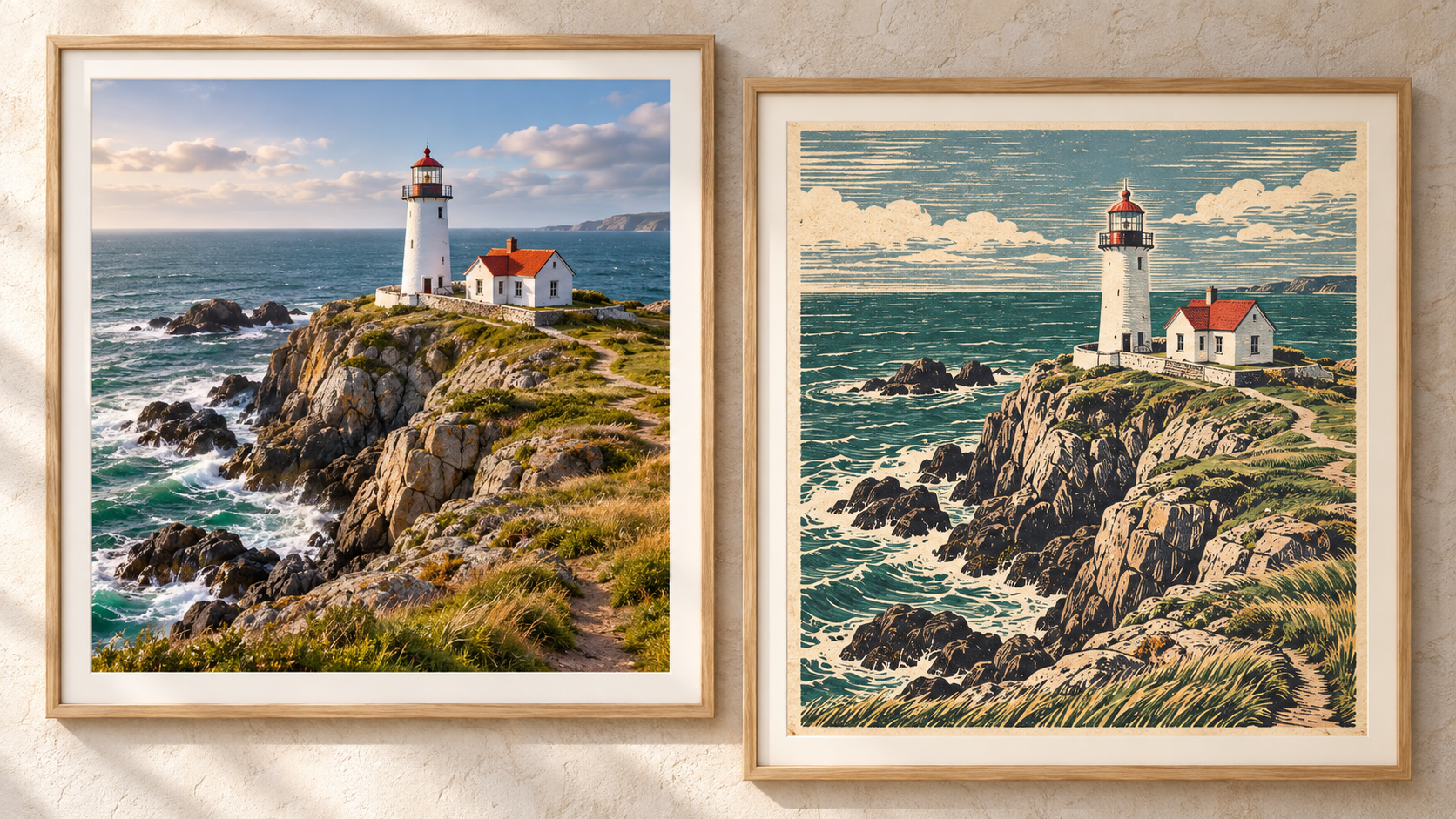
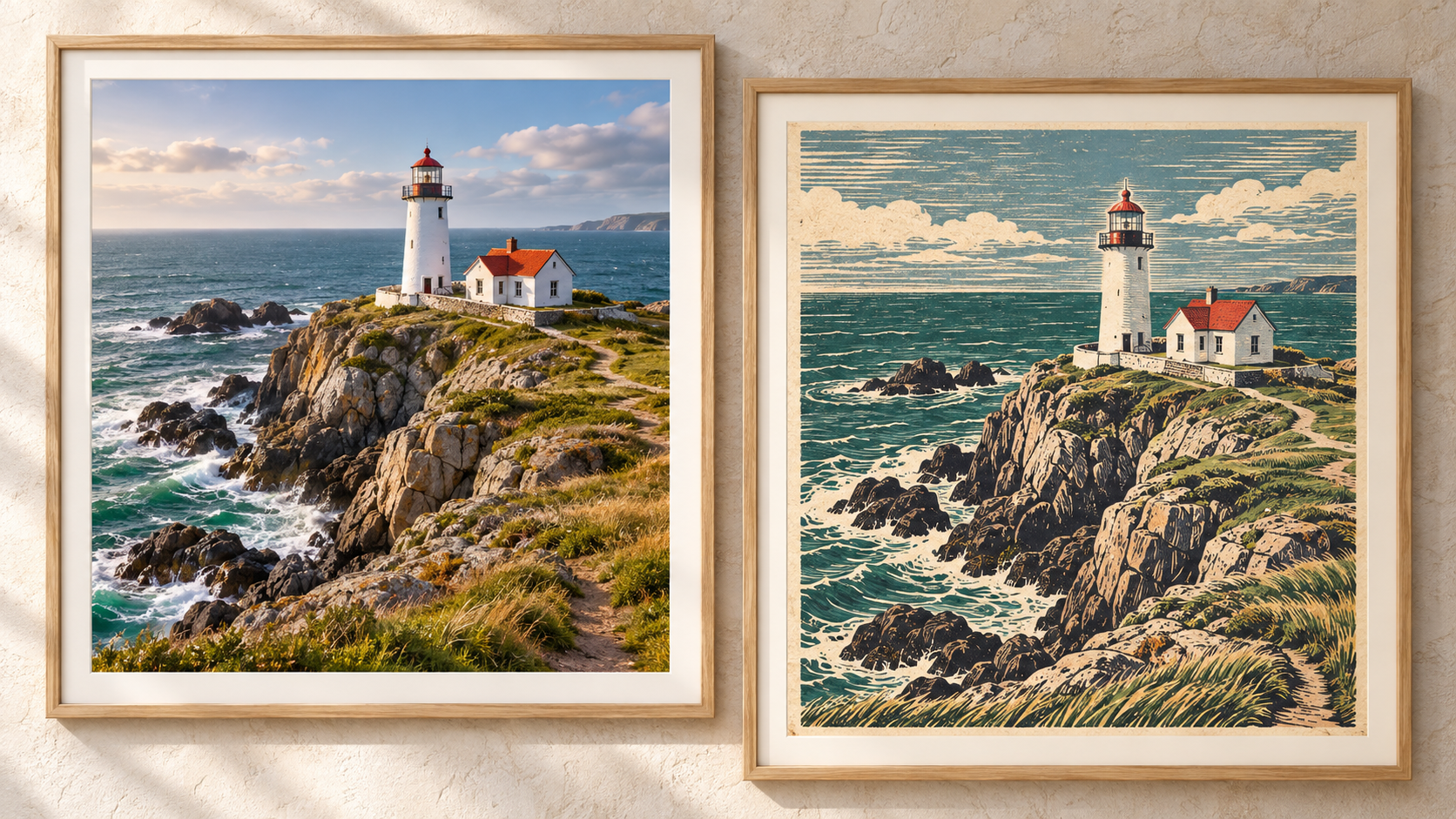
If you've ever asked AI to describe a photo, explain an error in a screenshot, or generate a product description from an image, you've already used a Vision Language Model (VLM).
From automated invoice processing to e-commerce product quality checks, from surveillance video analysis to GUI agents that operate your computer, VLMs are turning "understanding images" into a capability every application can have.
But here's the question: to use VLMs, do you really need to buy GPUs, set up servers, and tune models yourself?
The answer is no. With a unified AI API platform like https://www.runninghub.ai/ , you only need one API Key to call GPT-4o, Gemini, Qwen-VL, GLM-V, and all major vision language models — no infrastructure required. This article will walk you through building your first VLM application in just a few minutes.
1. What Is a Vision Language Model (VLM)?
A Vision Language Model (VLM) is a multimodal AI model that can understand both visual inputs — images, screenshots, documents, videos — and text, and generate text responses. It combines a vision encoder with a Large Language Model (LLM), essentially giving the LLM a pair of "eyes."
Unlike traditional Computer Vision (CV) models, VLMs are not limited to fixed categories or single tasks. With a natural language instruction, a single VLM can simultaneously perform visual question answering, OCR, classification, image captioning, document understanding, visual reasoning, and more.
In one sentence: A VLM is an AI model that can "see" images or videos and "talk" about them in natural language — like a chatbot with eyes.
2. What Can VLMs Do? Real-World Use Cases
VLMs go far beyond "describing images." Here are typical scenarios already deployed across industries:
📄 Document Understanding & OCR
Automatically extract structured data from invoices, contracts, and insurance policies; parse scanned documents, passports, and IDs; summarize multi-page reports and locate charts.
🛒 E-Commerce Product Analysis
Upload a product image to automatically extract color, style, and material, generate product descriptions, and perform image quality checks and brand logo verification.
🖥️ GUI Agents
Understand screens, recognize icons, interpret app states — powering RPA automation, accessibility tools, and automated UI testing.
🎬 Video Understanding & Summarization
Summarize long videos, identify key events, detect anomalies in surveillance footage, and auto-generate sports commentary or highlight reels.
🏥 Healthcare & Education
Assist with medical image interpretation; convert handwritten math problems into step-by-step solutions.
🏛️ Government & Finance
Make policy documents, application materials, and financial reports understandable, searchable, and automatically analyzable.
What all these scenarios have in common: they all need to process "visual information + language instructions" simultaneously — which is exactly the core capability of VLMs.
3. Want to Use VLMs? How Hard Is It to Build Yourself?
By now you might be eager to try. But if you plan to build a VLM application from scratch, here are the real challenges you'll face:
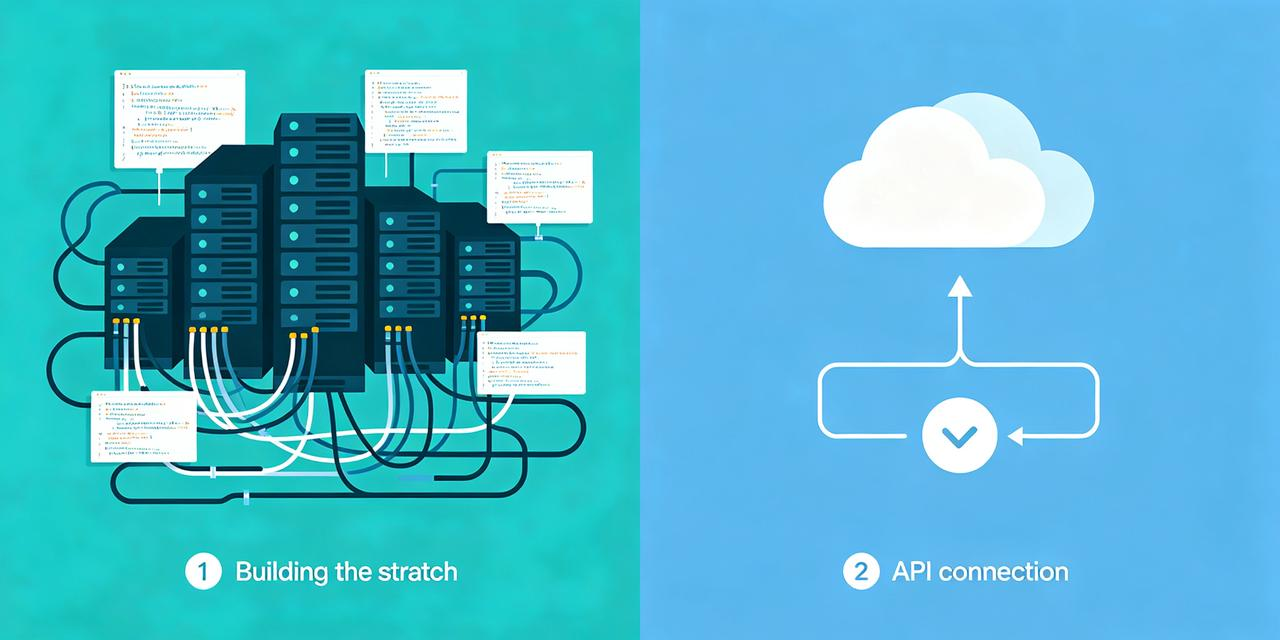
| Challenge | Build It Yourself | Use RunningHub |
| GPU Infrastructure | Purchase or rent high-performance GPUs — expensive | ✅ No GPU needed, cloud-hosted |
| Model Deployment | Deploy, optimize, and maintain each model yourself | ✅ Ready to use, switch models with one line of code |
| Model Selection | Evaluate and integrate different vendor APIs one by one | ✅ One API covers all major models |
| Ops Cost | Dedicated staff for servers, monitoring, scaling | ✅ Fully managed, auto-scaling |
| Time to First Call | Days to weeks | ✅ 5 minutes to your first call |
Key takeaway: The value of VLMs lies in the application, not the infrastructure. Leave GPUs, deployment, and operations to RunningHub — focus only on your business logic and prompt design.
4. What Is RunningHub? One API for All VLMs
RunningHub is a unified AI model API platform that lets developers call the world's leading vision language models through a single standard interface — without managing any infrastructure.
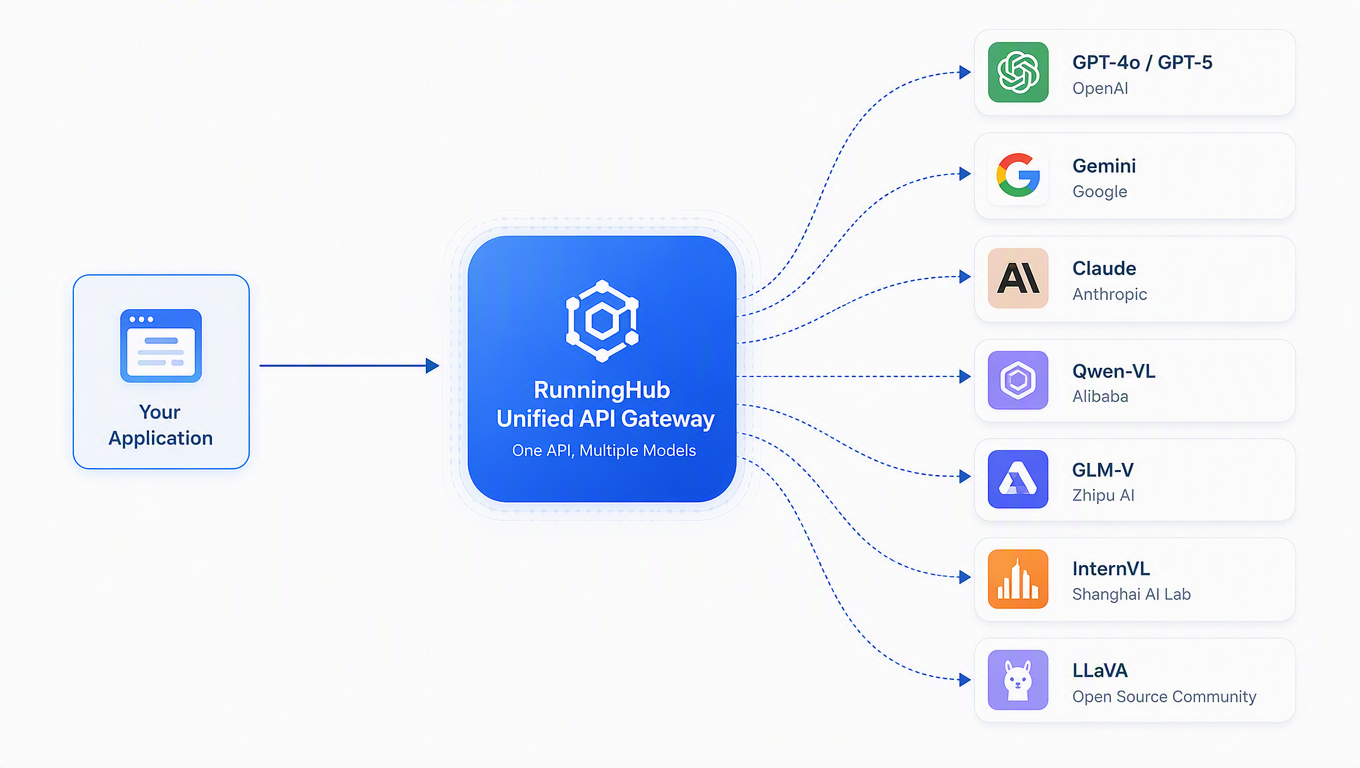
Core Advantages of RunningHub
🔄 One API, Endless Models
Compatible with OpenAI / Anthropic / Gemini protocols. Switch models by changing one parameter — no code changes needed.
💰 Pay-as-You-Go, Cost-Controlled
Billed by actual usage, no minimum spend, no hidden fees. Open-source models cost far less than commercial APIs.
⚡ Instant Access, 5-Minute Setup
Get an API Key upon registration. Standard REST interface, supports all major programming languages.
🔒 Enterprise-Grade Stability & Security
High-availability architecture with automatic failover; encrypted data transmission, no storage of user input content.
🌐 Commercial + Open-Source Coverage
Offers both commercial models like GPT-4o and Gemini, and open-source models like Qwen-VL, InternVL, and LLaVA — flexibly matching cost and performance needs.
5. Get Started in 5 Minutes: Call Your First VLM with RunningHub
No GPU needed, no machine learning background required. Follow these four steps and let AI understand your images right away.
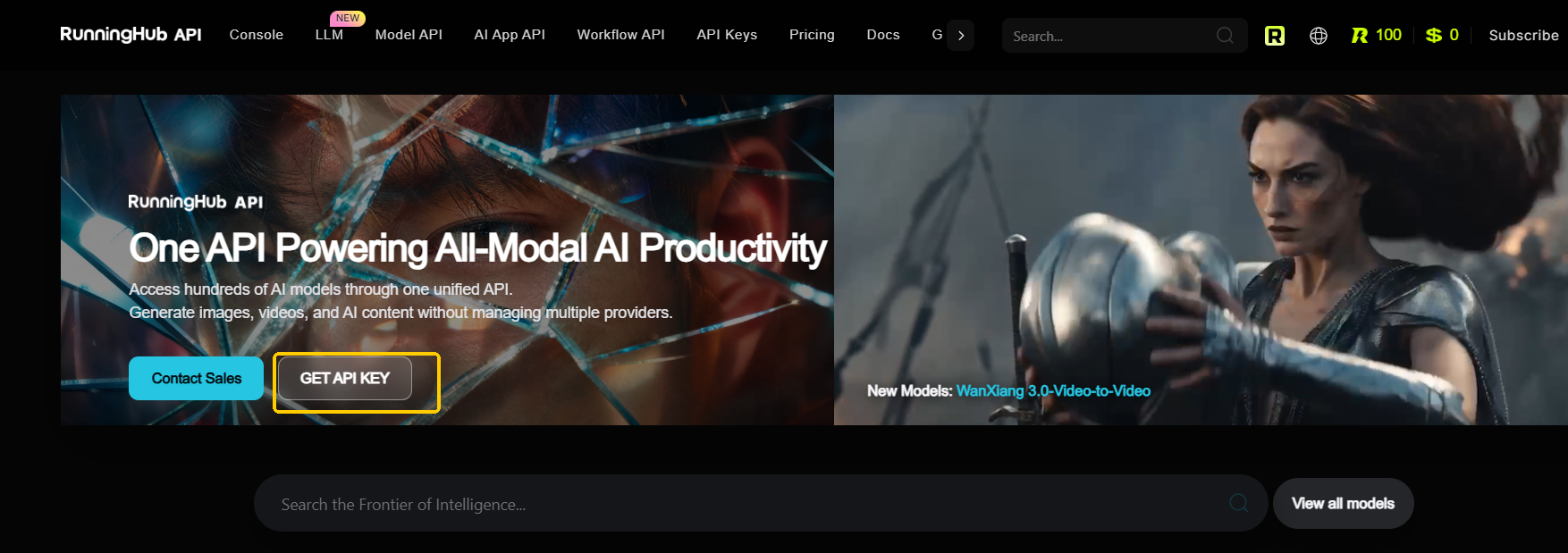
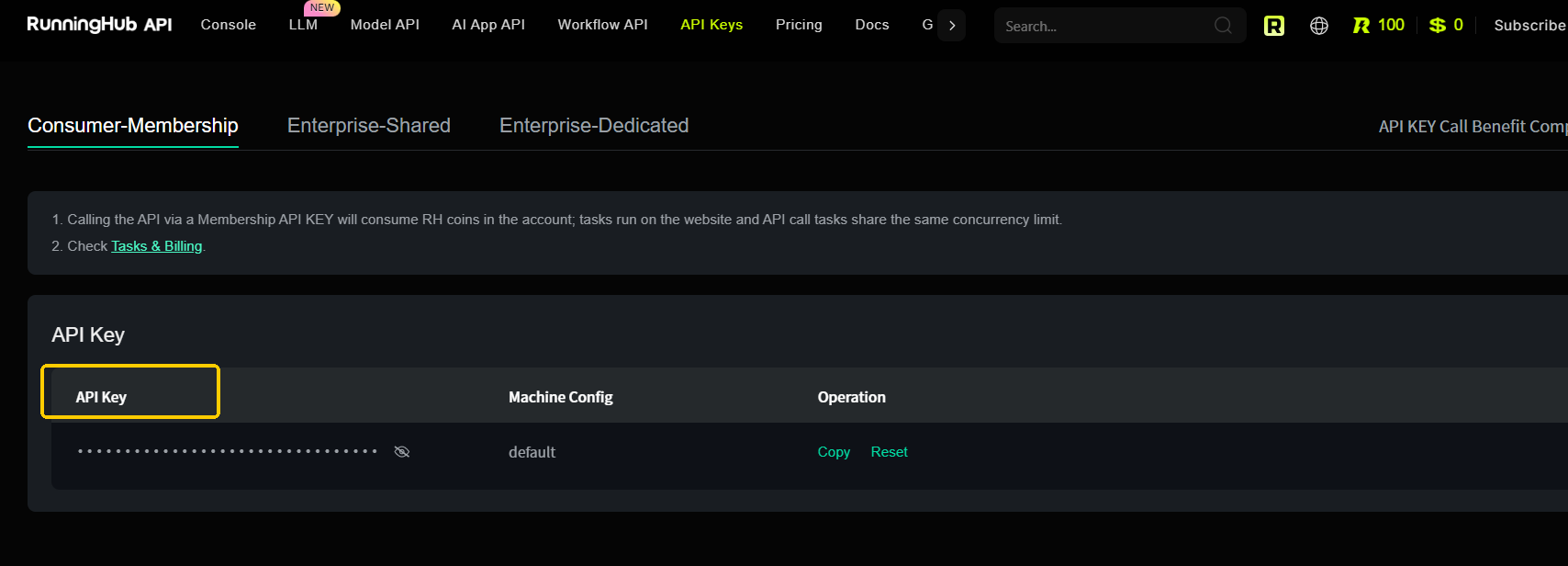
Step 1: Sign Up for RunningHub and Get an API Key
Go to the RunningHub website to register an account, then create an API Key in the console. The whole process takes less than a minute.
Step 2: Choose a Vision Model
RunningHub supports multiple vision models. Here are our recommendations:
| Scenario | Recommended Model | Strengths |
| General visual Q&A and reasoning | GPT-4o / Gemini / Claude | Best performance, ideal for complex reasoning |
| Document OCR and table extraction | Qwen-VL / Gemini / GLM-V | Strong Chinese & English OCR capabilities |
| Cost-sensitive / high concurrency | Qwen-VL / InternVL / LLaVA | Open-source models, lower pricing |
| GUI agents / screen understanding | GLM-V / GPT-4o | Precise screen element recognition |
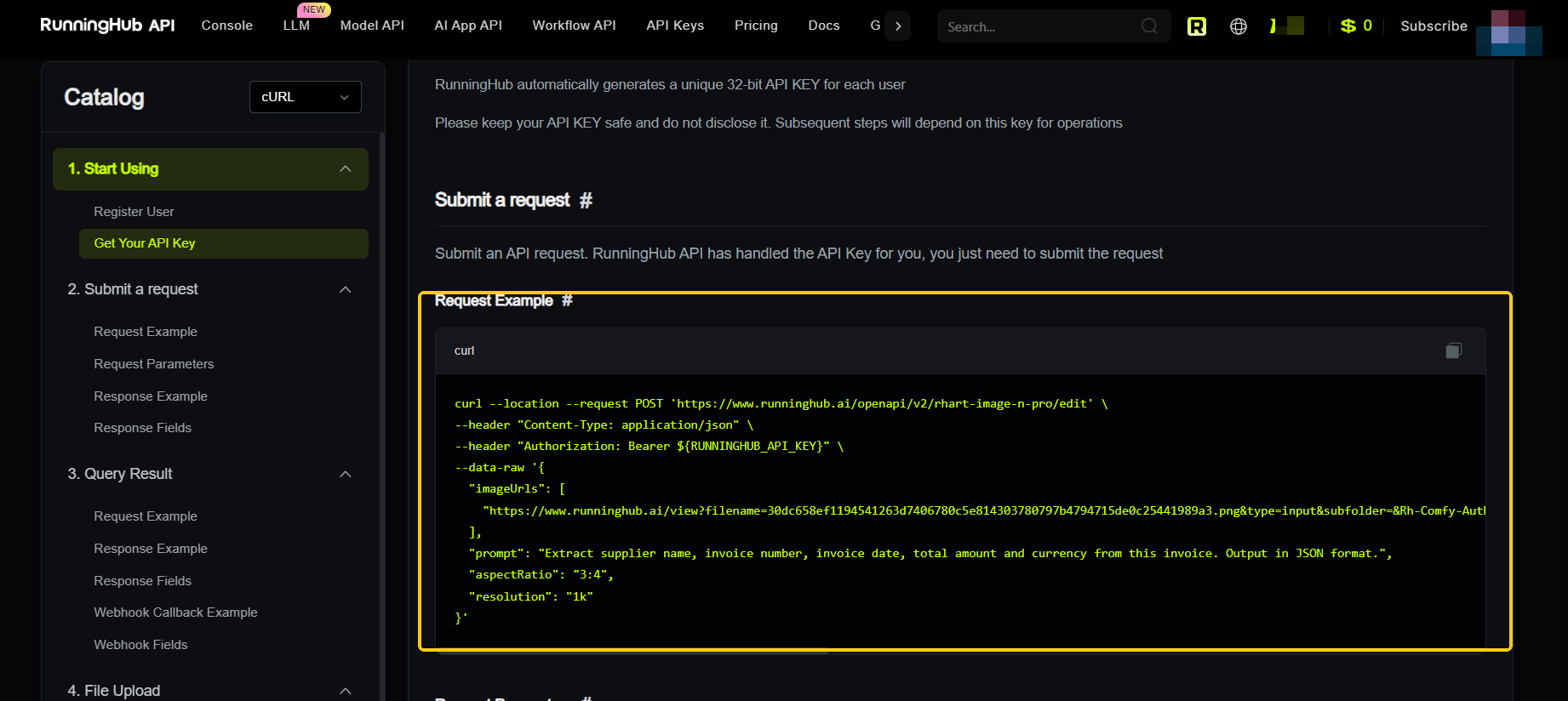
Step 3: Send an Image + Instruction
RunningHub is fully compatible with the OpenAI API format. Simply send an image URL along with a text instruction:
Step 4: Get Results and Iterate
The model will return structured JSON results. If the output isn't ideal, simply adjust your prompt — tell the model more specifically what to look at, what to extract, and what format to use. No code changes needed.
Want to try a different model? Just change the model parameter from qwen-vl-max to gpt-4o or gemini-1.5-pro — everything else stays exactly the same. That's the power of RunningHub's unified API.
6. Real Applications Built on RunningHub
Here are typical applications that developers and enterprises are building on RunningHub:
📑 Smart Invoice Processing System
Finance teams upload invoice photos, and RunningHub VLM automatically extracts all fields and enters them into the financial system — 10x efficiency improvement.
🏪 E-Commerce Product Listing Automation
Merchants upload product images, and the system auto-generates titles, descriptions, and attribute tags, plus performs image compliance checks — listing time drops from hours to seconds.
🤖 GUI Automated Testing Assistant
Testing teams use VLMs to understand app interfaces and automatically perform clicks, inputs, and verification actions — replacing numerous manual test cases.
📊 Financial Report Chart Interpretation
Financial analysts upload report screenshots, and VLMs automatically identify chart data, summarize key metrics, and generate analysis summaries.
7. Frequently Asked Questions (FAQ)
Which vision language models does RunningHub support?
RunningHub supports GPT-4o / GPT-5 (OpenAI), Gemini (Google), Claude (Anthropic), Qwen-VL / Qwen3-VL (Alibaba), GLM-4V / GLM-V (Zhipu), InternVL (Shanghai AI Lab), LLaVA, and other major commercial and open-source vision models. The model list is continuously updated.
Do I need to provide my own GPU or server?
Not at all. RunningHub is a fully managed API service — all models run in the cloud, and you only need to call them through the standard REST API.
How is pricing structured? Is there a free tier?
RunningHub bills by actual usage (tokens), with different pricing for different models — open-source models cost less. New users receive free trial credits upon registration; specific amounts are subject to the latest promotions on the website.
Are my images and data secure?
RunningHub uses encrypted transmission and does not store user input images or text content, meeting enterprise-grade data security standards.
Can I compare multiple models simultaneously?
Yes. Because RunningHub unifies the API format, you can call multiple models with the same code, compare results, and choose the best fit — or even dynamically route by scenario in production.
What's the difference between a VLM and a pure LLM?
A pure LLM can only process text; a VLM adds a vision encoder on top of an LLM, enabling it to understand images and videos simultaneously. On RunningHub, you can freely choose between text-only models and vision models based on your needs.
8. Get Started Now: Your First VLM App in 5 Minutes
The era of vision language models has arrived. From invoice processing to e-commerce automation, from video analysis to GUI agents, VLMs are reshaping every industry that needs to "understand images."
But you don't need to be a machine learning expert or invest heavily in infrastructure. RunningHub encapsulates all the complexity behind a simple API, so you can focus on creating value.
Start now:
Go to the https://www.runninghub.ai/ and register an account
Create an API Key in the console
Copy the code example from this article and replace YOUR_API_KEY
Send your first image and let AI understand it
5 minutes — from registration to your first successful VLM call.
For more model listings, API documentation, and example code, visit: