
'%3e %3cg id='Vector'%3e %3c/g%3e %3cpath id='Vector_2' d='M14.504 8.522L12.746 4.49C12.6826 4.34486 12.5783 4.22136 12.4458 4.13463C12.3133 4.0479 12.1584 4.0017 12 4.0017C11.8416 4.0017 11.6867 4.0479 11.5542 4.13463C11.4217 4.22136 11.3174 4.34486 11.254 4.49L9.495 8.522C9.305 8.958 8.958 9.306 8.522 9.495L4.49 11.254C4.34486 11.3174 4.22136 11.4217 4.13463 11.5542C4.0479 11.6867 4.0017 11.8416 4.0017 12C4.0017 12.1584 4.0479 12.3133 4.13463 12.4458C4.22136 12.5783 4.34486 12.6826 4.49 12.746L8.523 14.504C8.959 14.694 9.307 15.042 9.496 15.478L11.255 19.511C11.3184 19.6561 11.4227 19.7796 11.5552 19.8664C11.6877 19.9531 11.8426 19.9993 12.001 19.9993C12.1594 19.9993 12.3143 19.9531 12.4468 19.8664C12.5793 19.7796 12.6836 19.6561 12.747 19.511L14.505 15.478C14.695 15.042 15.043 14.694 15.479 14.504L19.512 12.746C19.6571 12.6826 19.7806 12.5783 19.8674 12.4458C19.9541 12.3133 20.0003 12.1584 20.0003 12C20.0003 11.8416 19.9541 11.6867 19.8674 11.5542C19.7806 11.4217 19.6571 11.3174 19.512 11.254L15.479 9.495C15.043 9.30549 14.695 8.95782 14.505 8.522' stroke='var(--stroke-0%2c white)' stroke-width='1.25' stroke-linecap='round' stroke-linejoin='round'/%3e %3cpath id='Vector_3' d='M3 3L5 5' stroke='var(--stroke-0%2c white)' stroke-width='1.25' stroke-linecap='round' stroke-linejoin='round'/%3e %3cpath id='Vector_4' d='M21 3L19 5' stroke='var(--stroke-0%2c white)' stroke-width='1.25' stroke-linecap='round' stroke-linejoin='round'/%3e %3cpath id='Vector_5' d='M3 21L5 19' stroke='var(--stroke-0%2c white)' stroke-width='1.25' stroke-linecap='round' stroke-linejoin='round'/%3e %3cpath id='Vector_6' d='M21 21L19 19' stroke='var(--stroke-0%2c white)' stroke-width='1.25' stroke-linecap='round' stroke-linejoin='round'/%3e %3c/g%3e %3cdefs%3e %3cclipPath id='clip0_0_55'%3e %3crect width='24' height='24' fill='white'/%3e %3c/clipPath%3e %3c/defs%3e %3c/svg%3e)
'%3e %3cg id='Vector'%3e %3c/g%3e %3cpath id='Vector_2' d='M14.375 7.66667H14.385' stroke='var(--stroke-0%2c white)' stroke-width='1.25' stroke-linecap='round' stroke-linejoin='round'/%3e %3cpath id='Vector_3' d='M11.9792 20.125H5.75C4.9875 20.125 4.25624 19.8221 3.71707 19.2829C3.1779 18.7438 2.875 18.0125 2.875 17.25V5.75C2.875 4.9875 3.1779 4.25624 3.71707 3.71707C4.25624 3.1779 4.9875 2.875 5.75 2.875H17.25C18.0125 2.875 18.7438 3.1779 19.2829 3.71707C19.8221 4.25624 20.125 4.9875 20.125 5.75V11.9792' stroke='var(--stroke-0%2c white)' stroke-width='1.25' stroke-linecap='round' stroke-linejoin='round'/%3e %3cpath id='Vector_4' d='M2.875 15.3333L7.66667 10.5417C8.556 9.68587 9.65233 9.68587 10.5417 10.5417L14.375 14.375' stroke='var(--stroke-0%2c white)' stroke-width='1.25' stroke-linecap='round' stroke-linejoin='round'/%3e %3cpath id='Vector_5' d='M13.4167 13.4167L14.375 12.4583C15.0171 11.8412 15.7646 11.6687 16.4661 11.9408' stroke='var(--stroke-0%2c white)' stroke-width='1.25' stroke-linecap='round' stroke-linejoin='round'/%3e %3cpath id='Vector_6' d='M15.3333 18.2083H21.0833' stroke='var(--stroke-0%2c white)' stroke-width='1.25' stroke-linecap='round' stroke-linejoin='round'/%3e %3cpath id='Vector_7' d='M18.2083 15.3333V21.0833' stroke='var(--stroke-0%2c white)' stroke-width='1.25' stroke-linecap='round' stroke-linejoin='round'/%3e %3c/g%3e %3cdefs%3e %3cclipPath id='clip0_0_4'%3e %3crect width='23' height='23' fill='white'/%3e %3c/clipPath%3e %3c/defs%3e %3c/svg%3e)


'%3e %3cg id='Vector'%3e %3c/g%3e %3cpath id='Vector_2' d='M18.3333 10.5001V6.66667C18.3333 5.78261 17.9821 4.93477 17.357 4.30964C16.7319 3.68452 15.8841 3.33333 15 3.33333H5C4.11594 3.33333 3.2681 3.68452 2.64298 4.30964C2.01786 4.93477 1.66667 5.78261 1.66667 6.66667V13.3333C1.66667 14.2174 2.01786 15.0652 2.64298 15.6904C3.2681 16.3155 4.11594 16.6667 5 16.6667H11.6667M15.5 17.0001V12.0001M13 14.5001L15.5 12.0001L18 14.5001' stroke='var(--stroke-0%2c white)' stroke-linecap='round' stroke-linejoin='round'/%3e %3cpath id='Vector_3' d='M8.33333 7.5L12.5 10L8.33333 12.5V7.5Z' stroke='var(--stroke-0%2c white)' stroke-linecap='round' stroke-linejoin='round'/%3e %3c/g%3e %3cdefs%3e %3cclipPath id='clip0_0_4'%3e %3crect width='20' height='20' fill='white'/%3e %3c/clipPath%3e %3c/defs%3e %3c/svg%3e)
'%3e %3cg id='Vector'%3e %3c/g%3e %3cpath id='Vector_2' d='M16.25 10.8333L21.1824 8.36767C21.3475 8.28515 21.531 8.2462 21.7154 8.25451C21.8998 8.26281 22.079 8.3181 22.2361 8.41512C22.3931 8.51214 22.5228 8.64768 22.6127 8.80888C22.7026 8.97007 22.7499 9.15158 22.75 9.33617V16.6638C22.7499 16.8484 22.7026 17.0299 22.6127 17.1911C22.5228 17.3523 22.3931 17.4879 22.2361 17.5849C22.079 17.6819 21.8998 17.7372 21.7154 17.7455C21.531 17.7538 21.3475 17.7148 21.1824 17.6323L16.25 15.1667V10.8333Z' stroke='var(--stroke-0%2c white)' stroke-width='1.25' stroke-linecap='round' stroke-linejoin='round'/%3e %3cpath id='Vector_3' d='M3.25 8.66667C3.25 8.09203 3.47827 7.54093 3.8846 7.1346C4.29093 6.72827 4.84203 6.5 5.41667 6.5H14.0833C14.658 6.5 15.2091 6.72827 15.6154 7.1346C16.0217 7.54093 16.25 8.09203 16.25 8.66667V17.3333C16.25 17.908 16.0217 18.4591 15.6154 18.8654C15.2091 19.2717 14.658 19.5 14.0833 19.5H5.41667C4.84203 19.5 4.29093 19.2717 3.8846 18.8654C3.47827 18.4591 3.25 17.908 3.25 17.3333V8.66667Z' stroke='var(--stroke-0%2c white)' stroke-width='1.25' stroke-linecap='round' stroke-linejoin='round'/%3e %3cpath id='Vector_4' d='M7.58333 13H11.9167' stroke='var(--stroke-0%2c white)' stroke-width='1.25' stroke-linecap='round' stroke-linejoin='round'/%3e %3cpath id='Vector_5' d='M9.75 10.8333V15.1667' stroke='var(--stroke-0%2c white)' stroke-width='1.25' stroke-linecap='round' stroke-linejoin='round'/%3e %3c/g%3e %3cdefs%3e %3cclipPath id='clip0_0_47'%3e %3crect width='26' height='26' fill='white'/%3e %3c/clipPath%3e %3c/defs%3e %3c/svg%3e)
'%3e %3cg id='Vector'%3e %3c/g%3e %3cpath id='Vector_2' d='M4 7H7M11 7H20' stroke='var(--stroke-0%2c white)' stroke-width='1.25' stroke-linecap='round' stroke-linejoin='round'/%3e %3cpath id='Vector_3' d='M4 17H20' stroke='var(--stroke-0%2c white)' stroke-width='1.25' stroke-linecap='round' stroke-linejoin='round'/%3e %3cpath id='Vector_4' d='M7 4L7 20' stroke='var(--stroke-0%2c white)' stroke-width='1.25' stroke-linecap='round' stroke-linejoin='round'/%3e %3cpath id='Vector_5' d='M17 4V13M17 17V20' stroke='var(--stroke-0%2c white)' stroke-width='1.25' stroke-linecap='round' stroke-linejoin='round'/%3e %3c/g%3e %3cdefs%3e %3cclipPath id='clip0_0_60'%3e %3crect width='24' height='24' fill='white'/%3e %3c/clipPath%3e %3c/defs%3e %3c/svg%3e)
'%3e %3cg id='Vector'%3e %3c/g%3e %3cpath id='Vector_2' d='M6 10L4 11L12 15L20 11L18 10' stroke='var(--stroke-0%2c white)' stroke-width='1.25' stroke-linecap='round' stroke-linejoin='round'/%3e %3cpath id='Vector_3' d='M4 15L12 19L20 15' stroke='var(--stroke-0%2c white)' stroke-width='1.25' stroke-linecap='round' stroke-linejoin='round'/%3e %3cpath id='Vector_4' d='M12 4V11' stroke='var(--stroke-0%2c white)' stroke-width='1.25' stroke-linecap='round' stroke-linejoin='round'/%3e %3cpath id='Vector_5' d='M15 8L12 11L9 8' stroke='var(--stroke-0%2c white)' stroke-width='1.25' stroke-linecap='round' stroke-linejoin='round'/%3e %3c/g%3e %3cdefs%3e %3cclipPath id='clip0_0_9'%3e %3crect width='24' height='24' fill='white'/%3e %3c/clipPath%3e %3c/defs%3e %3c/svg%3e)


Best AI Poster Generator: 10 Tools Compared in 2026
Compare the best AI poster generator tools for events, ads, e-commerce, and social media, with pros, cons, use cases, and a RunningHub workflow.
Creating a poster usually involves more than generating a good-looking image. You need a clear visual hierarchy, readable text, suitable composition, the right aspect ratio, and enough flexibility to adapt the result for an event, product campaign, social post, or advertisement.
That is where an AI poster generator can help.
Instead of starting with a blank canvas, you can describe the visual direction, provide an image, select a template, or combine AI-generated assets with an existing design. Different platforms take very different approaches. Some are optimized for editable templates, while others focus on image generation and creative exploration.
For example, Canva combines poster templates with AI-powered creation and editing tools, while Adobe Express can generate editable templates from text descriptions. Ideogram focuses heavily on text rendering inside generated images, and Recraft combines AI-generated visuals with poster layouts and editable design elements.
For creators who want more than a one-off poster, platforms such as RunningHub provide another approach: combining AI image generation, AI applications, and ComfyUI workflows in one creative environment.
What Is an AI Poster Generator?
An AI poster generator is a tool that uses AI to help create poster visuals from text prompts, uploaded images, templates, or other inputs.
Depending on the platform, it may generate:
- Event posters
- Product advertisements
- Social media graphics
- Movie-style posters
- Promotional campaigns
- E-commerce visuals
- Educational posters
- Brand campaign concepts
- Typography-based designs
- Marketing banners
The important difference is how much control you get after generation.
A template-focused platform may give you a finished layout that you can edit element by element. An image-generation tool may produce a more original visual but give you less traditional layout control. A workflow-based platform can offer more flexibility by connecting models and image-processing steps.
So when comparing the best AI poster generator tools, look beyond the visual preview. Consider what happens after the first generation.
What Makes the Best AI Poster Generator?
Before comparing the tools, it helps to define what actually matters.
1. Visual quality
The generated image should have a coherent composition, lighting, subject placement, and visual style.
2. Text accuracy
For posters, text is especially important. A beautiful background is not enough if the headline, date, price, or product name is incorrect.
Ideogram, for example, specifically positions text rendering as a core capability and provides editable text-layer functionality for generated designs.
3. Editability
Ask whether you can change the headline, image, colors, layout, or other elements without starting again.
4. Input flexibility
Some projects start from a blank prompt. Others start with a product photo, reference image, logo, or existing creative.
5. Use-case fit
The best tool for a movie concept poster may not be the best tool for an e-commerce promotion or an academic poster.
6. Workflow flexibility
If you create posters regularly, the ability to reuse workflows, models, applications, or generation processes can become more important than simply generating one attractive image.
10 Best AI Poster Generator Tools Compared
| Tool | Best For | Main Approach | Key Strength |
| Canva | Beginners, marketers | Templates + AI | Easy editing |
| Adobe Express | Business content | AI templates | Adobe ecosystem |
| Ideogram | Typography posters | Image generation | Text rendering |
| Recraft | Creative visual design | AI generation + editing | Flexible visual styles |
| Microsoft Designer | Casual creators | AI design | Simple workflow |
| Piktochart | Information-heavy posters | AI + templates | Structured layouts |
| Venngage | Business and event posters | AI + editor | Content hierarchy |
| Kittl | Design-focused creators | AI + canvas | Typography and design tools |
| Midjourney | Artistic poster concepts | Image generation | Creative exploration |
| RunningHub | Advanced AI creation workflows | Models + Apps + Workflows | Workflow flexibility |
1. Canva — Best for Easy Poster Editing
Canva is a strong option when you want to generate or customize a poster without learning professional design software.
Its poster workflow combines templates, a drag-and-drop editor, stock assets, collaboration features, and AI-powered tools such as Magic Edit and Magic Media. Canva also supports poster exports in formats such as PDF, JPG, and PNG.
Best for:
Social media managers, marketers, small businesses, students, and beginners.
Strengths:
- Large poster template ecosystem
- Easy manual editing
- AI image and content generation
- Useful for team collaboration
- Good fit for conventional promotional posters
Limitations:
- Template-based designs can feel familiar
- Advanced AI experimentation is not its primary workflow
- Users seeking highly customized generation may want more model flexibility
Choose Canva when:
Your priority is getting an editable, conventional poster quickly.
2. Adobe Express — Best for Editable AI Templates
Adobe Express takes a template-oriented approach. Users can describe a design and generate editable templates for posters, flyers, social posts, and cards, then customize the result before downloading.
Best for:
Marketers, business users, and creators already working in the Adobe ecosystem.
Strengths:
- Prompt-to-template workflow
- Editable poster structure
- Branding and customization options
- Familiar Adobe design environment
Limitations:
- More focused on editable design than open-ended visual experimentation
- Some users may need additional tools for highly experimental AI imagery
Choose Adobe Express when:
You want AI to help with the first layout but still want a traditional editable design afterward.
3. Ideogram — Best for Typography-Heavy Posters
Ideogram is particularly relevant when the poster itself depends heavily on typography.
Its official documentation emphasizes text rendering for posters, signage, packaging, logos, and other designs where the words are part of the visual composition. It also offers a Layerize Text feature that can turn generated text into editable components.
Best for:
Movie posters, event announcements, typography posters, logos, and promotional graphics.
Strengths:
- Strong focus on text inside images
- Useful for typography-led designs
- Editable text layers
- Good fit for posters where the headline is part of the artwork
Limitations:
- More image-generation oriented than traditional design suites
- Complex business layouts may still benefit from a dedicated editor
Choose Ideogram when:
The words on the poster matter almost as much as the visual.
4. Recraft — Best for Creative Poster Design
Recraft approaches poster creation from a visual-generation perspective. Its poster tool can generate a poster base from a description, add or upload designs, layer elements, add custom text, and export the result. It also provides tools for visual editing, mockups, vector graphics, and image enhancement.
Best for:
Designers, brand teams, illustrators, and creators exploring original visual directions.
Strengths:
- Broad visual style range
- AI-generated design elements
- Poster mockup workflow
- Layer-based design possibilities
- Useful for brand and marketing visuals
Limitations:
- More design-oriented than simple one-click generation
- Some projects still require manual refinement
Choose Recraft when:
You want a poster that starts with AI-generated visual exploration rather than a standard template.
5. Microsoft Designer — Best for Simple AI-Assisted Graphics
Microsoft Designer is aimed at users who want AI assistance without needing extensive design experience. It can generate images from descriptions, offer design suggestions, and provide editing tools for uploaded images.
Best for:
Casual creators, Microsoft 365 users, and quick promotional graphics.
Strengths:
- Simple AI-assisted workflow
- Image generation and editing
- Easy starting point for non-designers
- Integration with Microsoft-oriented workflows
Limitations:
Microsoft notes that generated text may sometimes contain spelling errors or language issues, so important poster copy should always be checked before publishing.
Choose Microsoft Designer when:
You need a straightforward AI-assisted design tool for everyday visual content.
6. Piktochart — Best for Information-Heavy Poster
Piktochart is particularly useful when a poster needs to communicate structured information.
Its AI poster generator can create a design from a prompt, after which users can edit individual elements through a drag-and-drop interface. Its use cases include marketing, events, learning, and internal communications.
Best for:
- Educational posters
- Business announcements
- Data-heavy designs
- Event information
- Internal communications
Strengths:
- Strong information hierarchy
- Editable layouts
- Suitable for structured content
Limitations:
- Less suitable when the goal is purely artistic experimentation
Choose Piktochart when:
Your poster needs to communicate a lot of information clearly.
7. Venngage — Best for Business and Event Poster
Venngage combines AI poster generation with an editor for adjusting text, fonts, colors, layout, and branding.
Its workflow starts by defining the poster's goal, describing it in a prompt, generating a layout, and then refining the result in the editor.
Best for:
Marketers, event organizers, HR teams, and business users.
Strengths:
- Clear information hierarchy
- AI-generated layouts
- Brand-oriented editing
- Useful for event and campaign posters
Limitations:
- Less focused on highly artistic image generation
- More structured than experimental
Choose Venngage when:
The poster's primary purpose is to communicate information or promote an organized campaign.
8. Kittl — Best for Design-Oriented Creator
Kittl combines AI image generation with a design canvas. Users can generate images from prompts, select models and aspect ratios, and place generated visuals directly onto the canvas.
Best for:
Designers, print creators, merchandise creators, and typography-focused projects.
Strengths:
- AI generation inside a design canvas
- Model and aspect-ratio options
- Useful for combining generated imagery with design elements
Limitations:
- More suitable for users who want to work inside a design environment
- Free-plan visibility and licensing conditions should be checked before publishing
Choose Kittl when:
You want AI generation and traditional design tools in the same creative workspace.
9. Midjourney — Best for Artistic Poster Concepts
Midjourney is primarily an image-generation platform rather than a conventional poster editor. Its workflow starts with a text prompt and generates visual concepts that can be used as poster artwork.
Best for:
Concept artists, visual creators, moodboards, cinematic artwork, and experimental poster concepts.
Strengths:
- Strong creative exploration
- Useful for cinematic and artistic directions
- Good for developing poster backgrounds and visual concepts
Limitations:
- Not primarily an editable poster-layout platform
- Important text-heavy designs may require another tool for final typography and layout
Choose Midjourney when:
Your first priority is creating an original visual concept rather than finishing a fully editable poster.
10. RunningHub — Best for Flexible AI Poster Creation Workflows
RunningHub AI Content Creation Platform
RunningHub takes a different approach from traditional AI poster makers.
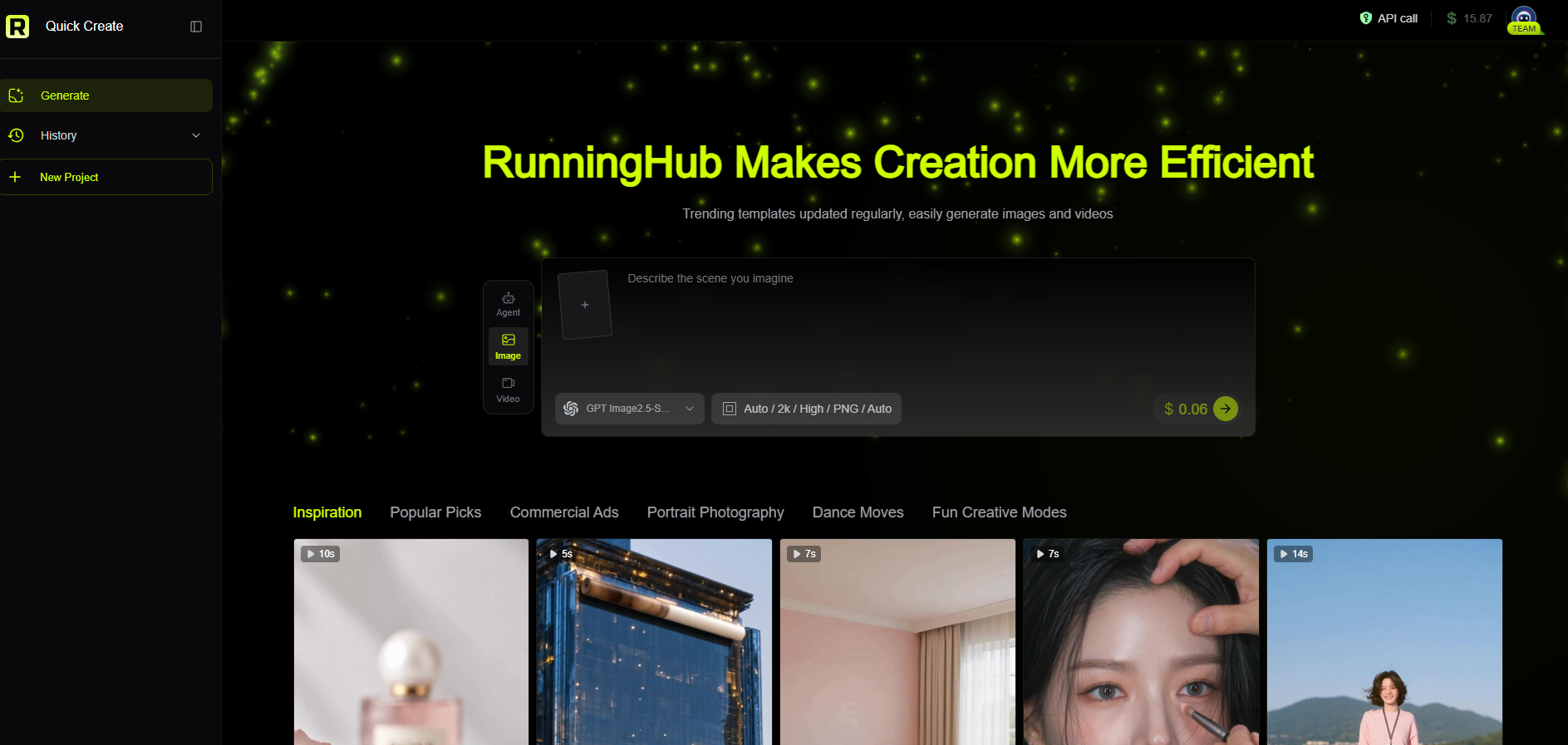
Instead of positioning itself only as a poster template generator, RunningHub provides an AI content creation environment that combines Quick Create, AI Apps, ComfyUI Workflows, AI models, and API capabilities. Its homepage currently includes graphic-design-oriented creations such as a watercolor collage city poster, alongside other AI image and video creation tools.
This makes RunningHub particularly relevant when a poster is part of a larger content workflow.
For example, a marketer may start with a product image, generate a new background, create several visual directions, adapt the composition, and then reuse the resulting assets for social content or video production.
RunningHub also provides an AI Apps section with applications covering graphic design, e-commerce posters, image generation, and other practical creation scenarios.
Best for:
- AI creators
- Designers
- E-commerce sellers
- Social media teams
- Brand marketers
- Users working with ComfyUI
- Creators who want reusable AI workflows
Strengths:
- Combines multiple AI creation approaches
- Supports AI Apps and ComfyUI workflows
- Useful for image-to-image and text-to-image workflows
- Can connect poster creation with broader image and video production
- Better suited to repeatable AI production workflows than a single template
Limitations:
- The platform offers more options than a dedicated poster maker, so beginners may need some time to understand which creation method fits their task.
- Different AI Apps, models, and workflows can have different input requirements.
- Exact model capabilities and availability should be checked on the current RunningHub page.
Why this matters for poster creation
A poster is often only one asset in a campaign.
An e-commerce seller may need:
Product image → promotional poster → social media image → short product video
A traditional poster maker mainly addresses the poster stage. A broader AI creation platform can help connect several stages of the content workflow.
That is the main reason to consider RunningHub when your goal is not just “make one poster”, but “build multiple visual assets from the same creative idea.”
What Can an AI Poster Generator Actually Help You Create?
The biggest difference between these tools becomes clearer when you look at practical scenarios.
Product Promotion Posters
For e-commerce sellers, a product poster usually starts with an existing product image.
Instead of photographing the product again for every campaign, you can use AI to explore different backgrounds, lighting styles, compositions, and campaign concepts.
Typical input:
- Product image
- Product description
- Campaign theme
- Desired visual style
Possible output:
- Product promotion poster
- Social media ad
- Product campaign visual
- Seasonal promotional image
RunningHub can be useful here because its platform includes AI Apps and workflows designed around image creation and e-commerce-related content.
Event and Social Media Posters
For events, the workflow is usually simpler:
Message → visual concept → poster → social media adaptation
Canva, Adobe Express, Venngage, and Piktochart are particularly useful when editable text and structured information are important.
For more visual experimentation, Ideogram, Recraft, Midjourney, or RunningHub can be considered.
Brand and Advertising Concepts
A brand team may need several visual directions before selecting a final campaign concept.
In this situation, AI image generation can be useful for exploring:
- Background styles
- Product placement
- Lighting
- Color direction
- Visual storytelling
- Campaign mood
- Different aspect ratios
The goal is not necessarily to publish the first AI output. Instead, use generation to quickly explore multiple creative directions and then refine the strongest concept.
Why Use RunningHub for AI Poster Generation?
If your goal is simply to edit a template, a traditional poster maker may be enough.
But if your workflow involves AI image generation, image editing, reusable workflows, or multiple content formats, RunningHub provides a broader environment.
The platform currently brings together Quick Create, rhTV Infinite Canvas, AI Apps, ComfyUI Workflows, and model/API-related capabilities.
1. Start from the task instead of a blank design file
A creator does not always know which model or workflow should be used.
A task-oriented approach makes more sense:
“I need a premium product poster.”
Then decide whether the job is better handled through an AI App, image-generation workflow, or another creation method.
2. Work from existing images
Many real-world poster projects begin with an existing asset rather than a blank prompt.
For example:
Product photo → background transformation → poster visual
This is especially useful for e-commerce sellers and marketers who already have product photography.
3. Reuse workflows
RunningHub provides a library of ComfyUI workflows, including image-generation, image-to-image, and design-oriented workflows. The workflow library is built around creator-contributed and practical production workflows.
This matters when you repeatedly create similar types of visual assets.
4. Connect image creation with video creation
A poster does not have to remain a static image.
A campaign may start with a poster or product image and later become a short video or social media creative. RunningHub's broader AI content creation environment makes this type of cross-format workflow possible.
How to Create an AI Poster with RunningHub
For a straightforward poster-generation workflow, you can approach the process in four stages.
Step 1: Start with RunningHub
Enter RunningHub and identify the creation method that matches your task.
For a simple image-generation task, start with a quick creation workflow or an appropriate AI App. If you need more control, explore the available ComfyUI workflows.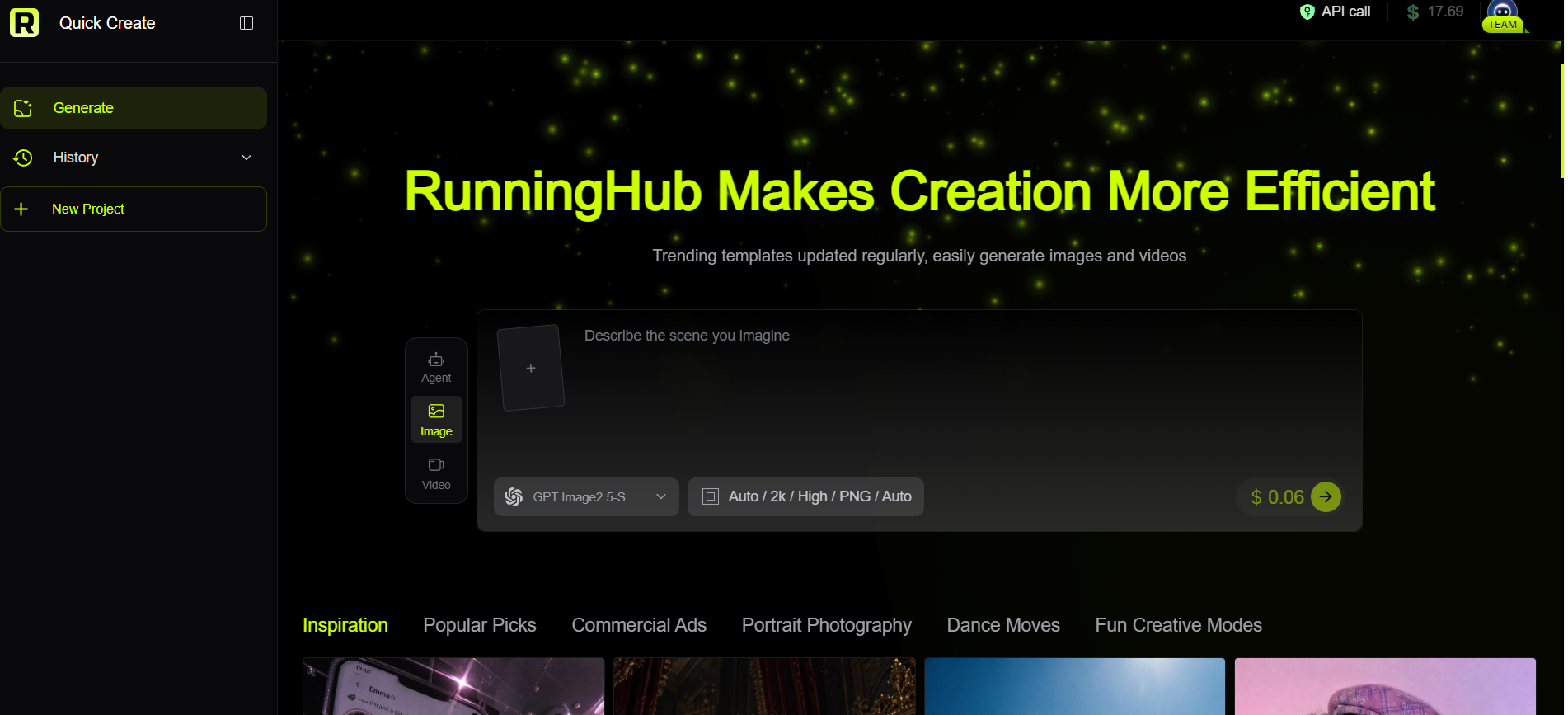
Step 2: Enter Your Poster Prompt
Describe the poster you want in the prompt box. Include the subject, visual style, composition, background, and lighting to make your instructions more specific.
For example:
A premium skincare product poster, minimalist blue background, centered product placement, soft lighting, clean commercial photography style, elegant and modern aesthetic.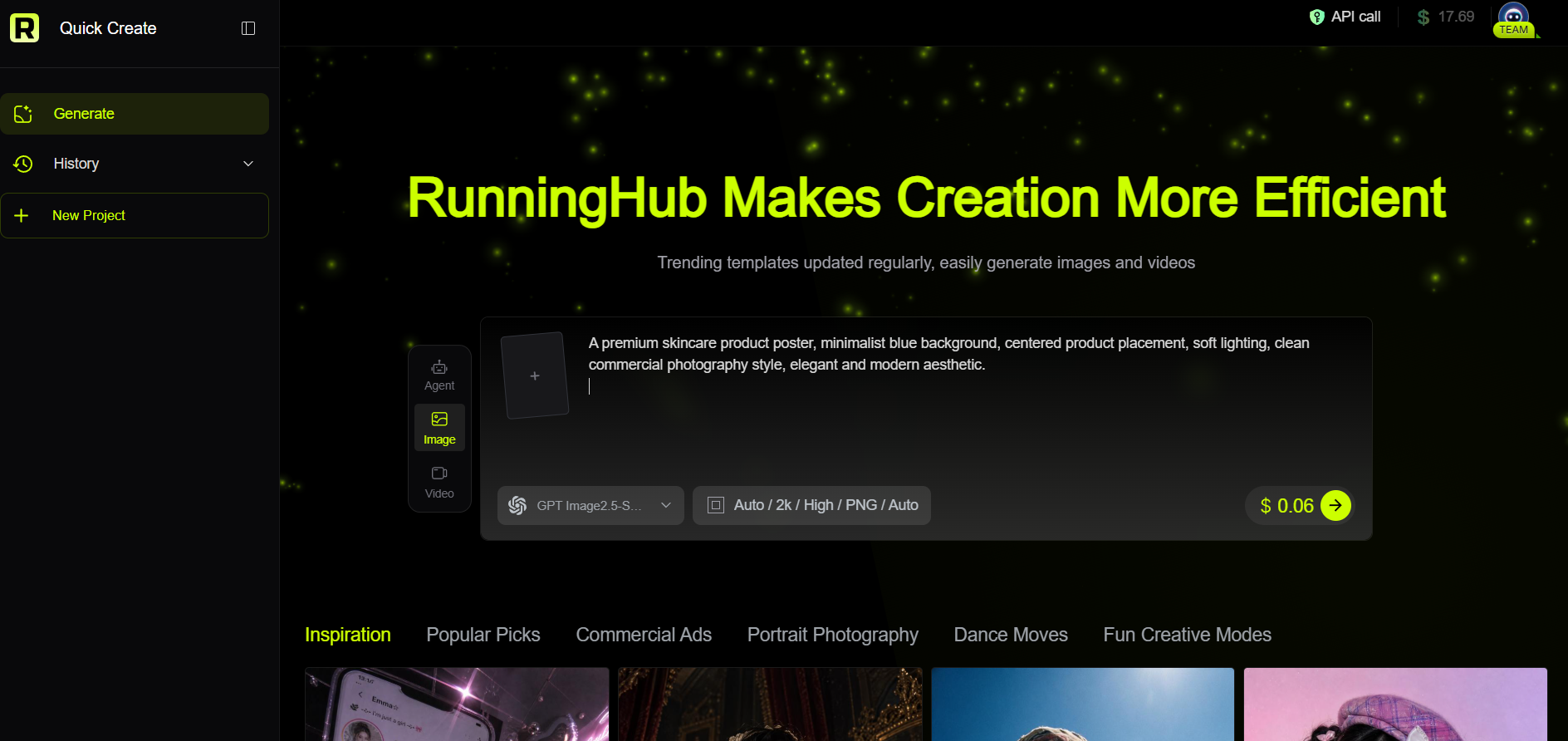

Step 3: Refine Your Poster
The first result does not have to be final. Continue your request in the chat box to adjust the poster. You can ask for a different background, lighting style, composition, or overall visual direction.
For example:
Make the background cleaner and add more negative space around the product.
This lets you refine the image step by step until it better matches your needs.

RunningHub and Other AI Poster Generators: Which Workflow Fits You?
There is no single workflow that makes sense for every poster project.
| If you need... | Consider |
| A ready-made editable template | Canva / Adobe Express |
| Typography-heavy visual posters | Ideogram |
| Structured information posters | Piktochart / Venngage |
| Artistic visual concepts | Midjourney / Recraft |
| Simple AI-assisted graphics | Microsoft Designer |
| AI generation inside a design canvas | Kittl |
| Multiple AI creation methods and workflows | RunningHub |
The important question is therefore not simply “Which is the best AI poster generator?”
A more useful question is:
Which AI poster workflow matches the way I create content?
If you need a conventional editable poster, a template platform may be the simplest route. If you need highly visual concepts, an image-generation tool may be more appropriate. If you want to combine models, AI Apps, image generation, and reusable workflows, RunningHub is worth exploring.
FAQ: Best AI Poster Generator
What is the best AI poster generator for beginners?
Beginner-friendly options include Canva, Adobe Express, Microsoft Designer, and other template-based tools. They reduce the amount of manual design work required and provide editable layouts. The right choice depends on whether you prioritize templates, AI image generation, or typography.
What is the best AI tool to create posters from text?
Several tools support text-to-poster or text-to-image workflows. Ideogram is particularly focused on text rendering, while Canva and Adobe Express combine AI generation with editable design workflows.
Can AI generate posters from an existing product image?
Yes. Image-to-image workflows can be useful when you already have a product photo and want to explore different backgrounds, compositions, or advertising concepts. RunningHub provides AI Apps and workflows that support image-generation use cases, although the exact input requirements depend on the selected tool or workflow.
How do I improve an AI-generated poster?
Start with a clear objective, then describe the subject, composition, visual style, lighting, and intended use. If the result is visually strong but the text is wrong, consider using a workflow that provides stronger text control or finishing the typography in an editable design tool.
Can AI-generated posters be used commercially?
Commercial use depends on the platform, model, source assets, and applicable usage terms. Before using a poster in advertising, product listings, or paid campaigns, check the current rules of the specific platform and model. For RunningHub, follow the current platform rules and the terms of the specific model or workflow you use.
Final Thoughts: Choose the AI Poster Workflow That Fits Your Work
The best AI poster generator depends on what you are trying to produce.
Canva and Adobe Express are useful when editable templates are the priority. Ideogram is particularly relevant for typography-heavy designs. Recraft and Midjourney are useful for visual exploration, while Piktochart and Venngage focus more on structured communication.
RunningHub takes a broader approach. Instead of limiting the workflow to one poster generator, it brings together AI creation tools, AI Apps, ComfyUI workflows, and other AI content capabilities.
That makes it particularly useful when a poster is only one part of a larger content-production workflow.
Start with one poster, compare several visual directions, and then turn the workflow into a repeatable process for your next campaign.