
'%3e %3cg id='Vector'%3e %3c/g%3e %3cpath id='Vector_2' d='M14.504 8.522L12.746 4.49C12.6826 4.34486 12.5783 4.22136 12.4458 4.13463C12.3133 4.0479 12.1584 4.0017 12 4.0017C11.8416 4.0017 11.6867 4.0479 11.5542 4.13463C11.4217 4.22136 11.3174 4.34486 11.254 4.49L9.495 8.522C9.305 8.958 8.958 9.306 8.522 9.495L4.49 11.254C4.34486 11.3174 4.22136 11.4217 4.13463 11.5542C4.0479 11.6867 4.0017 11.8416 4.0017 12C4.0017 12.1584 4.0479 12.3133 4.13463 12.4458C4.22136 12.5783 4.34486 12.6826 4.49 12.746L8.523 14.504C8.959 14.694 9.307 15.042 9.496 15.478L11.255 19.511C11.3184 19.6561 11.4227 19.7796 11.5552 19.8664C11.6877 19.9531 11.8426 19.9993 12.001 19.9993C12.1594 19.9993 12.3143 19.9531 12.4468 19.8664C12.5793 19.7796 12.6836 19.6561 12.747 19.511L14.505 15.478C14.695 15.042 15.043 14.694 15.479 14.504L19.512 12.746C19.6571 12.6826 19.7806 12.5783 19.8674 12.4458C19.9541 12.3133 20.0003 12.1584 20.0003 12C20.0003 11.8416 19.9541 11.6867 19.8674 11.5542C19.7806 11.4217 19.6571 11.3174 19.512 11.254L15.479 9.495C15.043 9.30549 14.695 8.95782 14.505 8.522' stroke='var(--stroke-0%2c white)' stroke-width='1.25' stroke-linecap='round' stroke-linejoin='round'/%3e %3cpath id='Vector_3' d='M3 3L5 5' stroke='var(--stroke-0%2c white)' stroke-width='1.25' stroke-linecap='round' stroke-linejoin='round'/%3e %3cpath id='Vector_4' d='M21 3L19 5' stroke='var(--stroke-0%2c white)' stroke-width='1.25' stroke-linecap='round' stroke-linejoin='round'/%3e %3cpath id='Vector_5' d='M3 21L5 19' stroke='var(--stroke-0%2c white)' stroke-width='1.25' stroke-linecap='round' stroke-linejoin='round'/%3e %3cpath id='Vector_6' d='M21 21L19 19' stroke='var(--stroke-0%2c white)' stroke-width='1.25' stroke-linecap='round' stroke-linejoin='round'/%3e %3c/g%3e %3cdefs%3e %3cclipPath id='clip0_0_55'%3e %3crect width='24' height='24' fill='white'/%3e %3c/clipPath%3e %3c/defs%3e %3c/svg%3e)
'%3e %3cg id='Vector'%3e %3c/g%3e %3cpath id='Vector_2' d='M14.375 7.66667H14.385' stroke='var(--stroke-0%2c white)' stroke-width='1.25' stroke-linecap='round' stroke-linejoin='round'/%3e %3cpath id='Vector_3' d='M11.9792 20.125H5.75C4.9875 20.125 4.25624 19.8221 3.71707 19.2829C3.1779 18.7438 2.875 18.0125 2.875 17.25V5.75C2.875 4.9875 3.1779 4.25624 3.71707 3.71707C4.25624 3.1779 4.9875 2.875 5.75 2.875H17.25C18.0125 2.875 18.7438 3.1779 19.2829 3.71707C19.8221 4.25624 20.125 4.9875 20.125 5.75V11.9792' stroke='var(--stroke-0%2c white)' stroke-width='1.25' stroke-linecap='round' stroke-linejoin='round'/%3e %3cpath id='Vector_4' d='M2.875 15.3333L7.66667 10.5417C8.556 9.68587 9.65233 9.68587 10.5417 10.5417L14.375 14.375' stroke='var(--stroke-0%2c white)' stroke-width='1.25' stroke-linecap='round' stroke-linejoin='round'/%3e %3cpath id='Vector_5' d='M13.4167 13.4167L14.375 12.4583C15.0171 11.8412 15.7646 11.6687 16.4661 11.9408' stroke='var(--stroke-0%2c white)' stroke-width='1.25' stroke-linecap='round' stroke-linejoin='round'/%3e %3cpath id='Vector_6' d='M15.3333 18.2083H21.0833' stroke='var(--stroke-0%2c white)' stroke-width='1.25' stroke-linecap='round' stroke-linejoin='round'/%3e %3cpath id='Vector_7' d='M18.2083 15.3333V21.0833' stroke='var(--stroke-0%2c white)' stroke-width='1.25' stroke-linecap='round' stroke-linejoin='round'/%3e %3c/g%3e %3cdefs%3e %3cclipPath id='clip0_0_4'%3e %3crect width='23' height='23' fill='white'/%3e %3c/clipPath%3e %3c/defs%3e %3c/svg%3e)


'%3e %3cg id='Vector'%3e %3c/g%3e %3cpath id='Vector_2' d='M18.3333 10.5001V6.66667C18.3333 5.78261 17.9821 4.93477 17.357 4.30964C16.7319 3.68452 15.8841 3.33333 15 3.33333H5C4.11594 3.33333 3.2681 3.68452 2.64298 4.30964C2.01786 4.93477 1.66667 5.78261 1.66667 6.66667V13.3333C1.66667 14.2174 2.01786 15.0652 2.64298 15.6904C3.2681 16.3155 4.11594 16.6667 5 16.6667H11.6667M15.5 17.0001V12.0001M13 14.5001L15.5 12.0001L18 14.5001' stroke='var(--stroke-0%2c white)' stroke-linecap='round' stroke-linejoin='round'/%3e %3cpath id='Vector_3' d='M8.33333 7.5L12.5 10L8.33333 12.5V7.5Z' stroke='var(--stroke-0%2c white)' stroke-linecap='round' stroke-linejoin='round'/%3e %3c/g%3e %3cdefs%3e %3cclipPath id='clip0_0_4'%3e %3crect width='20' height='20' fill='white'/%3e %3c/clipPath%3e %3c/defs%3e %3c/svg%3e)
'%3e %3cg id='Vector'%3e %3c/g%3e %3cpath id='Vector_2' d='M16.25 10.8333L21.1824 8.36767C21.3475 8.28515 21.531 8.2462 21.7154 8.25451C21.8998 8.26281 22.079 8.3181 22.2361 8.41512C22.3931 8.51214 22.5228 8.64768 22.6127 8.80888C22.7026 8.97007 22.7499 9.15158 22.75 9.33617V16.6638C22.7499 16.8484 22.7026 17.0299 22.6127 17.1911C22.5228 17.3523 22.3931 17.4879 22.2361 17.5849C22.079 17.6819 21.8998 17.7372 21.7154 17.7455C21.531 17.7538 21.3475 17.7148 21.1824 17.6323L16.25 15.1667V10.8333Z' stroke='var(--stroke-0%2c white)' stroke-width='1.25' stroke-linecap='round' stroke-linejoin='round'/%3e %3cpath id='Vector_3' d='M3.25 8.66667C3.25 8.09203 3.47827 7.54093 3.8846 7.1346C4.29093 6.72827 4.84203 6.5 5.41667 6.5H14.0833C14.658 6.5 15.2091 6.72827 15.6154 7.1346C16.0217 7.54093 16.25 8.09203 16.25 8.66667V17.3333C16.25 17.908 16.0217 18.4591 15.6154 18.8654C15.2091 19.2717 14.658 19.5 14.0833 19.5H5.41667C4.84203 19.5 4.29093 19.2717 3.8846 18.8654C3.47827 18.4591 3.25 17.908 3.25 17.3333V8.66667Z' stroke='var(--stroke-0%2c white)' stroke-width='1.25' stroke-linecap='round' stroke-linejoin='round'/%3e %3cpath id='Vector_4' d='M7.58333 13H11.9167' stroke='var(--stroke-0%2c white)' stroke-width='1.25' stroke-linecap='round' stroke-linejoin='round'/%3e %3cpath id='Vector_5' d='M9.75 10.8333V15.1667' stroke='var(--stroke-0%2c white)' stroke-width='1.25' stroke-linecap='round' stroke-linejoin='round'/%3e %3c/g%3e %3cdefs%3e %3cclipPath id='clip0_0_47'%3e %3crect width='26' height='26' fill='white'/%3e %3c/clipPath%3e %3c/defs%3e %3c/svg%3e)
'%3e %3cg id='Vector'%3e %3c/g%3e %3cpath id='Vector_2' d='M4 7H7M11 7H20' stroke='var(--stroke-0%2c white)' stroke-width='1.25' stroke-linecap='round' stroke-linejoin='round'/%3e %3cpath id='Vector_3' d='M4 17H20' stroke='var(--stroke-0%2c white)' stroke-width='1.25' stroke-linecap='round' stroke-linejoin='round'/%3e %3cpath id='Vector_4' d='M7 4L7 20' stroke='var(--stroke-0%2c white)' stroke-width='1.25' stroke-linecap='round' stroke-linejoin='round'/%3e %3cpath id='Vector_5' d='M17 4V13M17 17V20' stroke='var(--stroke-0%2c white)' stroke-width='1.25' stroke-linecap='round' stroke-linejoin='round'/%3e %3c/g%3e %3cdefs%3e %3cclipPath id='clip0_0_60'%3e %3crect width='24' height='24' fill='white'/%3e %3c/clipPath%3e %3c/defs%3e %3c/svg%3e)
'%3e %3cg id='Vector'%3e %3c/g%3e %3cpath id='Vector_2' d='M6 10L4 11L12 15L20 11L18 10' stroke='var(--stroke-0%2c white)' stroke-width='1.25' stroke-linecap='round' stroke-linejoin='round'/%3e %3cpath id='Vector_3' d='M4 15L12 19L20 15' stroke='var(--stroke-0%2c white)' stroke-width='1.25' stroke-linecap='round' stroke-linejoin='round'/%3e %3cpath id='Vector_4' d='M12 4V11' stroke='var(--stroke-0%2c white)' stroke-width='1.25' stroke-linecap='round' stroke-linejoin='round'/%3e %3cpath id='Vector_5' d='M15 8L12 11L9 8' stroke='var(--stroke-0%2c white)' stroke-width='1.25' stroke-linecap='round' stroke-linejoin='round'/%3e %3c/g%3e %3cdefs%3e %3cclipPath id='clip0_0_9'%3e %3crect width='24' height='24' fill='white'/%3e %3c/clipPath%3e %3c/defs%3e %3c/svg%3e)


How to Write a Gemini AI Photo Prompt for Better Photo Editing
Learn how to write a Gemini AI photo prompt, upload images, edit photos, and create better results with practical copy-and-paste prompts.
How to Write a Gemini AI Photo Prompt for Better Photo Editing
If you have ever uploaded a photo to an AI tool and received an image that looks completely different from what you wanted, the problem may not be the image model. It may be the prompt.
A vague instruction such as “make this photo better” gives Gemini too much room to decide what “better” means. A more useful Gemini AI photo prompt tells the model what to change, what to keep, what the new scene should look like, and how realistic the final image should be.
This makes Gemini useful for more than generating pictures from scratch. You can upload an existing photo and ask Gemini to change the background, adjust the outfit, restyle a portrait, improve lighting, create a beach scene, prepare a birthday image, or transform a simple photo into a polished social media visual.
The basic workflow is simple: open Gemini, upload an image or start with a generated image, describe the edit, review the result, and refine the prompt if necessary. Google's current documentation confirms that Gemini Apps can edit uploaded images and generated images using text instructions.
The key is learning how to give Gemini specific creative direction without overcomplicating the prompt. This guide shows you how.
What Can You Do with a Gemini AI Photo Prompt?
A Gemini AI photo prompt can describe a new image or instruct Gemini to modify an existing one. For photo editing, upload your original image first and then describe the desired transformation.
This is especially useful for creators who want visual content without spending time learning complex editing software.
1. Portrait Editing
You can use a prompt for Gemini photo editing to improve a portrait while keeping the person's recognizable appearance.
For example, you can request:
Natural lighting adjustments
Background replacement
Hairstyle changes
Outfit changes
Professional headshots
Cinematic portraits
Social media profile photos
Seasonal or festive portraits
The more important the person's identity is, the more clearly the prompt should state which facial and physical characteristics should remain unchanged.
2. Social Media Content
Social media creators often need several versions of the same photo. Instead of recreating each version manually, you can ask Gemini to transform one reference image into different visual concepts.
For example:
Beach vacation photos
Birthday portraits
Couple photos
Fashion content
Lifestyle photography
Seasonal campaigns
Festival-themed images
3. E-Commerce Images
E-commerce sellers can use image editing prompts to experiment with product presentation.
You might ask Gemini to:
Replace a distracting background
Create a clean studio environment
Change the surrounding scene
Add a lifestyle context
Improve composition
Create seasonal product visuals
For commercial use, always check the applicable Google terms and the rights associated with any source image, person, brand, or other visual material before publishing.
4. Creative Photo Restyling
You can also use Gemini to change the visual direction of an existing image.
For example:
Transform this portrait into a cinematic evening scene while preserving the subject's identity, facial expression, and pose.
This approach is useful when you already have a good source image but want to explore multiple creative directions.
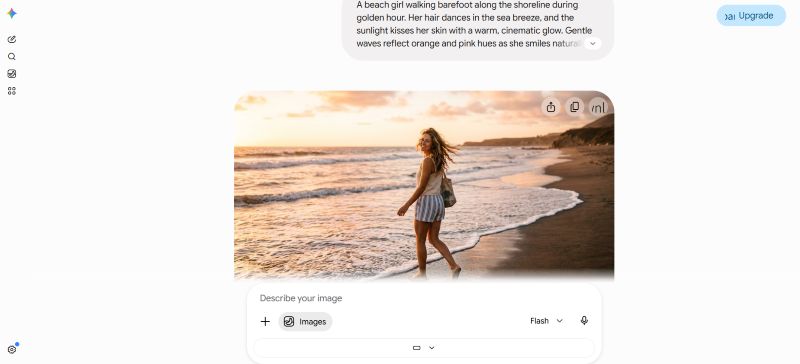
Why Use Gemini for AI Photo Editing?
For many users, the biggest advantage of Gemini is that you do not need to learn a traditional photo-editing workflow before starting.
You can begin with an image and a natural-language instruction. Gemini supports uploading an image, requesting specific changes, and refining generated images through additional prompts.
That makes the workflow accessible to:
AI image creators who want to experiment quickly
Designers who need visual variations
Social media managers creating content concepts
E-commerce sellers preparing product imagery
Brand marketers exploring campaign visuals
Content creators producing portraits and lifestyle images
Photography enthusiasts experimenting with styles
Instead of adjusting dozens of individual settings, you can describe the intended result in ordinary language.
For example, instead of manually changing a background, adjusting color temperature, creating a mask, and matching shadows, you can tell Gemini:
Replace the background with a warm beach at sunset. Keep the person exactly as they are. Match the direction and warmth of the sunset light to the subject and preserve realistic shadows.
That does not guarantee a perfect result every time, but it gives the image model a clearer target.
A Practical Gemini Editing Workflow
The simplest workflow is:
Choose create image → Upload → Describe → Generate → Review → Refine
If the first result is not right, you can continue the conversation and tell Gemini what needs to change rather than starting over.
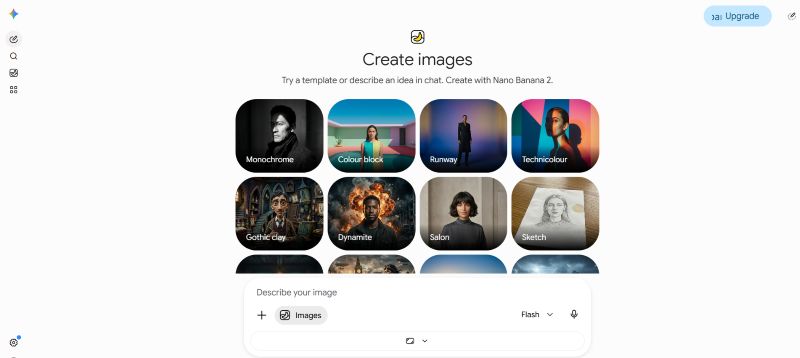
How to Use Gemini for AI Photo Editing
The process is straightforward, but the order of your instructions can affect how easy it is to control the result.
Step 1: Open Gemini
Open the Gemini web app and sign in if required.
On the web version, you can enter your request and attach an image when you want Gemini to work from an existing photo.
Tip: Start with a reasonably clear source image. If the original photo is extremely blurry, heavily compressed, or poorly lit, the model has less visual information to work with.
Step 2: Upload Your Photo
Upload the image you want to edit.
You can start with:
A portrait
A selfie
A couple photo
A family photo
A product photo
A travel photo
A lifestyle image
If the task depends on preserving a person or object, make that explicit in your prompt.
For example:
Keep the person's face, hairstyle, skin tone, body proportions, pose, and facial expression unchanged.
Do not use preservation instructions automatically for every image. Use them when the identity or structure of the original image matters.
Step 3: Describe the Edit Clearly
A useful prompt for Gemini photo editing usually contains five parts:
Subject + Change + Environment + Visual Style + Constraints
For example:
Edit the uploaded portrait of a young woman. Change her hairstyle to shoulder-length soft waves while preserving her facial features, skin tone, expression, and pose. Place her in a bright modern café with warm natural window light. Keep the result photorealistic and make the new hairstyle blend naturally with the original image.
This is more controllable than:
Change her hair and make it pretty.
The second prompt communicates an idea. The first communicates an editing task.
Step 4: Review and Refine the Result
Do not expect every prompt to produce the ideal result on the first attempt.
Look at the output and identify the specific problem.
Instead of:
Try again.
Use:
Keep the current background and outfit. The hairstyle is correct, but the face has changed too much. Restore the original facial features and expression while keeping the new hairstyle.
This gives Gemini a smaller correction to make.
You can also refine:
Lighting
Background
Hair
Clothing
Color
Composition
Facial expression
Object placement
Overall style
Gemini AI Photo Prompt Examples You Can Copy and Customize
The best way to learn prompt writing is to start with practical templates.
The following prompts are designed around common creator scenarios. Replace the bracketed sections with your own details rather than copying every visual description unchanged.
Prompt Group 1: Portraits, Girls, Boys and Hair
1. Boy Portrait Transformation
Best for: Social media creators, portrait experiments, profile images
Recommended method: Image + text prompt
Prompt:
Edit the uploaded photo of the young man into a polished outdoor lifestyle portrait. Keep his facial identity, skin tone, hairstyle, body proportions, pose, and natural expression unchanged. Place him in a modern city street during golden hour, with warm directional sunlight, realistic shadows, subtle background depth, and natural skin texture. Keep the result photorealistic and avoid excessive retouching.
Replace:
young man,modern city street,and golden hour with your preferred subject and location.
Usage tip: If the face changes too much, repeat the preservation instructions in your next message instead of adding many new visual details.
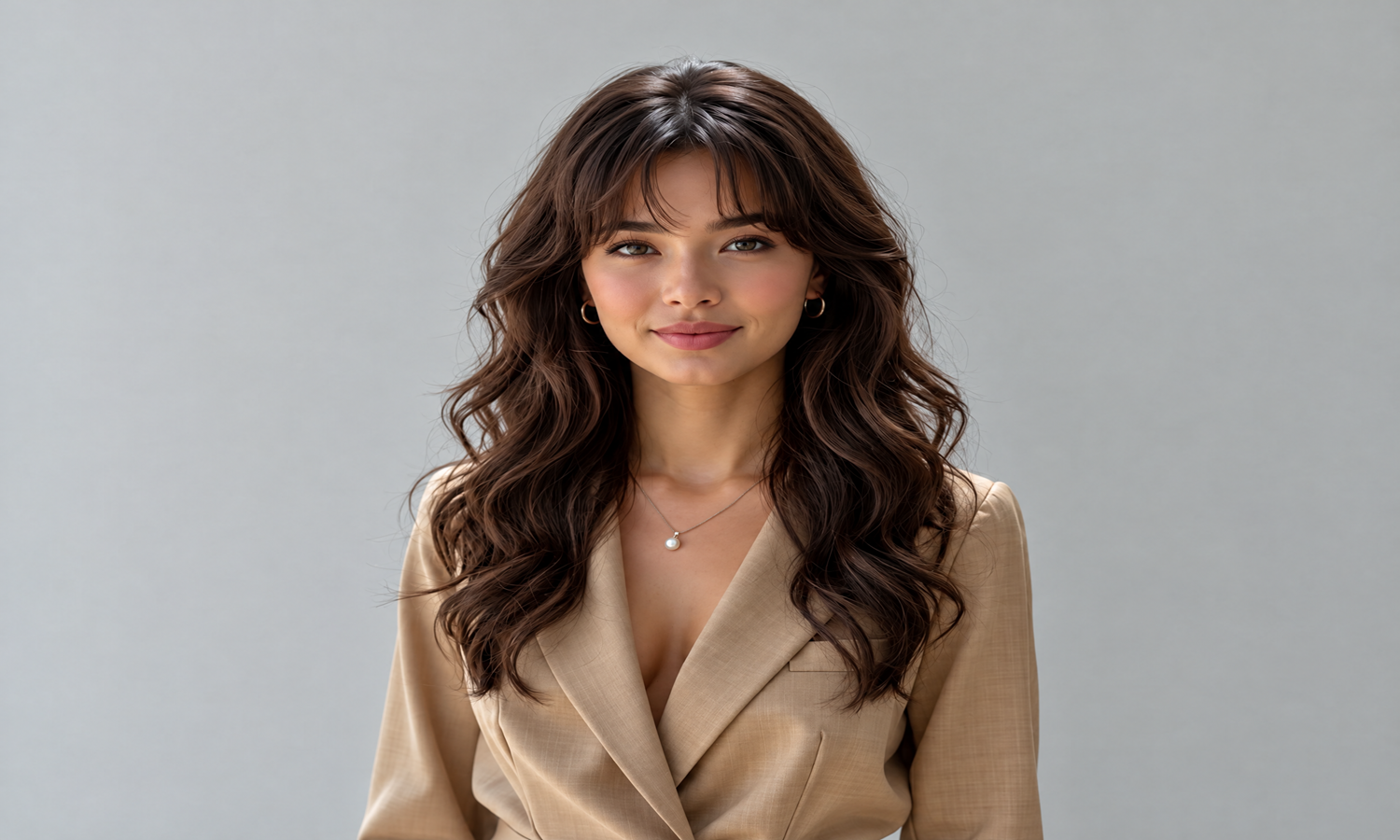
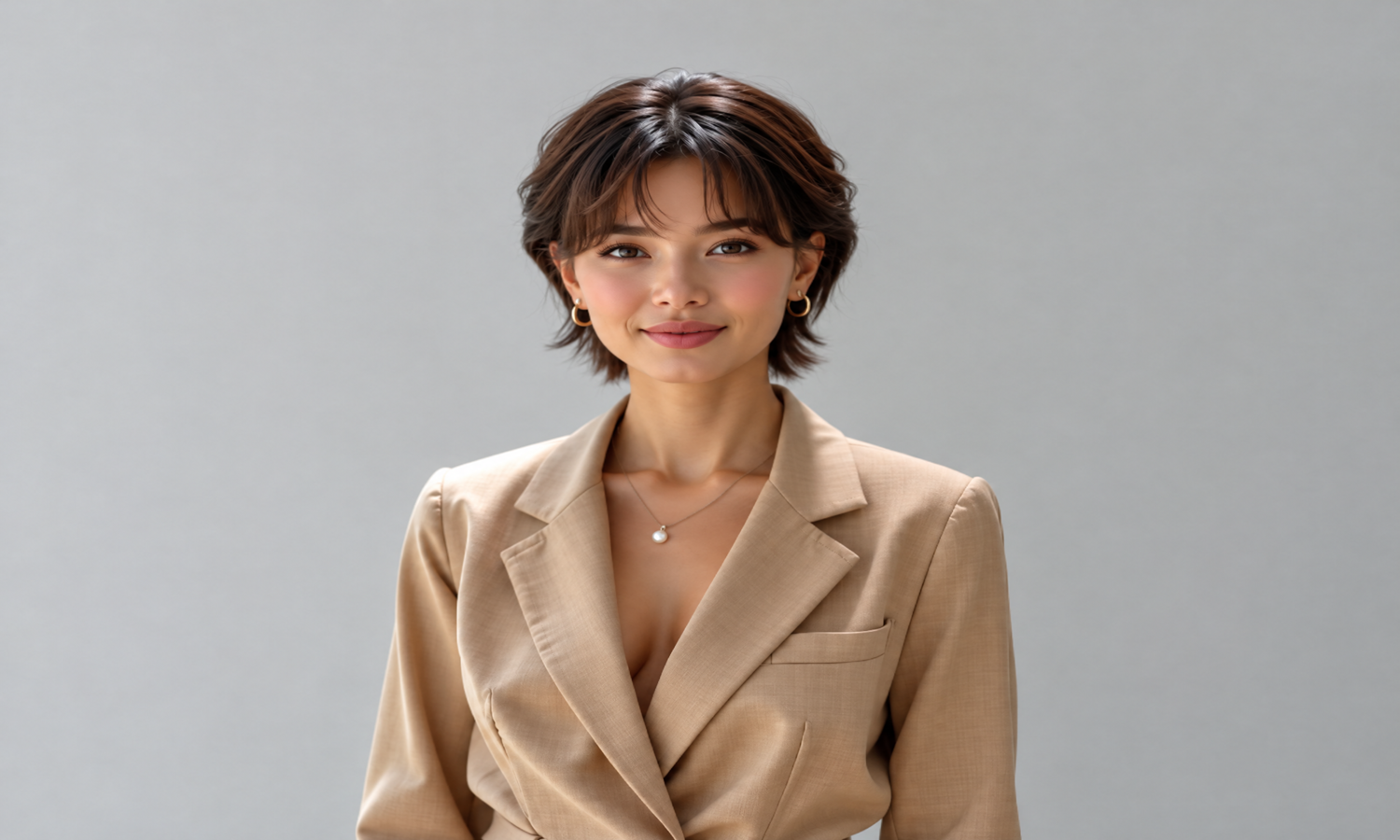
2. Girl Portrait + Hairstyle Change
Best for: Hairstyle previews, fashion creators, profile content
Recommended method: Image + text prompt
Prompt:
Edit this portrait by changing the woman's hairstyle to long, soft layered waves with natural volume. Preserve her original face, facial features, skin tone, expression, body proportions, clothing, and pose. Keep the new hairstyle realistic and naturally connected to the head. Use soft studio lighting and a clean neutral background. Maintain realistic hair texture and avoid an overly retouched appearance.
Replace:
long,soft layered waves with short bob,curly hair,high ponytail,or another hairstyle.
Usage tip: Describe the hairstyle itself rather than using vague words such as “beautiful hair” or “trendy hair.”
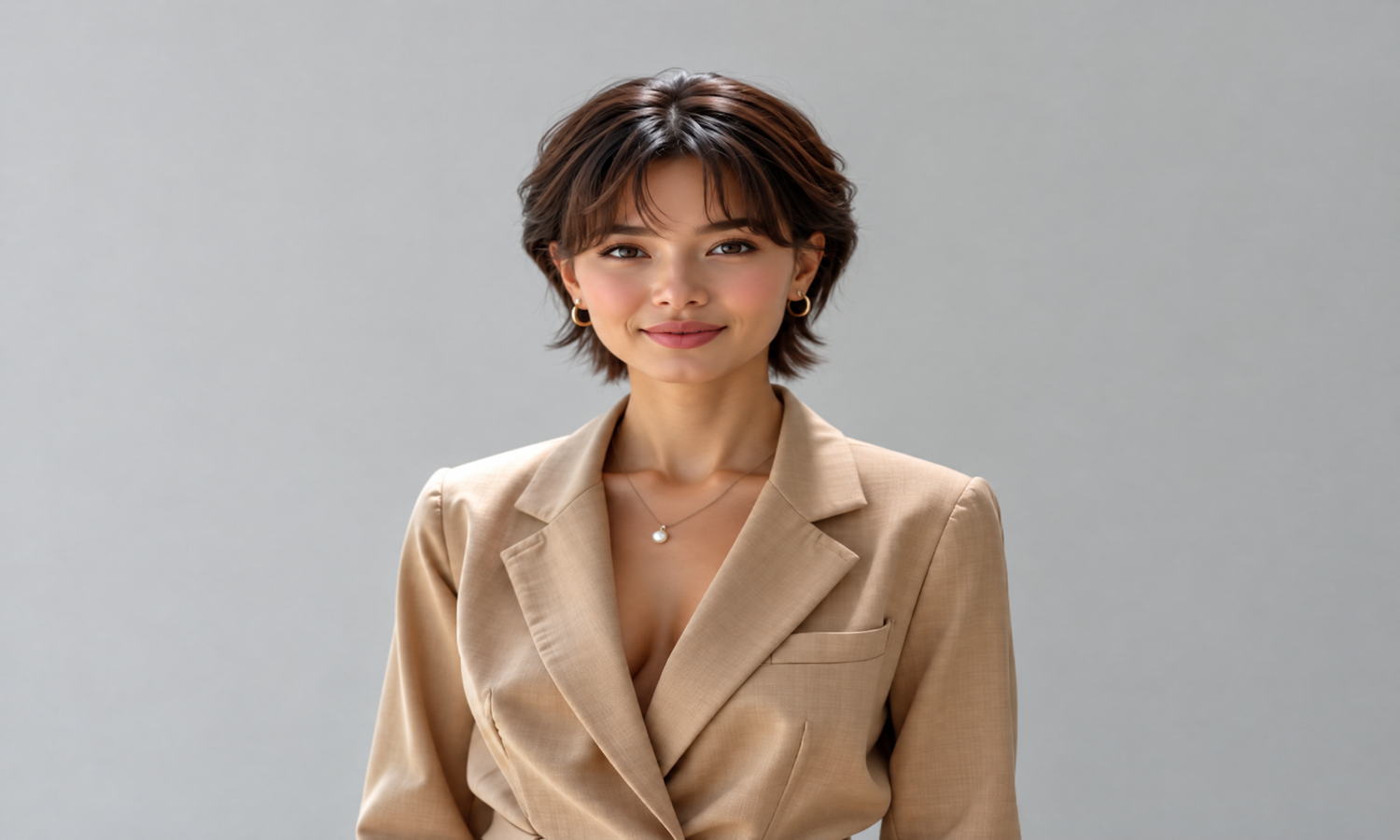
After Entering the Prompt:
3. Couple Photo
Best for: Anniversary posts, social media content and lifestyle photography
Recommended method: Image + text prompt
Prompt:
Transform this couple photo into a natural cinematic lifestyle photograph on a quiet seaside walkway during sunset. Keep both people's identities, facial features, body proportions, expressions, and clothing recognizable. Add warm sunset light, subtle reflections, realistic shadows, and a soft ocean background. Keep the composition natural and avoid changing the relationship or pose of the two subjects.
Usage tip: When editing multiple people, explicitly identify what should remain unchanged for each subject.
Prompt Group 2: Family, Beach and Birthday Content
4. Family Lifestyle Photo
Best for: Family albums, social posts and lifestyle campaigns
Prompt:
Turn the uploaded family photo into a warm outdoor lifestyle scene in a spacious park during late afternoon. Keep every family member recognizable and preserve their facial features, expressions, ages, clothing details, and body proportions. Add natural sunlight, soft shadows, green trees in the background, and realistic depth of field. The final image should look like a professionally photographed family portrait rather than an illustration.
Replace:
park with beach, garden,home, or another setting.
5. Beach Vacation Photo
Best for: Travel creators and summer social media content
Prompt:
Reimagine this photo as a realistic beach vacation portrait. Keep the subject's identity, face, hairstyle, skin tone, pose, and clothing unchanged. Replace the background with a clean tropical beach, turquoise water, soft white sand, and warm late-afternoon sunlight. Match the lighting and shadows on the subject to the new environment. Keep the result photorealistic, natural, and free from excessive color grading.
Usage tip: When replacing backgrounds, ask Gemini to match the lighting and shadows. This can help the subject and new environment feel more visually connected.
6. Birthday Photo
Best for: Birthday posts, invitations and personal content
Prompt:
Transform this portrait into an elegant birthday celebration scene. Keep the person's identity, facial features, hairstyle, expression, and body proportions unchanged. Add a tasteful birthday cake, subtle balloons, warm ambient lighting, and a softly decorated indoor background. Use a modern editorial photography style with natural skin texture and realistic shadows. Keep the decoration sophisticated rather than overly crowded.
Replace:
birthday cake,ballons, and indoor background with your preferred celebration concept.
After Entering the Prompt:

Prompt Group 3: Festival and Creative Visuals
7. Diwali / Deepavali Celebration
Best for: Festival content, social media campaigns and cultural visuals
Prompt:
Transform this portrait into a realistic Diwali celebration scene while preserving the subject's identity, facial features, expression, hairstyle, and body proportions. Add elegant traditional festive clothing, warm decorative lights, subtle diyas, and a refined evening background. Use realistic warm lighting and natural shadows that match the subject. Keep the image culturally respectful, photorealistic, and visually balanced.
Usage tip: Be specific about the cultural elements you want instead of asking for a generic “festival style.”
8. Fashion + New Hairstyle
Best for: Fashion creators and visual experimentation
Prompt:
Edit this fashion portrait into a polished editorial photograph. Change the hairstyle to [HAIRSTYLE] and the outfit to [OUTFIT]. Preserve the person's original facial identity, skin tone, expression, body proportions, and pose. Place the subject against a minimalist studio background with soft directional lighting and subtle shadows. Keep fabric texture, hair strands, and skin texture realistic.
Replace:
HAIRSTYLE and OUTFIT with your own choices.
How to Write Better Gemini Photo Editing Prompts
You do not need extremely long prompts to get useful results. What matters is clearly separating what should change from what should stay.
1. Start With the Main Action
Use direct verbs such as:
Edit
Change
Replace
Remove
Add
Transform
Reimagine
Restyle
Enhance
For example:
Replace the background with a modern studio.
is more actionable than:
I want this image to feel more professional.
2. Describe the Subject
Tell Gemini what it is editing.
For example:
Edit the uploaded portrait of a young woman.
or:
Transform the uploaded product photo of a white ceramic mug.
This gives the prompt a clear starting point.
3. Specify What Must Stay
This is especially important for portraits and product photography.
Useful constraints include:
Keep the original face unchanged.
Preserve the existing pose and expression.
Keep the product shape and proportions unchanged.
Do not change the clothing.
Avoid adding preservation instructions that conflict with the transformation you are requesting.
4. Describe the New Environment
If you want to change the background, explain the new environment.
Instead of:
Put me somewhere beautiful.
Try:
Place the subject on a quiet Mediterranean beach at sunset, with soft golden light, calm blue water, and a slightly blurred background.
The second prompt gives Gemini visual information that can guide the edit.
5. Control the Visual Style
Style can be described with practical photography language:
Photorealistic
Editorial photography
Natural lighting
Cinematic lighting
Soft daylight
Shallow depth of field
Warm color grading
Minimalist studio photography
Lifestyle photography
Do not add every style word you know. Pick the ones that support your intended result.
6. Add Constraints When Necessary
If an image keeps changing too much, add a final constraint.
For example:
Make only the requested changes. Keep all other visual details consistent with the original image.
This is useful when you want a controlled edit rather than a completely new image.
A Simple Formula for a Gemini AI Photo Prompt
For beginners, use this structure:
[Action] + [Subject] + [Main Change] + [Environment] + [Style] + [What to Preserve]
Template
Edit the uploaded [subject] by [main change]. Place it in [environment]. Use [lighting/style]. Preserve [important details] and keep the final result [realism/style requirement].
Example
Edit the uploaded portrait of a woman by changing her hairstyle to a shoulder-length bob. Place her in a bright modern studio with soft window light. Keep her original facial features, skin tone, expression, clothing, and pose unchanged. Make the hairstyle realistic and naturally integrated with the original photograph.
This formula works for portraits, family photos, product images, travel content and social media visuals.
What to Do When Gemini Produces a Bad Result
A poor result does not always mean that you need a completely new prompt.
First, identify what went wrong.
If the face changed
Try:
Keep the current edit, but restore the original facial features, identity, skin tone, and expression. Do not change the hairstyle or background.
If the background looks fake
Try:
Keep the subject unchanged. Make the background more photorealistic and match its lighting, perspective, color temperature, and shadows to the subject.
If the image is over-edited
Try:
Reduce the retouching. Restore natural skin texture, realistic hair detail, and subtle lighting. Avoid a plastic or overly processed appearance.
If Gemini changes too many elements
Try:
Make only the requested change. Preserve all other elements of the original image.
The general principle is simple: make each follow-up instruction smaller and more specific.
Gemini Alternative: A More Flexible AI Image Generation Platform
Gemini is a convenient option for AI photo editing, especially when you want to upload an image, describe an edit in natural language, and quickly explore different visual ideas.
However, if you create images frequently, you may eventually want more than a conversational editing experience. You may want to compare different AI image models, experiment with different visual styles, manage generation costs, or create more content without switching between multiple platforms.
That is where a Gemini alternative for AI image generation can be useful.
What to Look for in a Gemini Alternative
The best alternative is not necessarily another tool that works exactly like Gemini. Instead, look for a platform that gives you more flexibility over how you create and manage AI-generated images.
A useful AI image generation platform should make it easy to:
Try different AI image models in one place
Generate and edit images for different creative scenarios
Experiment with different styles and workflows
Compare results from different models
Create images more efficiently
Manage AI generation costs more flexibly
Scale from simple experiments to advanced creative production
This can be particularly useful for AI creators, designers, social media creators, e-commerce sellers, marketers, and teams producing visual content at scale.
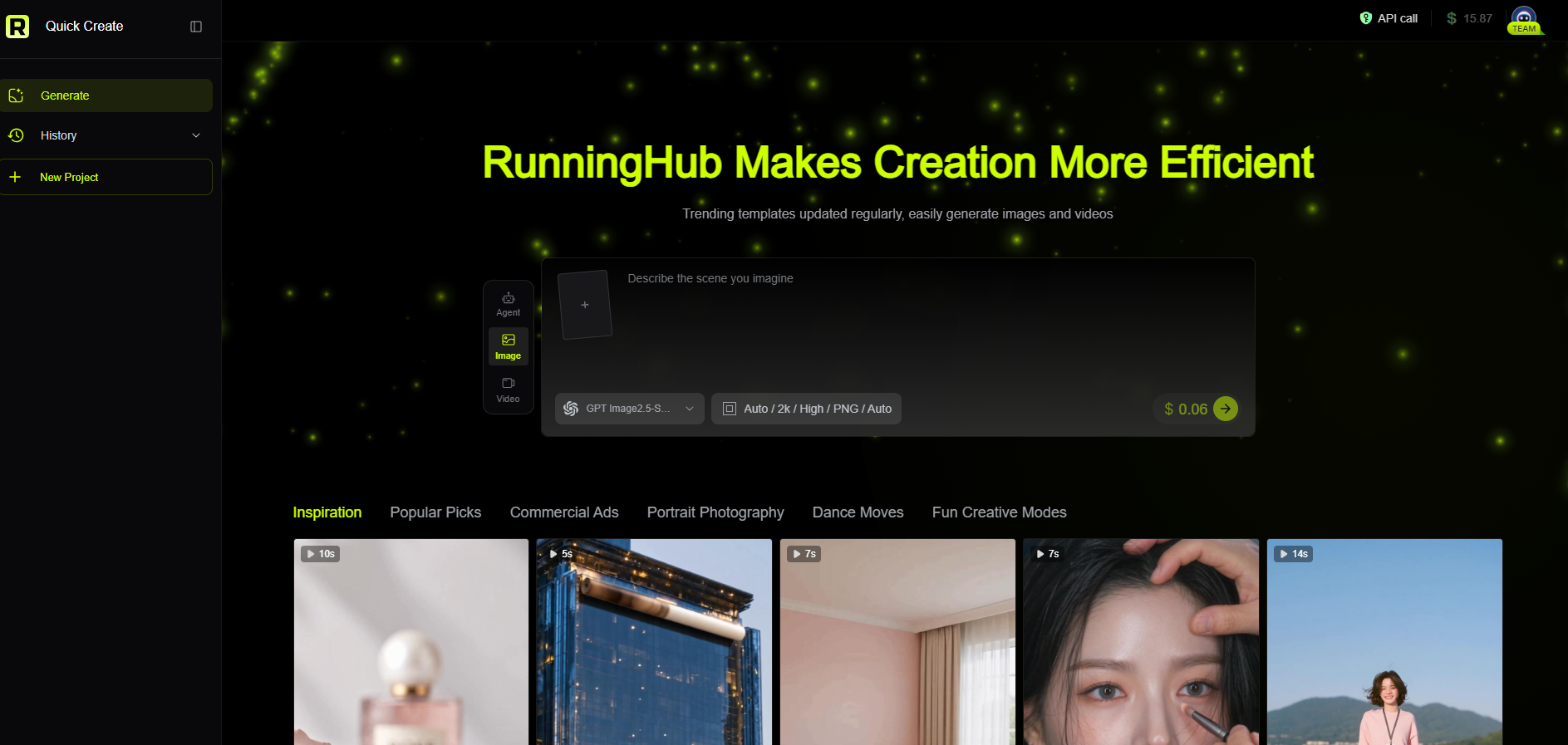
RunningHub: A Flexible Gemini Alternative for AI Image Creation
If you are looking for a more comprehensive Gemini alternative, RunningHub is worth considering.
RunningHub brings multiple AI image generation and editing capabilities together in one platform, allowing creators to explore different models and creative workflows without building a separate setup for every project.
Instead of relying on a single image-generation experience, you can choose the model and workflow that better match the task you are working on.
More AI Models in One Platform
One advantage of RunningHub is the ability to access different AI models and workflows from a single platform.
This gives you more freedom to choose the right tool for different creative goals, whether you are creating:
Photorealistic portraits
Product images
Fashion visuals
Social media content
Creative concept art
Background replacements
Image variations
Marketing visuals
Stylized AI artwork
Rather than trying to make one model handle every type of image, you can explore different models and workflows based on the result you want.
More Flexible AI Image Generation Costs
For users who generate images frequently, cost can become just as important as image quality.
A conversational AI tool can be convenient for occasional image creation, while a dedicated AI creation platform can provide more flexibility when you want to compare models, choose different generation options, or produce larger volumes of content.
RunningHub is designed around this flexible AI creation workflow, making it easier to explore different generation options according to your project and budget.
From Simple Prompts to Advanced Workflows
RunningHub is not limited to a simple prompt-and-generate experience.
You can start with straightforward AI image generation and gradually move into more advanced ComfyUI workflows and visual production pipelines when you need greater control.
Beginners can use ready-made workflows and tools, while experienced creators can build or customize workflows for specific production needs.
Gemini vs. RunningHub: Which One Should You Choose?
Gemini can be a good choice when your priority is simple, conversational AI photo editing. You can upload an image, describe what you want to change, and refine the result through natural-language instructions.
RunningHub is more suitable when your priority is flexibility, model selection, cost control, and a broader AI creation workflow.
| Feature | Gemini | RunningHub |
| Natural-language image editing | ✓ | ✓ |
| AI image generation | ✓ | ✓ |
| Multiple AI models and workflows | Limited to its own ecosystem | ✓ |
| Model comparison | Limited | ✓ |
| Advanced workflows | Limited | ✓ |
| ComfyUI workflow support | — | ✓ |
| Flexible creative production | ✓ | ✓ |
| Suitable for larger-scale AI creation | Moderate | ✓ |
The two platforms do not have to be mutually exclusive. You can use Gemini for a quick conversational editing experience and turn to RunningHub when you need more model choices, flexible workflows, or a more scalable AI image creation setup.
Ready to Explore More AI Image Generation Possibilities?
A good Gemini AI photo prompt can help you get better results from an image-editing workflow. But once you start creating AI images regularly, you may want to go beyond one model and one generation experience.
That is where a multi-model AI creation platform can make a difference.
With RunningHub, you can exploreAI image generation, different AI models, and reusable workflows in one place. Whether you are experimenting with a new portrait style, creating product visuals, generating social media content, or building a repeatable AI production workflow, you can choose the tools that fit your creative goal.
If Gemini is a convenient starting point for AI photo editing, RunningHub can be the next step when you want more flexibility and a broader AI image creation experience.
Frequently Asked Questions
What is a Gemini AI photo prompt?
A Gemini AI photo prompt is a natural-language instruction used to tell Gemini what image to create or how to edit an existing image. For photo editing, you can upload an image and describe specific changes such as the background, hairstyle, outfit, lighting, or visual style.
How do I use a prompt for Gemini photo editing?
Open Gemini, upload the photo you want to edit, and describe the desired change. A good prompt should identify the subject, explain the change, describe the intended visual result, and state important details that should remain unchanged.
What should I include in a Gemini photo editing prompt?
A useful Gemini photo editing prompt can include five key elements: subject, change, environment, visual style, and constraints.
Instead of saying “make my photo better,” specify whether you want to change the background, hairstyle, outfit, lighting, composition, or another visual element.
Why does Gemini sometimes change the face or other details?
AI image editing interprets your instructions rather than applying traditional pixel-level editing commands. If an important feature changes unexpectedly, explicitly tell Gemini what must remain unchanged and make the requested edit more specific.
Can Gemini edit an uploaded photo?
Yes. Gemini can be used to edit uploaded images and refine generated images through natural-language instructions. The exact availability of image features may vary depending on region, account type, language, age, and product version.
What is a Gemini alternative for AI image generation?
A Gemini alternative is an AI image generation or editing platform that provides a different approach to creating visual content. An alternative may be useful if you want access to multiple AI models, more flexible workflows, different generation options, or a platform designed for larger-scale image creation.
Is RunningHub a Gemini alternative?
Yes. RunningHub can be considered a Gemini alternative for AI image generation and creative workflows. While Gemini provides a convenient conversational experience for image generation and editing, RunningHub focuses on multiple AI models, reusable workflows, and flexible AI production options in one platform.
Which is better, Gemini or RunningHub for AI image generation?
It depends on your workflow.
Gemini is convenient when you want to quickly upload an image, describe an edit in natural language, and refine the result through conversation.
RunningHub is more suitable when you want to explore different AI models, compare creative workflows, manage AI generation more flexibly, or build a repeatable image-production process.
For occasional image editing, Gemini may be enough. For more extensive AI image creation and experimentation, RunningHub can provide more flexibility.
Final Thoughts: From Gemini AI Photo Prompts to More Flexible Image Creation
You do not need to become a professional photo editor to start creating better AI images. A clear Gemini AI photo prompt can help you turn an existing photo into a portrait, lifestyle scene, festival visual, birthday image, beach photo, or creative social media asset.
The most useful workflow is simple: upload the right image, describe one clear transformation, specify what should stay unchanged, review the result, and refine the instruction when necessary.
Once you understand this basic prompt structure, you can apply the same principles to many AI image generation and editing workflows. The key is not finding one “magic” prompt, but learning how to clearly communicate your creative goal.
As your AI image creation needs grow, you may also want more models, reusable workflows, flexible generation options, and a more scalable creative environment.
This is where a Gemini alternative such as RunningHub can be useful.
RunningHub brings multiple AI models and creative workflows together in one platform, giving creators more flexibility to experiment with different approaches to AI image generation and editing.
Whether you are creating portraits, product visuals, social media content, marketing assets, or experimental AI artwork, choosing the right platform can make the creative process more flexible and efficient.
Gemini can be a great place to start with conversational AI photo editing. RunningHub gives you another option when you want to explore more models, workflows, and possibilities in one AI creation platform.
Start Creating with RunningHub