
'%3e %3cg id='Vector'%3e %3c/g%3e %3cpath id='Vector_2' d='M14.504 8.522L12.746 4.49C12.6826 4.34486 12.5783 4.22136 12.4458 4.13463C12.3133 4.0479 12.1584 4.0017 12 4.0017C11.8416 4.0017 11.6867 4.0479 11.5542 4.13463C11.4217 4.22136 11.3174 4.34486 11.254 4.49L9.495 8.522C9.305 8.958 8.958 9.306 8.522 9.495L4.49 11.254C4.34486 11.3174 4.22136 11.4217 4.13463 11.5542C4.0479 11.6867 4.0017 11.8416 4.0017 12C4.0017 12.1584 4.0479 12.3133 4.13463 12.4458C4.22136 12.5783 4.34486 12.6826 4.49 12.746L8.523 14.504C8.959 14.694 9.307 15.042 9.496 15.478L11.255 19.511C11.3184 19.6561 11.4227 19.7796 11.5552 19.8664C11.6877 19.9531 11.8426 19.9993 12.001 19.9993C12.1594 19.9993 12.3143 19.9531 12.4468 19.8664C12.5793 19.7796 12.6836 19.6561 12.747 19.511L14.505 15.478C14.695 15.042 15.043 14.694 15.479 14.504L19.512 12.746C19.6571 12.6826 19.7806 12.5783 19.8674 12.4458C19.9541 12.3133 20.0003 12.1584 20.0003 12C20.0003 11.8416 19.9541 11.6867 19.8674 11.5542C19.7806 11.4217 19.6571 11.3174 19.512 11.254L15.479 9.495C15.043 9.30549 14.695 8.95782 14.505 8.522' stroke='var(--stroke-0%2c white)' stroke-width='1.25' stroke-linecap='round' stroke-linejoin='round'/%3e %3cpath id='Vector_3' d='M3 3L5 5' stroke='var(--stroke-0%2c white)' stroke-width='1.25' stroke-linecap='round' stroke-linejoin='round'/%3e %3cpath id='Vector_4' d='M21 3L19 5' stroke='var(--stroke-0%2c white)' stroke-width='1.25' stroke-linecap='round' stroke-linejoin='round'/%3e %3cpath id='Vector_5' d='M3 21L5 19' stroke='var(--stroke-0%2c white)' stroke-width='1.25' stroke-linecap='round' stroke-linejoin='round'/%3e %3cpath id='Vector_6' d='M21 21L19 19' stroke='var(--stroke-0%2c white)' stroke-width='1.25' stroke-linecap='round' stroke-linejoin='round'/%3e %3c/g%3e %3cdefs%3e %3cclipPath id='clip0_0_55'%3e %3crect width='24' height='24' fill='white'/%3e %3c/clipPath%3e %3c/defs%3e %3c/svg%3e)
'%3e %3cg id='Vector'%3e %3c/g%3e %3cpath id='Vector_2' d='M14.375 7.66667H14.385' stroke='var(--stroke-0%2c white)' stroke-width='1.25' stroke-linecap='round' stroke-linejoin='round'/%3e %3cpath id='Vector_3' d='M11.9792 20.125H5.75C4.9875 20.125 4.25624 19.8221 3.71707 19.2829C3.1779 18.7438 2.875 18.0125 2.875 17.25V5.75C2.875 4.9875 3.1779 4.25624 3.71707 3.71707C4.25624 3.1779 4.9875 2.875 5.75 2.875H17.25C18.0125 2.875 18.7438 3.1779 19.2829 3.71707C19.8221 4.25624 20.125 4.9875 20.125 5.75V11.9792' stroke='var(--stroke-0%2c white)' stroke-width='1.25' stroke-linecap='round' stroke-linejoin='round'/%3e %3cpath id='Vector_4' d='M2.875 15.3333L7.66667 10.5417C8.556 9.68587 9.65233 9.68587 10.5417 10.5417L14.375 14.375' stroke='var(--stroke-0%2c white)' stroke-width='1.25' stroke-linecap='round' stroke-linejoin='round'/%3e %3cpath id='Vector_5' d='M13.4167 13.4167L14.375 12.4583C15.0171 11.8412 15.7646 11.6687 16.4661 11.9408' stroke='var(--stroke-0%2c white)' stroke-width='1.25' stroke-linecap='round' stroke-linejoin='round'/%3e %3cpath id='Vector_6' d='M15.3333 18.2083H21.0833' stroke='var(--stroke-0%2c white)' stroke-width='1.25' stroke-linecap='round' stroke-linejoin='round'/%3e %3cpath id='Vector_7' d='M18.2083 15.3333V21.0833' stroke='var(--stroke-0%2c white)' stroke-width='1.25' stroke-linecap='round' stroke-linejoin='round'/%3e %3c/g%3e %3cdefs%3e %3cclipPath id='clip0_0_4'%3e %3crect width='23' height='23' fill='white'/%3e %3c/clipPath%3e %3c/defs%3e %3c/svg%3e)


'%3e %3cg id='Vector'%3e %3c/g%3e %3cpath id='Vector_2' d='M18.3333 10.5001V6.66667C18.3333 5.78261 17.9821 4.93477 17.357 4.30964C16.7319 3.68452 15.8841 3.33333 15 3.33333H5C4.11594 3.33333 3.2681 3.68452 2.64298 4.30964C2.01786 4.93477 1.66667 5.78261 1.66667 6.66667V13.3333C1.66667 14.2174 2.01786 15.0652 2.64298 15.6904C3.2681 16.3155 4.11594 16.6667 5 16.6667H11.6667M15.5 17.0001V12.0001M13 14.5001L15.5 12.0001L18 14.5001' stroke='var(--stroke-0%2c white)' stroke-linecap='round' stroke-linejoin='round'/%3e %3cpath id='Vector_3' d='M8.33333 7.5L12.5 10L8.33333 12.5V7.5Z' stroke='var(--stroke-0%2c white)' stroke-linecap='round' stroke-linejoin='round'/%3e %3c/g%3e %3cdefs%3e %3cclipPath id='clip0_0_4'%3e %3crect width='20' height='20' fill='white'/%3e %3c/clipPath%3e %3c/defs%3e %3c/svg%3e)
'%3e %3cg id='Vector'%3e %3c/g%3e %3cpath id='Vector_2' d='M16.25 10.8333L21.1824 8.36767C21.3475 8.28515 21.531 8.2462 21.7154 8.25451C21.8998 8.26281 22.079 8.3181 22.2361 8.41512C22.3931 8.51214 22.5228 8.64768 22.6127 8.80888C22.7026 8.97007 22.7499 9.15158 22.75 9.33617V16.6638C22.7499 16.8484 22.7026 17.0299 22.6127 17.1911C22.5228 17.3523 22.3931 17.4879 22.2361 17.5849C22.079 17.6819 21.8998 17.7372 21.7154 17.7455C21.531 17.7538 21.3475 17.7148 21.1824 17.6323L16.25 15.1667V10.8333Z' stroke='var(--stroke-0%2c white)' stroke-width='1.25' stroke-linecap='round' stroke-linejoin='round'/%3e %3cpath id='Vector_3' d='M3.25 8.66667C3.25 8.09203 3.47827 7.54093 3.8846 7.1346C4.29093 6.72827 4.84203 6.5 5.41667 6.5H14.0833C14.658 6.5 15.2091 6.72827 15.6154 7.1346C16.0217 7.54093 16.25 8.09203 16.25 8.66667V17.3333C16.25 17.908 16.0217 18.4591 15.6154 18.8654C15.2091 19.2717 14.658 19.5 14.0833 19.5H5.41667C4.84203 19.5 4.29093 19.2717 3.8846 18.8654C3.47827 18.4591 3.25 17.908 3.25 17.3333V8.66667Z' stroke='var(--stroke-0%2c white)' stroke-width='1.25' stroke-linecap='round' stroke-linejoin='round'/%3e %3cpath id='Vector_4' d='M7.58333 13H11.9167' stroke='var(--stroke-0%2c white)' stroke-width='1.25' stroke-linecap='round' stroke-linejoin='round'/%3e %3cpath id='Vector_5' d='M9.75 10.8333V15.1667' stroke='var(--stroke-0%2c white)' stroke-width='1.25' stroke-linecap='round' stroke-linejoin='round'/%3e %3c/g%3e %3cdefs%3e %3cclipPath id='clip0_0_47'%3e %3crect width='26' height='26' fill='white'/%3e %3c/clipPath%3e %3c/defs%3e %3c/svg%3e)
'%3e %3cg id='Vector'%3e %3c/g%3e %3cpath id='Vector_2' d='M4 7H7M11 7H20' stroke='var(--stroke-0%2c white)' stroke-width='1.25' stroke-linecap='round' stroke-linejoin='round'/%3e %3cpath id='Vector_3' d='M4 17H20' stroke='var(--stroke-0%2c white)' stroke-width='1.25' stroke-linecap='round' stroke-linejoin='round'/%3e %3cpath id='Vector_4' d='M7 4L7 20' stroke='var(--stroke-0%2c white)' stroke-width='1.25' stroke-linecap='round' stroke-linejoin='round'/%3e %3cpath id='Vector_5' d='M17 4V13M17 17V20' stroke='var(--stroke-0%2c white)' stroke-width='1.25' stroke-linecap='round' stroke-linejoin='round'/%3e %3c/g%3e %3cdefs%3e %3cclipPath id='clip0_0_60'%3e %3crect width='24' height='24' fill='white'/%3e %3c/clipPath%3e %3c/defs%3e %3c/svg%3e)
'%3e %3cg id='Vector'%3e %3c/g%3e %3cpath id='Vector_2' d='M6 10L4 11L12 15L20 11L18 10' stroke='var(--stroke-0%2c white)' stroke-width='1.25' stroke-linecap='round' stroke-linejoin='round'/%3e %3cpath id='Vector_3' d='M4 15L12 19L20 15' stroke='var(--stroke-0%2c white)' stroke-width='1.25' stroke-linecap='round' stroke-linejoin='round'/%3e %3cpath id='Vector_4' d='M12 4V11' stroke='var(--stroke-0%2c white)' stroke-width='1.25' stroke-linecap='round' stroke-linejoin='round'/%3e %3cpath id='Vector_5' d='M15 8L12 11L9 8' stroke='var(--stroke-0%2c white)' stroke-width='1.25' stroke-linecap='round' stroke-linejoin='round'/%3e %3c/g%3e %3cdefs%3e %3cclipPath id='clip0_0_9'%3e %3crect width='24' height='24' fill='white'/%3e %3c/clipPath%3e %3c/defs%3e %3c/svg%3e)


Best Chatbot API for Developers: 5 Options Compared
Compare five chatbot APIs by context length, streaming, tool calling, multi-turn support, and pricing. Learn how to connect chat models through RunningHub.
A chatbot API connects your application to an AI model. Your backend sends a user message, any relevant conversation history, and instructions for how the assistant should respond. The API returns a reply that your product can display as it arrives or show when it is complete. On supported models, the API can also return a request to use a tool, such as a search function that retrieves an answer from your help center.
You can connect directly to a model developer or use a platform that offers models from several developers. A direct API makes sense when you already know which model family and native features your application needs. A multi-model platform gives you a convenient way to compare options before you commit or serve different workloads with different models.
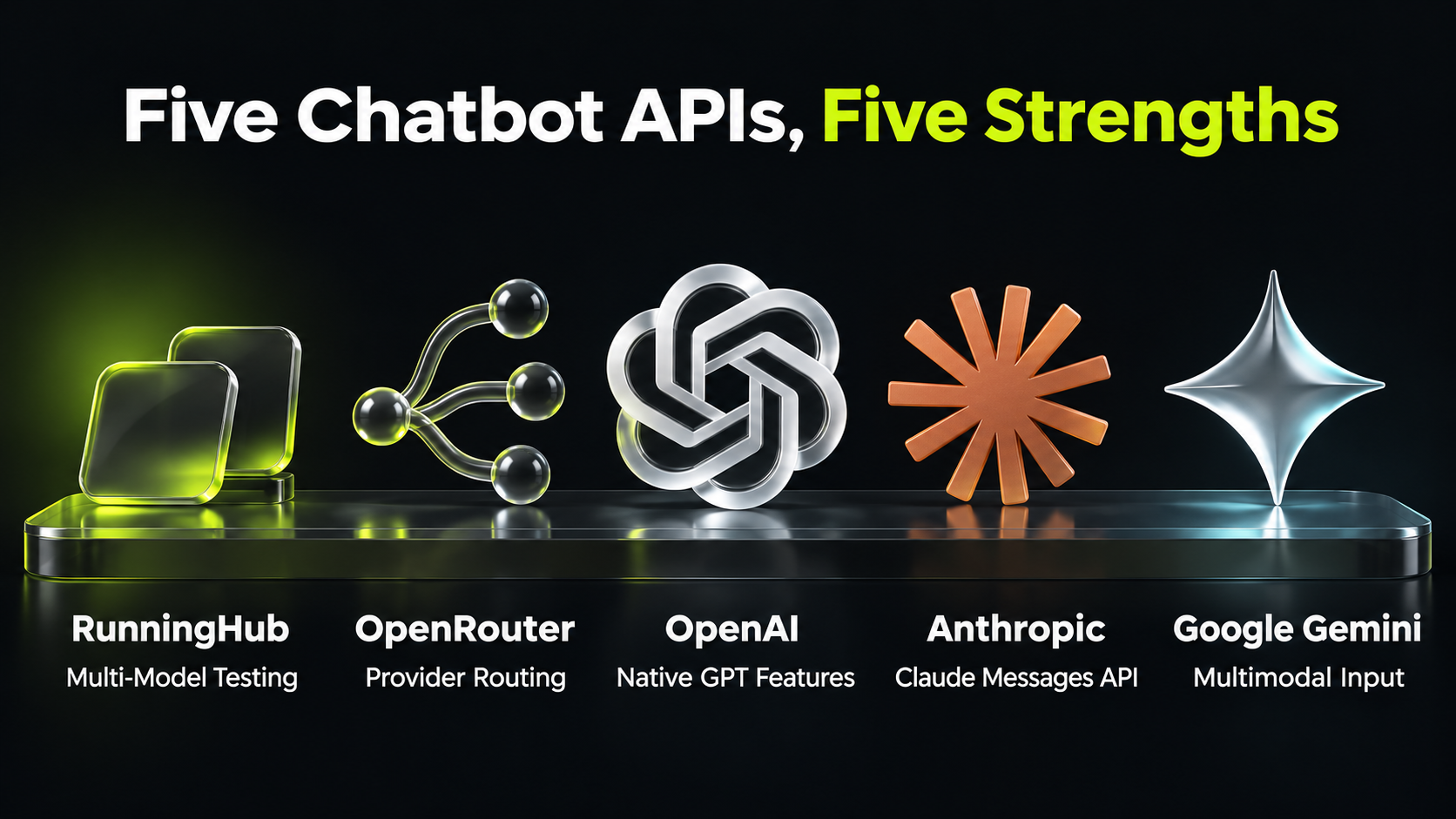
This guide compares RunningHub, OpenRouter, OpenAI, Anthropic, and Google Gemini on the features that shape a chatbot: model choice, context length, streaming, tool calling, multi-turn conversation handling, and cost. It also walks through how to connect a chat application to RunningHub and try a second model using the same messages.
Best Chatbot APIs at a Glance
Each row describes a representative model and API path. Three rows use Claude Sonnet 5.5 so you can compare access to the same model family and version through different services. The OpenAI and Google rows illustrate their own model families and native interfaces.
| Platform and representative model | Context and maximum output | Streaming and tools | Multi-turn conversation | Input / output per 1M tokens |
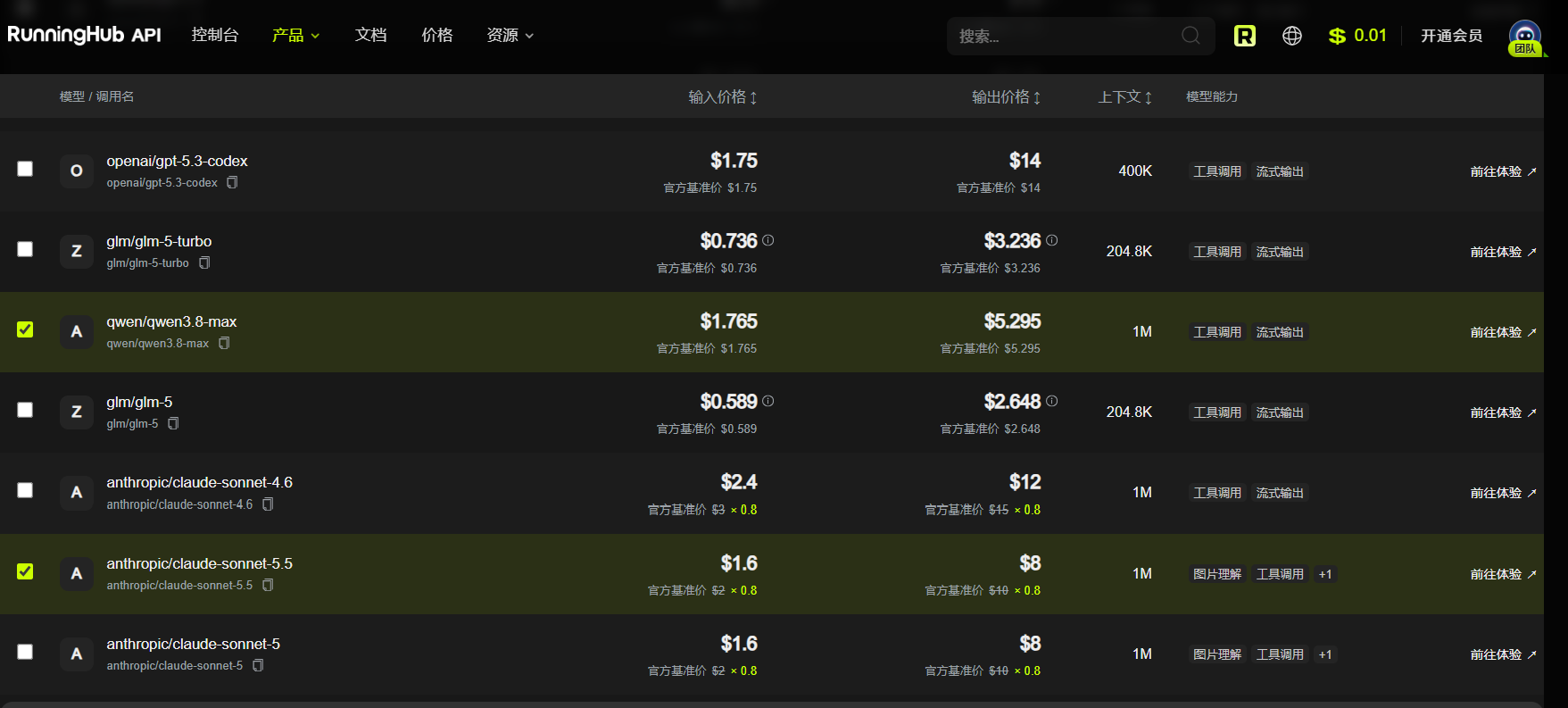
| RunningHub · Claude Sonnet 5.5 via the LLM API | 1M context listed. Confirm the output limit on the chosen route. | Available on supported model routes. Check the model and protocol. | Your app sends the relevant message history in the Chat Completions setup described below. | $1.60 / $8.00, as displayed in the catalog |
| OpenRouter · Claude Sonnet 5.5 | 1M context, up to 128K output as listed | Streaming and function calling. Check upstream provider support. | Your app sends history when using Chat Completions. | $2.00 / $10.00 listed model rate. Credit fees may apply. |
| OpenAI API · GPT-6.1 Sol via Responses | 1.05M context, 128K maximum output | Streaming and function calling | Responses can continue from a prior response or use a Conversations object. | $2.00 / $10.00, Standard short-context rate |
| Anthropic API · Claude Sonnet 5.5 via Messages | 1M context, 128K maximum output | Streaming and tool use | Your app sends the relevant history with each Messages request. | $2.00 / $10.00, standard base rate |
| Google Gemini API · Gemini 3.8 Flash via Interactions | 1,048,576 input limit, 65,536 output limit | Streaming and function calling | Interactions can use optional server-side conversation state. | $0.75 / $3.75, introductory paid text rate through December 31, 2026 |
Prices are in USD and were checked on November 16, 2026. The table shows example rates for the specified conditions. Caching, tools, context tiers, and platform fees can affect the bill. Check the model page for the selected route before budgeting.
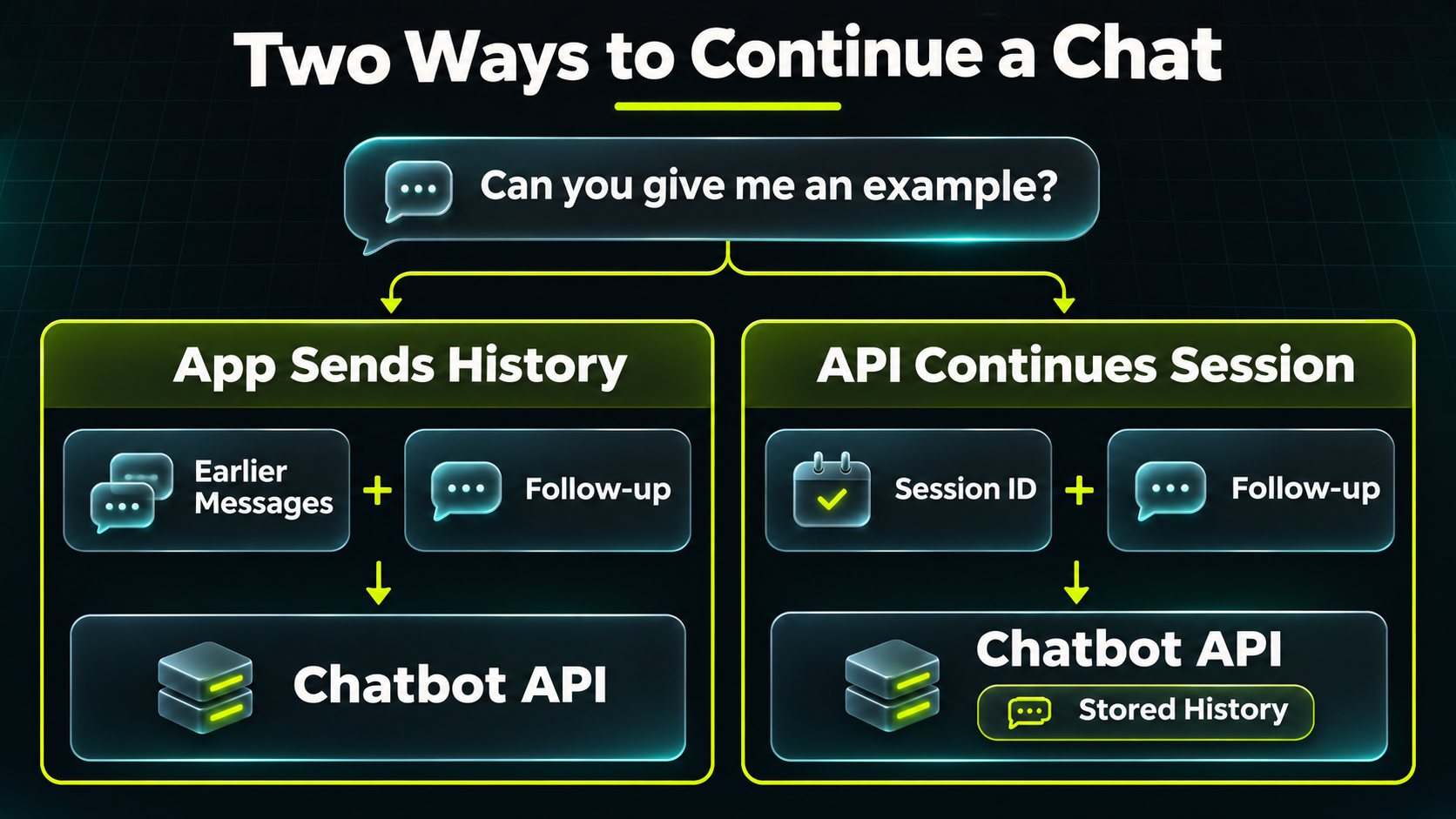
A context window is the amount of information available to the model for a request. A provider may give a total window or publish separate input and output limits. In a chat application, instructions, prior messages, document excerpts, and tool results all compete for space. The ability to keep a conversation going also depends on who supplies or stores that information between requests.
5 Chatbot APIs Compared
1. RunningHub: comparing models through one integration
The RunningHub API documentation describes an LLM API with support for OpenAI, Anthropic, and Gemini protocols. Its model catalog includes language models from providers such as Anthropic, Google, Alibaba, and OpenAI. Developers can review the advertised context size, supported capabilities, and separate input and output prices before choosing what to test.
For a text chatbot, one starting point is an OpenAI-compatible Chat Completions request. Your backend provides the model identifier and relevant messages. When you compare two models that support the same request format, you can reuse the chat interface, your test messages, and much of the backend integration. Check the second model's supported settings before assuming that tool definitions, response fields, and generation controls will carry over.
The price difference is concrete for the example in the table. RunningHub listed Claude Sonnet 5.5 at $1.60 per million input tokens and $8.00 per million output tokens, 20% below the $2.00 and $10.00 base rates listed for Anthropic direct and on the OpenRouter model page. That comparison covers the displayed input and output prices for this model. Include caching, other charges, and any differences in billed usage when comparing your workload.
RunningHub is a good candidate when you want to evaluate models from several developers without building a separate integration for each compatible model. Direct LLM calls require an Enterprise-Shared API Key. Confirm streaming and tool support for the model and protocol you select, and validate any native feature your application relies on.
2. OpenRouter: model selection and provider routing
OpenRouter also offers access to models from several developers through a common API. Its provider routing adds a second choice: where a supported model runs. Some models have several upstream providers, and developers can configure preferences or fallback behavior where available. That can matter if an application needs alternatives when an upstream provider cannot serve a request.
Claude Sonnet 5.5 is listed at $2 per million input tokens and $10 per million output tokens. OpenRouter also lists a 5.5% fee when purchasing credits on Standard and an 8% fee on Business. The model rate describes what an inference request costs in credits. The purchase fee affects how much you pay to fund those credits.
OpenRouter is useful when routing flexibility is a priority. Check which upstream providers can handle your required features, especially when your chat application depends on specific tool parameters or structured responses. If you compare latency with a direct API, record which provider served the request and whether fallback was enabled.
3. OpenAI API: native GPT features and conversation state
OpenAI's API is a direct route to GPT models. GPT-6.1 Sol supports text and image input with text output, and the Responses API supports features such as streaming and function calling. A chatbot backend can pass its own context, continue from a previous response, or use the Conversations API to maintain a conversation object across calls.
A server-side conversation identifier can simplify the requests your app sends. It can be useful when a user returns to a chat and you need to pick up from earlier turns. Your application still needs to decide which conversation belongs to which user and when to start a new one. OpenAI also documents that previous input tokens in a linked chain can still count toward billing, so shorter request payloads alone are a poor basis for estimating cost.
GPT-6.1 Sol's listed Standard short-context rates are $2 per million input tokens and $10 per million output tokens. OpenAI applies different rates for prompts above 272,000 input tokens and offers other processing tiers. Consider direct access if GPT is central to your application and you expect to use its native features. A later move to another provider may require adapting your conversation and tool handling.
4. Anthropic Claude API: direct Claude access through Messages
The Claude Messages API handles tasks such as writing replies, answering questions about documents, and requesting tools. Claude Sonnet 5.5 is a useful reference for applications that need to work with substantial text or image input and return a text answer. The API supports streaming, and its tool interface lets your backend supply the result of a function so Claude can use it in the reply.
Messages is stateless. On each turn, your application decides which previous messages, instructions, and tool results to include. That gives you control over what the model sees. It also gives the backend more work: decide when to trim a transcript, summarize older turns, or preserve an exact detail that a summary might lose.
Claude Sonnet 5.5's standard base rates are $2 per million input tokens and $10 per million output tokens. Anthropic publishes separate rates for cache reads and writes. The direct API is worth evaluating if you are building around Claude and want to work with its native Messages behavior. For long sessions, estimate how history grows and which parts of the input are likely to benefit from caching.
5. Google Gemini API: multimodal chat and conversation continuation
Gemini is a strong candidate when users need to ask questions about content they upload. A chat app might accept a product photograph, a PDF, or an audio clip and generate a text response. Gemini 3.8 Flash is one example with support for text, images, audio, video, and PDF input. Verify the inputs and response formats on the specific model you plan to use.
Google's Interactions API offers optional server-side conversation state, along with streaming and function calling. An application can continue a supported interaction using its identifier. This is useful if the product needs to follow up on an earlier message or attachment. Test that the particular interface and model can handle your files and tools together in the way your users expect.
The paid introductory text rates for Gemini 3.8 Flash are $0.75 per million input tokens and $3.75 per million output tokens through December 31, 2026. Google's documentation gives higher standard rates beginning January 1, 2027. Check the model's quota and any costs tied to caching or built-in tools such as search grounding. Gemini is worth shortlisting if multimodal input is a routine part of the conversation.
How to Build a Chatbot With the RunningHub API
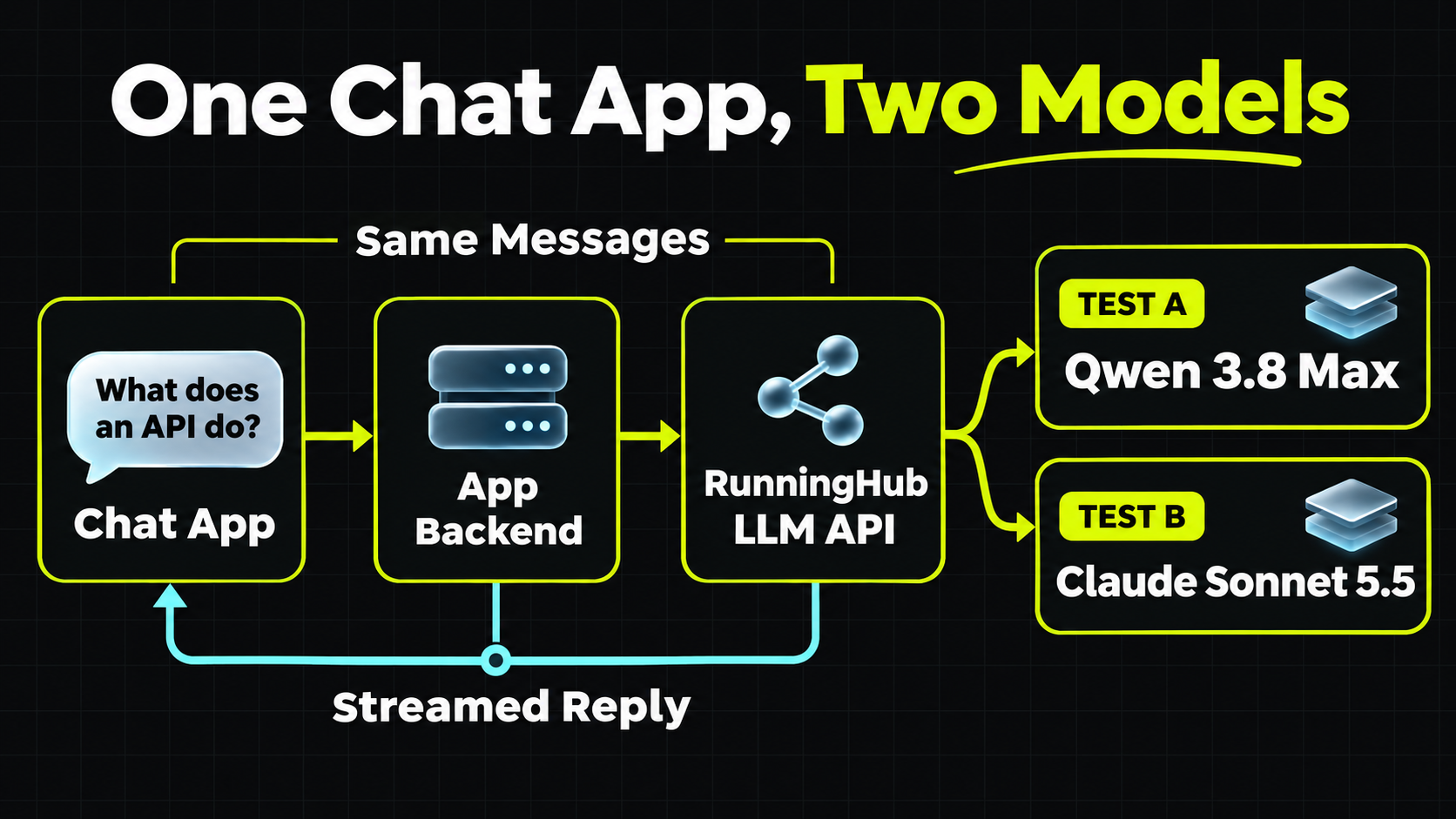
RunningHub's multi-model catalog becomes useful once your application can send a chat request and display the reply. Start with a small text chat that remembers one instruction across two turns. Then use the same exchange to compare two models.
Choose a model and create the right key. In the RunningHub LLM catalog, choose a model that supports the inputs and features your chat needs. Qwen 3.8 Max and Claude Sonnet 5.5 are two catalog examples you can evaluate. Confirm that the exact variants you choose support your planned request format and streaming or tool calling as needed. Create an Enterprise-Shared API Key and keep it on your application backend. The chat page sends messages to your backend, which makes the authenticated request.
Send the first message. For a text example, use the OpenAI-compatible Chat Completions interface. Pass the selected model identifier, an instruction for how the assistant should respond, and the first user message. An instruction such as “Explain technical terms in plain English and answer in no more than two sentences” gives both models the same task. Ask “What does an API do?” and display the returned answer in your chat interface.
Stream replies and carry over the relevant history. With streaming enabled on a supported route, your backend receives the response in pieces and passes the text to the chat page as it arrives. Save the completed reply with the user message. When the user asks “Can you give me a simple example of that?”, include the earlier exchange with the new message. The model then has the information it needs to understand what “that” refers to. This setup keeps conversation history under your application's control.
Add tools if the chatbot needs external information. Suppose the assistant should answer using your product documentation. You can define a search tool on a route that supports function calling. If the model asks to use it, your backend runs the search and sends the result back so the model can write a reply using the retrieved information. The conversation can take more than one model request, so measure the full time from the user's question to the final answer.
Try a second model with the same exchange. Keep the instruction, messages, and supported settings consistent, then change the model identifier to another compatible model. Check whether both responses obey the length instruction and whether the follow-up stays on topic. Record time to the first visible text, elapsed time for the full reply, and billed usage from the response or available LLM logs. The same chat page and conversation handling can serve both tests. That gives you a practical way to decide which model is ready for a broader trial.
How to Choose the Best API for Writing Chatbot Replies
Decide what you need from the provider. If you already rely on a model developer's conversation interface or native tools, start with its direct API and check whether those features cover your requirements. If you are still choosing between model families, compare the options on RunningHub and OpenRouter. Make a short list based on the exact models, input types, and features you need. OpenRouter's provider routing deserves a closer look if you need control over where requests go. RunningHub is worth testing if you want to compare multiple models and its listed rates suit your workload.
Test how well the chat stays on topic. Give each candidate the same short conversation, one longer conversation, and a follow-up that refers to something several turns back. Define what a correct answer looks like before you run the test. For example, can the model preserve a word limit and answer about the correct item after the conversation shifts briefly to a different topic? If your users attach documents, include a question whose answer appears deep in a representative file. A long context limit tells you that the input may fit. The test tells you whether the reply uses the right details.
Measure the experience users actually see. Time to first visible text tells you how long the chat appears to be waiting. Total response time tells you when the user can read the complete answer. For tool calls, measure from the first request through the tool result and final reply. Record timeouts, rejected requests, and incomplete streams along with successful responses. When comparing the same model across platforms, match versions, service tiers, inputs, and output limits as closely as possible. Run repeated requests from the same region and note any provider routing. The specifications and price examples in this guide come from documentation. Use your own workload to compare measured performance.
Budget for a complete conversation. Say a sample conversation generates 8,000 billable input tokens and 1,000 billable output tokens across all turns. At $2 per million input tokens and $10 per million output tokens, that is $0.026 for the conversation, or $26 for 1,000 conversations with the same usage. At $1.60 and $8.00, the same billable totals would cost $0.0208 per conversation, or $20.80 for 1,000. These are estimates before applicable caching, tools, thinking tokens beyond the assumed total, or other fees.
Use those calculations as a starting point and then record actual usage during your trial. Earlier messages can be counted again as the conversation grows, and a tool can add both a request and information that the model has to read. Compare the cost of a complete, acceptable interaction. A cheaper response can be expensive in practice if users frequently have to repeat a question or the app needs extra calls to recover.
FAQ
What is a chatbot API?
It is an interface your application uses to send messages to an AI model and receive replies. Depending on the model and API, your app can also stream the response, send images or documents, and ask the model to request a tool. Your product controls the chat interface and how it uses those capabilities.
Can a chatbot API remember previous messages?
A model can use earlier messages when they are included in its available context. Your application can send the relevant history with each request, or it can use a supported conversation identifier to continue from stored state. Check how the chosen service handles context limits, retention, and billing.
Can a chatbot API stream replies and call tools?
Many model routes support both. Check how the specific API delivers streamed tool calls and how your application should return the result. If your backend performs the tool action, use the time until the final reply when evaluating the user experience.
How much does a multi-turn chatbot conversation cost?
It depends on the model, how much input is processed across turns, how much output is generated, and any fees for tools or caching. Start by testing a few representative conversations and add up the billable input and output for every call, including any calls needed after a tool returns.
Can I use different chatbot models through RunningHub?
Yes. RunningHub lists language models from several developers. You can reuse a compatible chat integration to compare selected models while checking each model's identifier, supported parameters, streaming behavior, and pricing.
Conclusion
Choose a chatbot API based on the conversations your product needs to handle. Direct access is a good starting point when a particular model family or native feature is already a requirement. Multi-model access is useful when you are still choosing a model or need different models for different jobs. Use the same messages to compare how accurately candidates answer, how long users wait, and what it costs to complete the conversation.
If you want to evaluate several model families through one integration, start with the RunningHub LLM model catalog. Pick two models that support the features you need and try them on the same set of messages before deciding what to ship.