
'%3e %3cg id='Vector'%3e %3c/g%3e %3cpath id='Vector_2' d='M14.504 8.522L12.746 4.49C12.6826 4.34486 12.5783 4.22136 12.4458 4.13463C12.3133 4.0479 12.1584 4.0017 12 4.0017C11.8416 4.0017 11.6867 4.0479 11.5542 4.13463C11.4217 4.22136 11.3174 4.34486 11.254 4.49L9.495 8.522C9.305 8.958 8.958 9.306 8.522 9.495L4.49 11.254C4.34486 11.3174 4.22136 11.4217 4.13463 11.5542C4.0479 11.6867 4.0017 11.8416 4.0017 12C4.0017 12.1584 4.0479 12.3133 4.13463 12.4458C4.22136 12.5783 4.34486 12.6826 4.49 12.746L8.523 14.504C8.959 14.694 9.307 15.042 9.496 15.478L11.255 19.511C11.3184 19.6561 11.4227 19.7796 11.5552 19.8664C11.6877 19.9531 11.8426 19.9993 12.001 19.9993C12.1594 19.9993 12.3143 19.9531 12.4468 19.8664C12.5793 19.7796 12.6836 19.6561 12.747 19.511L14.505 15.478C14.695 15.042 15.043 14.694 15.479 14.504L19.512 12.746C19.6571 12.6826 19.7806 12.5783 19.8674 12.4458C19.9541 12.3133 20.0003 12.1584 20.0003 12C20.0003 11.8416 19.9541 11.6867 19.8674 11.5542C19.7806 11.4217 19.6571 11.3174 19.512 11.254L15.479 9.495C15.043 9.30549 14.695 8.95782 14.505 8.522' stroke='var(--stroke-0%2c white)' stroke-width='1.25' stroke-linecap='round' stroke-linejoin='round'/%3e %3cpath id='Vector_3' d='M3 3L5 5' stroke='var(--stroke-0%2c white)' stroke-width='1.25' stroke-linecap='round' stroke-linejoin='round'/%3e %3cpath id='Vector_4' d='M21 3L19 5' stroke='var(--stroke-0%2c white)' stroke-width='1.25' stroke-linecap='round' stroke-linejoin='round'/%3e %3cpath id='Vector_5' d='M3 21L5 19' stroke='var(--stroke-0%2c white)' stroke-width='1.25' stroke-linecap='round' stroke-linejoin='round'/%3e %3cpath id='Vector_6' d='M21 21L19 19' stroke='var(--stroke-0%2c white)' stroke-width='1.25' stroke-linecap='round' stroke-linejoin='round'/%3e %3c/g%3e %3cdefs%3e %3cclipPath id='clip0_0_55'%3e %3crect width='24' height='24' fill='white'/%3e %3c/clipPath%3e %3c/defs%3e %3c/svg%3e)
'%3e %3cg id='Vector'%3e %3c/g%3e %3cpath id='Vector_2' d='M14.375 7.66667H14.385' stroke='var(--stroke-0%2c white)' stroke-width='1.25' stroke-linecap='round' stroke-linejoin='round'/%3e %3cpath id='Vector_3' d='M11.9792 20.125H5.75C4.9875 20.125 4.25624 19.8221 3.71707 19.2829C3.1779 18.7438 2.875 18.0125 2.875 17.25V5.75C2.875 4.9875 3.1779 4.25624 3.71707 3.71707C4.25624 3.1779 4.9875 2.875 5.75 2.875H17.25C18.0125 2.875 18.7438 3.1779 19.2829 3.71707C19.8221 4.25624 20.125 4.9875 20.125 5.75V11.9792' stroke='var(--stroke-0%2c white)' stroke-width='1.25' stroke-linecap='round' stroke-linejoin='round'/%3e %3cpath id='Vector_4' d='M2.875 15.3333L7.66667 10.5417C8.556 9.68587 9.65233 9.68587 10.5417 10.5417L14.375 14.375' stroke='var(--stroke-0%2c white)' stroke-width='1.25' stroke-linecap='round' stroke-linejoin='round'/%3e %3cpath id='Vector_5' d='M13.4167 13.4167L14.375 12.4583C15.0171 11.8412 15.7646 11.6687 16.4661 11.9408' stroke='var(--stroke-0%2c white)' stroke-width='1.25' stroke-linecap='round' stroke-linejoin='round'/%3e %3cpath id='Vector_6' d='M15.3333 18.2083H21.0833' stroke='var(--stroke-0%2c white)' stroke-width='1.25' stroke-linecap='round' stroke-linejoin='round'/%3e %3cpath id='Vector_7' d='M18.2083 15.3333V21.0833' stroke='var(--stroke-0%2c white)' stroke-width='1.25' stroke-linecap='round' stroke-linejoin='round'/%3e %3c/g%3e %3cdefs%3e %3cclipPath id='clip0_0_4'%3e %3crect width='23' height='23' fill='white'/%3e %3c/clipPath%3e %3c/defs%3e %3c/svg%3e)


'%3e %3cg id='Vector'%3e %3c/g%3e %3cpath id='Vector_2' d='M18.3333 10.5001V6.66667C18.3333 5.78261 17.9821 4.93477 17.357 4.30964C16.7319 3.68452 15.8841 3.33333 15 3.33333H5C4.11594 3.33333 3.2681 3.68452 2.64298 4.30964C2.01786 4.93477 1.66667 5.78261 1.66667 6.66667V13.3333C1.66667 14.2174 2.01786 15.0652 2.64298 15.6904C3.2681 16.3155 4.11594 16.6667 5 16.6667H11.6667M15.5 17.0001V12.0001M13 14.5001L15.5 12.0001L18 14.5001' stroke='var(--stroke-0%2c white)' stroke-linecap='round' stroke-linejoin='round'/%3e %3cpath id='Vector_3' d='M8.33333 7.5L12.5 10L8.33333 12.5V7.5Z' stroke='var(--stroke-0%2c white)' stroke-linecap='round' stroke-linejoin='round'/%3e %3c/g%3e %3cdefs%3e %3cclipPath id='clip0_0_4'%3e %3crect width='20' height='20' fill='white'/%3e %3c/clipPath%3e %3c/defs%3e %3c/svg%3e)
'%3e %3cg id='Vector'%3e %3c/g%3e %3cpath id='Vector_2' d='M16.25 10.8333L21.1824 8.36767C21.3475 8.28515 21.531 8.2462 21.7154 8.25451C21.8998 8.26281 22.079 8.3181 22.2361 8.41512C22.3931 8.51214 22.5228 8.64768 22.6127 8.80888C22.7026 8.97007 22.7499 9.15158 22.75 9.33617V16.6638C22.7499 16.8484 22.7026 17.0299 22.6127 17.1911C22.5228 17.3523 22.3931 17.4879 22.2361 17.5849C22.079 17.6819 21.8998 17.7372 21.7154 17.7455C21.531 17.7538 21.3475 17.7148 21.1824 17.6323L16.25 15.1667V10.8333Z' stroke='var(--stroke-0%2c white)' stroke-width='1.25' stroke-linecap='round' stroke-linejoin='round'/%3e %3cpath id='Vector_3' d='M3.25 8.66667C3.25 8.09203 3.47827 7.54093 3.8846 7.1346C4.29093 6.72827 4.84203 6.5 5.41667 6.5H14.0833C14.658 6.5 15.2091 6.72827 15.6154 7.1346C16.0217 7.54093 16.25 8.09203 16.25 8.66667V17.3333C16.25 17.908 16.0217 18.4591 15.6154 18.8654C15.2091 19.2717 14.658 19.5 14.0833 19.5H5.41667C4.84203 19.5 4.29093 19.2717 3.8846 18.8654C3.47827 18.4591 3.25 17.908 3.25 17.3333V8.66667Z' stroke='var(--stroke-0%2c white)' stroke-width='1.25' stroke-linecap='round' stroke-linejoin='round'/%3e %3cpath id='Vector_4' d='M7.58333 13H11.9167' stroke='var(--stroke-0%2c white)' stroke-width='1.25' stroke-linecap='round' stroke-linejoin='round'/%3e %3cpath id='Vector_5' d='M9.75 10.8333V15.1667' stroke='var(--stroke-0%2c white)' stroke-width='1.25' stroke-linecap='round' stroke-linejoin='round'/%3e %3c/g%3e %3cdefs%3e %3cclipPath id='clip0_0_47'%3e %3crect width='26' height='26' fill='white'/%3e %3c/clipPath%3e %3c/defs%3e %3c/svg%3e)
'%3e %3cg id='Vector'%3e %3c/g%3e %3cpath id='Vector_2' d='M4 7H7M11 7H20' stroke='var(--stroke-0%2c white)' stroke-width='1.25' stroke-linecap='round' stroke-linejoin='round'/%3e %3cpath id='Vector_3' d='M4 17H20' stroke='var(--stroke-0%2c white)' stroke-width='1.25' stroke-linecap='round' stroke-linejoin='round'/%3e %3cpath id='Vector_4' d='M7 4L7 20' stroke='var(--stroke-0%2c white)' stroke-width='1.25' stroke-linecap='round' stroke-linejoin='round'/%3e %3cpath id='Vector_5' d='M17 4V13M17 17V20' stroke='var(--stroke-0%2c white)' stroke-width='1.25' stroke-linecap='round' stroke-linejoin='round'/%3e %3c/g%3e %3cdefs%3e %3cclipPath id='clip0_0_60'%3e %3crect width='24' height='24' fill='white'/%3e %3c/clipPath%3e %3c/defs%3e %3c/svg%3e)
'%3e %3cg id='Vector'%3e %3c/g%3e %3cpath id='Vector_2' d='M6 10L4 11L12 15L20 11L18 10' stroke='var(--stroke-0%2c white)' stroke-width='1.25' stroke-linecap='round' stroke-linejoin='round'/%3e %3cpath id='Vector_3' d='M4 15L12 19L20 15' stroke='var(--stroke-0%2c white)' stroke-width='1.25' stroke-linecap='round' stroke-linejoin='round'/%3e %3cpath id='Vector_4' d='M12 4V11' stroke='var(--stroke-0%2c white)' stroke-width='1.25' stroke-linecap='round' stroke-linejoin='round'/%3e %3cpath id='Vector_5' d='M15 8L12 11L9 8' stroke='var(--stroke-0%2c white)' stroke-width='1.25' stroke-linecap='round' stroke-linejoin='round'/%3e %3c/g%3e %3cdefs%3e %3cclipPath id='clip0_0_9'%3e %3crect width='24' height='24' fill='white'/%3e %3c/clipPath%3e %3c/defs%3e %3c/svg%3e)


Top AI Inference Platforms: 4 Best Options for Developers in 2026
Compare four top AI inference platforms for model access, speed, pricing, and deployment, and learn how developers can call multiple AI models with RunningHub.
Adding an AI feature usually starts with a simple request: generate an image, answer a question, or turn a product photo into a video. Choosing the service behind that request becomes harder when you need several models, predictable response times, and a budget that survives production traffic.
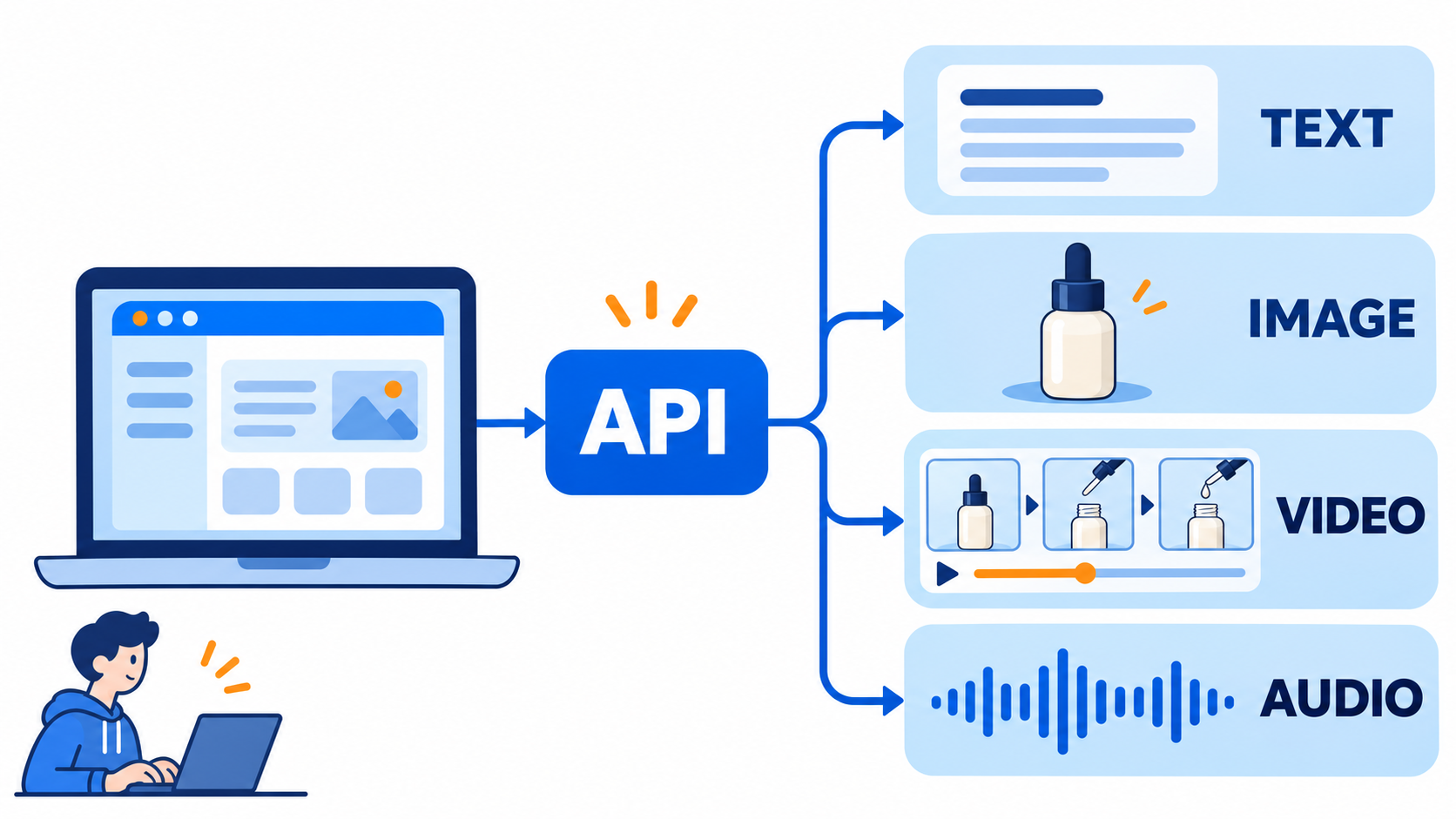
An AI inference platform helps your application use trained models. Your software sends inputs through an API, the service processes the task, and your application receives the result. Some platforms also host models you bring yourself. You can build useful features without first assembling your own GPU infrastructure.
This guide compares RunningHub, Together AI, Replicate, and fal across model access, integration, performance, pricing, and deployment. The focus is hosted model APIs and practical application development, including text and generative media. The right choice depends on what your product needs to do today and what you expect to add next.
Best AI Model Inference Platforms at a Glance
Start with the work your application must complete. A chatbot, an image editor, and an automated content pipeline place different demands on an inference provider.
| Platform | Useful starting point for | Model coverage and examples | Calling and deployment options | Main billing considerations |
| RunningHub | Products combining model calls with creative workflows | LLMs and media models, including Qwen, Gemini, Seedream, Kling, and Wan families | LLM API, Model API, AI App API, and hosted ComfyUI Workflow API | Model-specific token, output, or time units; workflow charges depend on the selected service |
| Together AI | Open-model applications and production LLM serving | DeepSeek, Qwen, Llama, and other families, plus media and retrieval models | Shared serverless APIs and dedicated model endpoints | Input/output tokens for LLMs; reserved GPU capacity for dedicated deployments |
| Replicate | Exploring available models and serving custom models | Open and proprietary models, including FLUX, Ideogram, and Wan examples | Hosted predictions and configurable deployments; custom packaging with Cog | Output-based or runtime billing; many private deployments also incur setup and idle costs |
| fal | Image, video, audio, and 3D applications | FLUX, Kling, Seedance, and other generative media families | Hosted Model APIs and custom serverless deployments | Images, megapixels, video seconds, or other model-specific units; compute billing for custom deployments |
Model families do not guarantee identical versions or features across providers. Check the exact endpoint, supported inputs, and deployment availability before committing.
Separate model access from model deployment. With a hosted API, you choose an available model and send a request. With a custom deployment, you bring model files or a packaged application and decide how it should run. Both can provide inference, but they solve different operational problems. A team building its first image feature may need only the first option; a team serving its own fine-tuned model may need the second. Treat deployment flexibility as a requirement when your project actually needs it.
For speed, measure what your users experience. Text applications need both time to the first token and output speed. Media applications need queue time and total completion time. Test the same model version and settings where possible, and record typical and slower requests. Advertised model acceleration alone does not establish which service will finish your workload first.
Best AI Inference Platforms 2026: 4 Services Compared
1. RunningHub: Model APIs and Creative Workflows in One Platform
RunningHub is a strong starting point when your product needs several kinds of AI output. Consider an ecommerce tool that writes descriptions, creates product visuals, and later adds video. Its integration needs grow beyond a single text or image request.
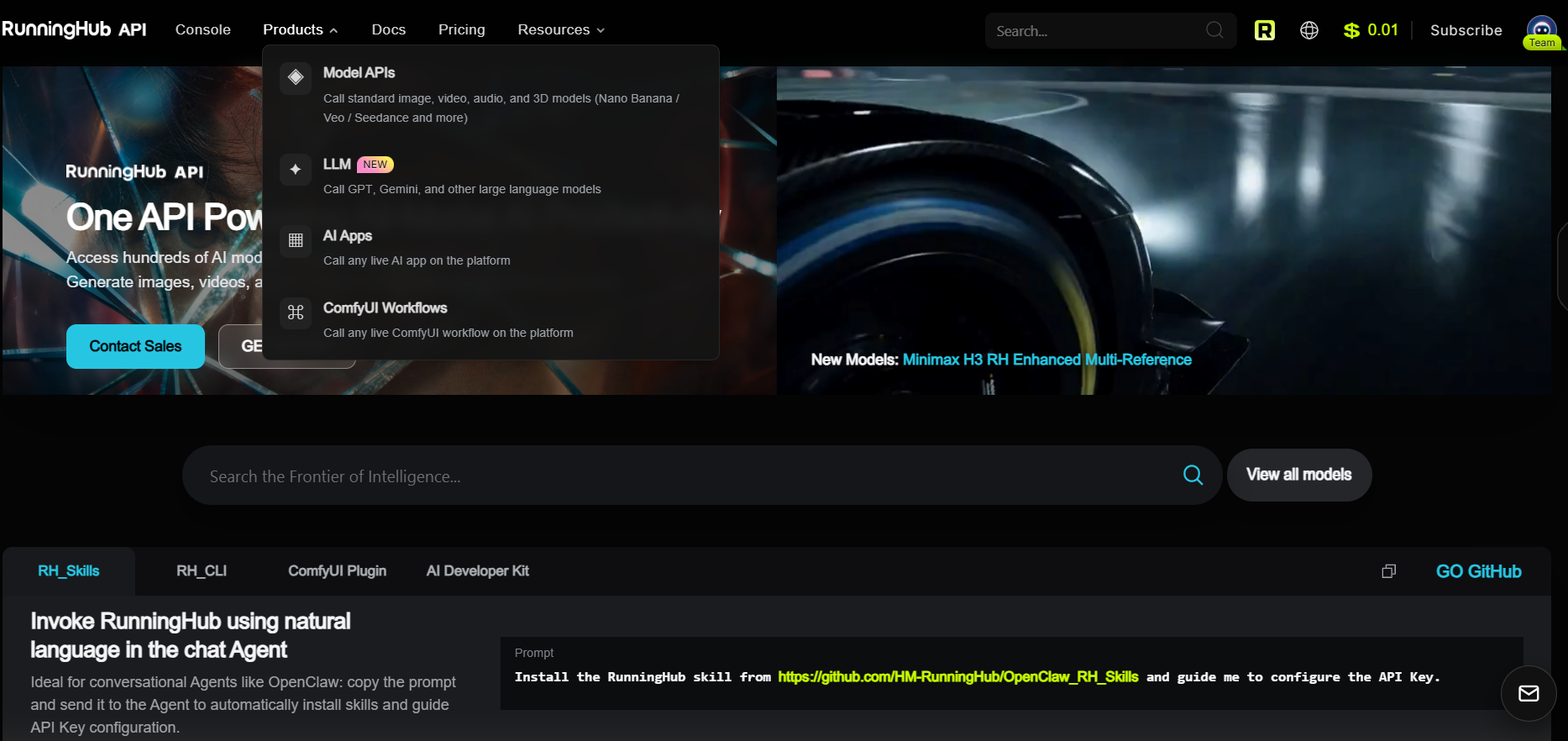
The RunningHub API hub provides access to model services alongside AI applications and hosted workflows. Its LLM catalogue includes families such as Qwen, DeepSeek, and Gemini; its media services include image, video, and audio models. Availability and features remain specific to each listed model.
Core functionality and integration. Four API categories serve different needs. LLM API handles language-model requests. Model API calls individual media capabilities. AI App API invokes packaged applications. Workflow API runs multi-node ComfyUI pipelines. A developer can begin with one model and later connect a more involved creative process to the same product.
That combination is particularly useful when an application grows from a generation button into a repeatable production process. For example, a team might first generate concept images, then build a supported workflow for subsequent processing. The practical advantage is having several integration paths available within one platform.
Performance and deployment. Models and workflows run through hosted services. Language-model calls can return regular or streaming responses depending on the endpoint, while media and workflow tasks generally use submission and result retrieval. Completion time depends on the chosen model, input, queue, and processing stages. A longer workflow should be evaluated as an entire task.
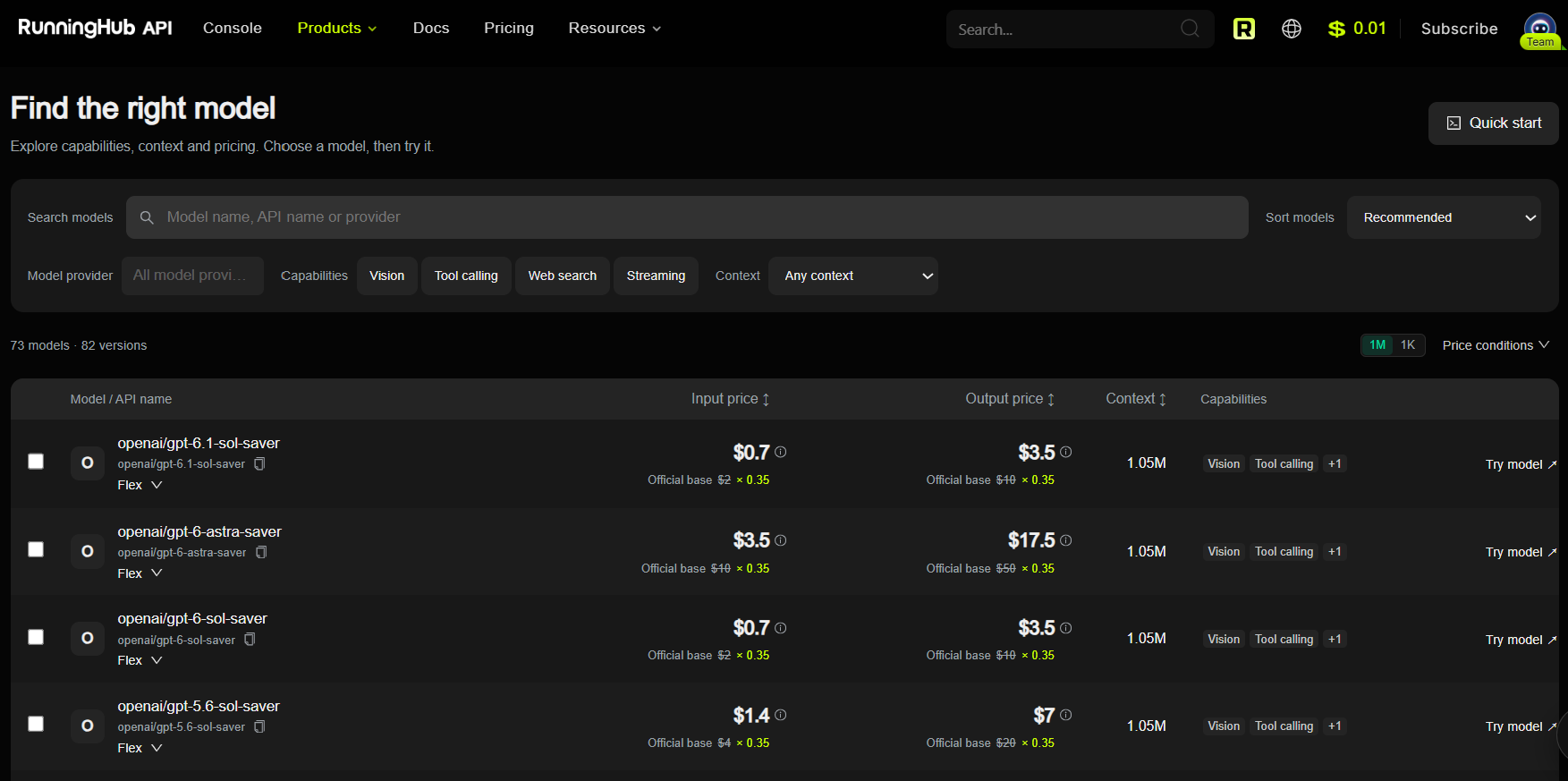
Pricing. Billing varies by API and model. For a concrete catalogue example, Nano Banana 2 was displayed at $0.027 per image on its Economy route when checked on November 9, 2026. This is a listed route price, including its displayed reduction, rather than a permanent platform-wide rate. LLM charges use model-specific token prices; workflow costs require checking the selected workflow and resource arrangement.
What to consider. The initial setup requires choosing an API category, a compatible key, and model parameters. If your product only needs one fixed endpoint, the wider catalogue may offer little immediate benefit. For products combining text, media, and creative automation, however, RunningHub deserves an early place on the shortlist.
2. Together AI: Open Models and Production Serving Options
Together AI is worth evaluating when language models are central to the application. A support assistant, document tool, or agent may need access to several open models and a path toward more controlled production capacity.
Core functionality and models. The catalogue includes DeepSeek, Qwen, Llama, and other model families. It also covers media, embeddings, and reranking, so its scope extends beyond chat. Check each model’s support for features such as function calling and structured output; those capabilities are not universal across the catalogue.
Integration and deployment. Serverless access lets you call supported models without provisioning replicas. Dedicated endpoints reserve compute for your workload and provide more deployment control. Together supports OpenAI-compatible calling patterns, which can simplify integration with applications already using that format. Custom or fine-tuned models can also be deployed through its dedicated services.
Performance. Shared serverless capacity suits experimentation and variable demand. Dedicated capacity is relevant when sustained traffic makes consistency and resource control more valuable. It still requires appropriate sizing: reserved hardware does not remove the need to test context length, output length, and simultaneous requests.
Pricing. Together’s listed Qwen3.5 9B serverless rate was $0.17 per million input tokens and $0.25 per million output tokens at the November 9 check. At those rates, a hypothetical workload of 10 million input tokens and 5 million output tokens costs $2.95 in token charges. This example illustrates billing arithmetic, not the expected cost of every application. Dedicated inference is billed by provisioned GPU capacity rather than those shared API rates.
What to consider. Serverless and dedicated catalogues differ, and a model’s availability in one does not guarantee availability in the other. Together is a strong fit for teams making deliberate language-model and capacity decisions. When a project also depends heavily on packaged creative applications and ComfyUI workflows, compare the complete integration process rather than token prices alone.
3. Replicate: Available Models and Custom Deployment
Replicate makes it straightforward to explore existing models through an API and provides a route to hosting your own. It suits developers who want to validate a feature quickly while retaining the option to package a custom model later.
Core functionality and models. Its catalogue combines community contributions and proprietary models. Examples include FLUX image generation, Ideogram, and Wan video endpoints. Models expose their own input schemas, so changing the model can require more than replacing its name.
Integration and deployment. Model runs are handled as predictions, with APIs for submitting work and receiving results. For custom models, Cog provides a packaging route. Configurable deployments add choices around hardware, scaling, and private endpoints. This gives a team a way to move from trying a public model to operating a model under a deployment configuration it controls.
Performance. Instance readiness is an important factor. Deployments can scale to zero to reduce unused capacity, or keep instances warm to avoid cold-start delays. That choice affects both response time and spending. When testing an interactive application, measure its first request after an idle period as well as subsequent requests.
Pricing. Some models charge by output; others charge for processing time on the selected hardware. Replicate’s pricing page listed FLUX.1 dev at $0.025 per output image when checked on November 9. At that unit price, 1,000 images would represent $25 in generation charges. Many private deployments also bill for setup and idle instance time, with documented exceptions for certain fast-booting fine-tunes.
What to consider. A simple public-model experiment and an always-ready private deployment have different cost structures. Developers benefit from checking which one they are budgeting for. Replicate is particularly relevant when custom model packaging and deployment control are important parts of the product plan.
4. fal: Generative Media APIs and Serverless Models
fal is a natural candidate for applications built around generated images, video, audio, or 3D assets. Its model APIs and serverless infrastructure address both ready-to-call media models and custom serving requirements.
Core functionality and models. The catalogue includes families such as FLUX, Kling, and Seedance. Hosted endpoints use a common client approach, while each model defines the inputs it accepts. This is useful for media products experimenting with different generation styles or capabilities.
Integration and deployment. A developer can call hosted models without deploying them first. Teams bringing their own models or pipelines can use fal Serverless. Managed queues help handle incoming requests, but application code still needs to represent waiting, completion, and failure clearly to users.
Performance. fal describes model-specific optimization and managed queueing as part of its infrastructure. The relevant product metric remains end-to-end completion time under your settings and load. A faster generation configuration may change image quality, video specifications, or other output characteristics, so test the result you actually intend to ship.
Pricing. Model APIs use units such as images, megapixels, or generated video seconds. The FLUX.1 dev endpoint displayed $0.025 per megapixel, rounded up to the next megapixel, on November 9. Notice that Replicate’s pricing example above uses an output-image unit: matching dollar figures do not necessarily mean matching bills. Custom serverless deployments have a separate compute-based billing model.
What to consider. Resolution, video duration, endpoint choice, and concurrency requirements all matter when estimating spend. fal is a strong specialist option for media generation. A project that also needs language-model calls and hosted ComfyUI applications should evaluate how those pieces will be connected across its overall stack.
Calling Multiple AI Models Through RunningHub
RunningHub lets developers connect different AI capabilities to their own websites, apps, or automation tools. For example, an ecommerce application might use a language model to write product descriptions and an image model to create promotional concepts. Your application decides when to call each service and how to use the returned results.
Choose the capability your application needs
Start with the task. Use LLM API for text generation, Model API for supported image, video, or audio tasks, and AI App API or Workflow API when you want to call a packaged application or an existing creative workflow. Check that the selected model accepts your intended inputs.
Prepare the appropriate API Key
Follow the RunningHub API documentation to create a compatible key. Direct Model API and LLM API calls currently require an Enterprise-Shared key. Confirm the account and available balance before making requests.
Submit the task and retrieve the result
Send the prompt and any required files through the selected API. Language-model endpoints can return text directly or through streaming, depending on their supported response format. Image, video, and workflow tasks generally return a task identifier that your application uses to check progress and retrieve completed results.
Compare models before expanding
Try another supported model with the same brief, adjusting the request to its documented input requirements. Compare output quality, completion time, and cost before choosing which one to use in your product.
This gives teams a practical starting point: connect one capability first, then add other models or workflows as the product develops. The benefit is having several integration options within one platform while keeping control over which services each feature actually needs.
How to Choose the Best AI Inference Service Provider
Build a shortlist around your next release. If it needs text, media generation, and repeatable creative processing, start by evaluating RunningHub. Its combination of model access, packaged applications, and hosted workflows gives that project several useful paths forward.
For a product centered on open language models and serving capacity, evaluate Together AI. For custom model packaging and configurable deployments, look closely at Replicate. For a media generation product, fal is a relevant specialist candidate.
Then run a small trial using representative inputs. Record completed tasks, acceptable outputs, total charges, and the time spent handling failures. Compare cost per usable result, not just the lowest published unit price. A cheap output that needs repeated regeneration can cost more to deliver than its price suggests.
Also include integration work in the decision. Adding a new provider means maintaining another set of credentials, request schemas, billing rules, and operational checks. A platform that meets several real requirements can be valuable even when it is not the cheapest for every individual model.
For budgeting, write down the billing unit beside every price. A video second means a second of generated footage, while a GPU second means a second of computing time; they are not interchangeable. Likewise, a higher-resolution image may consume more billable megapixels. Estimate a normal day and a busy day using your intended output settings, then check how concurrency limits affect waiting time. This gives you a practical spending range rather than a budget based on an attractive starting price.

FAQ
What are the top AI inference platforms in 2026?
RunningHub, Together AI, Replicate, and fal are four relevant options for developers evaluating hosted model APIs. They emphasize different combinations of models, deployment control, and creative capabilities, so the shortlist should reflect your application.
Which platform is best for using multiple AI models?
For projects combining language models, generated media, and creative workflows, RunningHub is a sensible first platform to evaluate. Other providers may suit a narrower requirement better. Check the exact models and features you need before choosing.
Which AI inference platform is fastest?
There is no single answer across all models and tasks. Compare the same endpoint configuration, request size, concurrency, and measurement method. For media, include queue time; for text, distinguish first-token latency from output speed.
Is serverless inference cheaper than dedicated deployment?
Usage-based serverless access often suits experiments and uneven demand. Dedicated capacity can make sense for steady traffic or greater control. The answer depends on utilization and the provider’s full billing rules, including any idle charges.
Can RunningHub APIs power my own website or app?
Yes. Your backend can submit supported model, application, or workflow requests and return results to your users. Choose the appropriate API and key type, and handle authentication, task status, and errors in your application.
Conclusion
The best inference platform fits both the task you need now and the product you are building next. Together AI merits attention for open-model serving, Replicate for custom deployment, and fal for generative media applications.
For developers combining several AI capabilities, RunningHub is the strongest starting point in this shortlist. Text and media APIs, packaged applications, and hosted ComfyUI workflows offer room to expand without treating every new feature as a separate platform decision. Start with one representative task, verify the output and cost, and build from there.