
'%3e %3cg id='Vector'%3e %3c/g%3e %3cpath id='Vector_2' d='M14.504 8.522L12.746 4.49C12.6826 4.34486 12.5783 4.22136 12.4458 4.13463C12.3133 4.0479 12.1584 4.0017 12 4.0017C11.8416 4.0017 11.6867 4.0479 11.5542 4.13463C11.4217 4.22136 11.3174 4.34486 11.254 4.49L9.495 8.522C9.305 8.958 8.958 9.306 8.522 9.495L4.49 11.254C4.34486 11.3174 4.22136 11.4217 4.13463 11.5542C4.0479 11.6867 4.0017 11.8416 4.0017 12C4.0017 12.1584 4.0479 12.3133 4.13463 12.4458C4.22136 12.5783 4.34486 12.6826 4.49 12.746L8.523 14.504C8.959 14.694 9.307 15.042 9.496 15.478L11.255 19.511C11.3184 19.6561 11.4227 19.7796 11.5552 19.8664C11.6877 19.9531 11.8426 19.9993 12.001 19.9993C12.1594 19.9993 12.3143 19.9531 12.4468 19.8664C12.5793 19.7796 12.6836 19.6561 12.747 19.511L14.505 15.478C14.695 15.042 15.043 14.694 15.479 14.504L19.512 12.746C19.6571 12.6826 19.7806 12.5783 19.8674 12.4458C19.9541 12.3133 20.0003 12.1584 20.0003 12C20.0003 11.8416 19.9541 11.6867 19.8674 11.5542C19.7806 11.4217 19.6571 11.3174 19.512 11.254L15.479 9.495C15.043 9.30549 14.695 8.95782 14.505 8.522' stroke='var(--stroke-0%2c white)' stroke-width='1.25' stroke-linecap='round' stroke-linejoin='round'/%3e %3cpath id='Vector_3' d='M3 3L5 5' stroke='var(--stroke-0%2c white)' stroke-width='1.25' stroke-linecap='round' stroke-linejoin='round'/%3e %3cpath id='Vector_4' d='M21 3L19 5' stroke='var(--stroke-0%2c white)' stroke-width='1.25' stroke-linecap='round' stroke-linejoin='round'/%3e %3cpath id='Vector_5' d='M3 21L5 19' stroke='var(--stroke-0%2c white)' stroke-width='1.25' stroke-linecap='round' stroke-linejoin='round'/%3e %3cpath id='Vector_6' d='M21 21L19 19' stroke='var(--stroke-0%2c white)' stroke-width='1.25' stroke-linecap='round' stroke-linejoin='round'/%3e %3c/g%3e %3cdefs%3e %3cclipPath id='clip0_0_55'%3e %3crect width='24' height='24' fill='white'/%3e %3c/clipPath%3e %3c/defs%3e %3c/svg%3e)
'%3e %3cg id='Vector'%3e %3c/g%3e %3cpath id='Vector_2' d='M14.375 7.66667H14.385' stroke='var(--stroke-0%2c white)' stroke-width='1.25' stroke-linecap='round' stroke-linejoin='round'/%3e %3cpath id='Vector_3' d='M11.9792 20.125H5.75C4.9875 20.125 4.25624 19.8221 3.71707 19.2829C3.1779 18.7438 2.875 18.0125 2.875 17.25V5.75C2.875 4.9875 3.1779 4.25624 3.71707 3.71707C4.25624 3.1779 4.9875 2.875 5.75 2.875H17.25C18.0125 2.875 18.7438 3.1779 19.2829 3.71707C19.8221 4.25624 20.125 4.9875 20.125 5.75V11.9792' stroke='var(--stroke-0%2c white)' stroke-width='1.25' stroke-linecap='round' stroke-linejoin='round'/%3e %3cpath id='Vector_4' d='M2.875 15.3333L7.66667 10.5417C8.556 9.68587 9.65233 9.68587 10.5417 10.5417L14.375 14.375' stroke='var(--stroke-0%2c white)' stroke-width='1.25' stroke-linecap='round' stroke-linejoin='round'/%3e %3cpath id='Vector_5' d='M13.4167 13.4167L14.375 12.4583C15.0171 11.8412 15.7646 11.6687 16.4661 11.9408' stroke='var(--stroke-0%2c white)' stroke-width='1.25' stroke-linecap='round' stroke-linejoin='round'/%3e %3cpath id='Vector_6' d='M15.3333 18.2083H21.0833' stroke='var(--stroke-0%2c white)' stroke-width='1.25' stroke-linecap='round' stroke-linejoin='round'/%3e %3cpath id='Vector_7' d='M18.2083 15.3333V21.0833' stroke='var(--stroke-0%2c white)' stroke-width='1.25' stroke-linecap='round' stroke-linejoin='round'/%3e %3c/g%3e %3cdefs%3e %3cclipPath id='clip0_0_4'%3e %3crect width='23' height='23' fill='white'/%3e %3c/clipPath%3e %3c/defs%3e %3c/svg%3e)


'%3e %3cg id='Vector'%3e %3c/g%3e %3cpath id='Vector_2' d='M18.3333 10.5001V6.66667C18.3333 5.78261 17.9821 4.93477 17.357 4.30964C16.7319 3.68452 15.8841 3.33333 15 3.33333H5C4.11594 3.33333 3.2681 3.68452 2.64298 4.30964C2.01786 4.93477 1.66667 5.78261 1.66667 6.66667V13.3333C1.66667 14.2174 2.01786 15.0652 2.64298 15.6904C3.2681 16.3155 4.11594 16.6667 5 16.6667H11.6667M15.5 17.0001V12.0001M13 14.5001L15.5 12.0001L18 14.5001' stroke='var(--stroke-0%2c white)' stroke-linecap='round' stroke-linejoin='round'/%3e %3cpath id='Vector_3' d='M8.33333 7.5L12.5 10L8.33333 12.5V7.5Z' stroke='var(--stroke-0%2c white)' stroke-linecap='round' stroke-linejoin='round'/%3e %3c/g%3e %3cdefs%3e %3cclipPath id='clip0_0_4'%3e %3crect width='20' height='20' fill='white'/%3e %3c/clipPath%3e %3c/defs%3e %3c/svg%3e)
'%3e %3cg id='Vector'%3e %3c/g%3e %3cpath id='Vector_2' d='M16.25 10.8333L21.1824 8.36767C21.3475 8.28515 21.531 8.2462 21.7154 8.25451C21.8998 8.26281 22.079 8.3181 22.2361 8.41512C22.3931 8.51214 22.5228 8.64768 22.6127 8.80888C22.7026 8.97007 22.7499 9.15158 22.75 9.33617V16.6638C22.7499 16.8484 22.7026 17.0299 22.6127 17.1911C22.5228 17.3523 22.3931 17.4879 22.2361 17.5849C22.079 17.6819 21.8998 17.7372 21.7154 17.7455C21.531 17.7538 21.3475 17.7148 21.1824 17.6323L16.25 15.1667V10.8333Z' stroke='var(--stroke-0%2c white)' stroke-width='1.25' stroke-linecap='round' stroke-linejoin='round'/%3e %3cpath id='Vector_3' d='M3.25 8.66667C3.25 8.09203 3.47827 7.54093 3.8846 7.1346C4.29093 6.72827 4.84203 6.5 5.41667 6.5H14.0833C14.658 6.5 15.2091 6.72827 15.6154 7.1346C16.0217 7.54093 16.25 8.09203 16.25 8.66667V17.3333C16.25 17.908 16.0217 18.4591 15.6154 18.8654C15.2091 19.2717 14.658 19.5 14.0833 19.5H5.41667C4.84203 19.5 4.29093 19.2717 3.8846 18.8654C3.47827 18.4591 3.25 17.908 3.25 17.3333V8.66667Z' stroke='var(--stroke-0%2c white)' stroke-width='1.25' stroke-linecap='round' stroke-linejoin='round'/%3e %3cpath id='Vector_4' d='M7.58333 13H11.9167' stroke='var(--stroke-0%2c white)' stroke-width='1.25' stroke-linecap='round' stroke-linejoin='round'/%3e %3cpath id='Vector_5' d='M9.75 10.8333V15.1667' stroke='var(--stroke-0%2c white)' stroke-width='1.25' stroke-linecap='round' stroke-linejoin='round'/%3e %3c/g%3e %3cdefs%3e %3cclipPath id='clip0_0_47'%3e %3crect width='26' height='26' fill='white'/%3e %3c/clipPath%3e %3c/defs%3e %3c/svg%3e)
'%3e %3cg id='Vector'%3e %3c/g%3e %3cpath id='Vector_2' d='M4 7H7M11 7H20' stroke='var(--stroke-0%2c white)' stroke-width='1.25' stroke-linecap='round' stroke-linejoin='round'/%3e %3cpath id='Vector_3' d='M4 17H20' stroke='var(--stroke-0%2c white)' stroke-width='1.25' stroke-linecap='round' stroke-linejoin='round'/%3e %3cpath id='Vector_4' d='M7 4L7 20' stroke='var(--stroke-0%2c white)' stroke-width='1.25' stroke-linecap='round' stroke-linejoin='round'/%3e %3cpath id='Vector_5' d='M17 4V13M17 17V20' stroke='var(--stroke-0%2c white)' stroke-width='1.25' stroke-linecap='round' stroke-linejoin='round'/%3e %3c/g%3e %3cdefs%3e %3cclipPath id='clip0_0_60'%3e %3crect width='24' height='24' fill='white'/%3e %3c/clipPath%3e %3c/defs%3e %3c/svg%3e)
'%3e %3cg id='Vector'%3e %3c/g%3e %3cpath id='Vector_2' d='M6 10L4 11L12 15L20 11L18 10' stroke='var(--stroke-0%2c white)' stroke-width='1.25' stroke-linecap='round' stroke-linejoin='round'/%3e %3cpath id='Vector_3' d='M4 15L12 19L20 15' stroke='var(--stroke-0%2c white)' stroke-width='1.25' stroke-linecap='round' stroke-linejoin='round'/%3e %3cpath id='Vector_4' d='M12 4V11' stroke='var(--stroke-0%2c white)' stroke-width='1.25' stroke-linecap='round' stroke-linejoin='round'/%3e %3cpath id='Vector_5' d='M15 8L12 11L9 8' stroke='var(--stroke-0%2c white)' stroke-width='1.25' stroke-linecap='round' stroke-linejoin='round'/%3e %3c/g%3e %3cdefs%3e %3cclipPath id='clip0_0_9'%3e %3crect width='24' height='24' fill='white'/%3e %3c/clipPath%3e %3c/defs%3e %3c/svg%3e)


What Is a Character Reference in AI? Meaning, Uses, and Tips
Learn what a character reference is in AI, how to prepare one, and how to use RunningHub to keep characters recognizable across images and video projects.
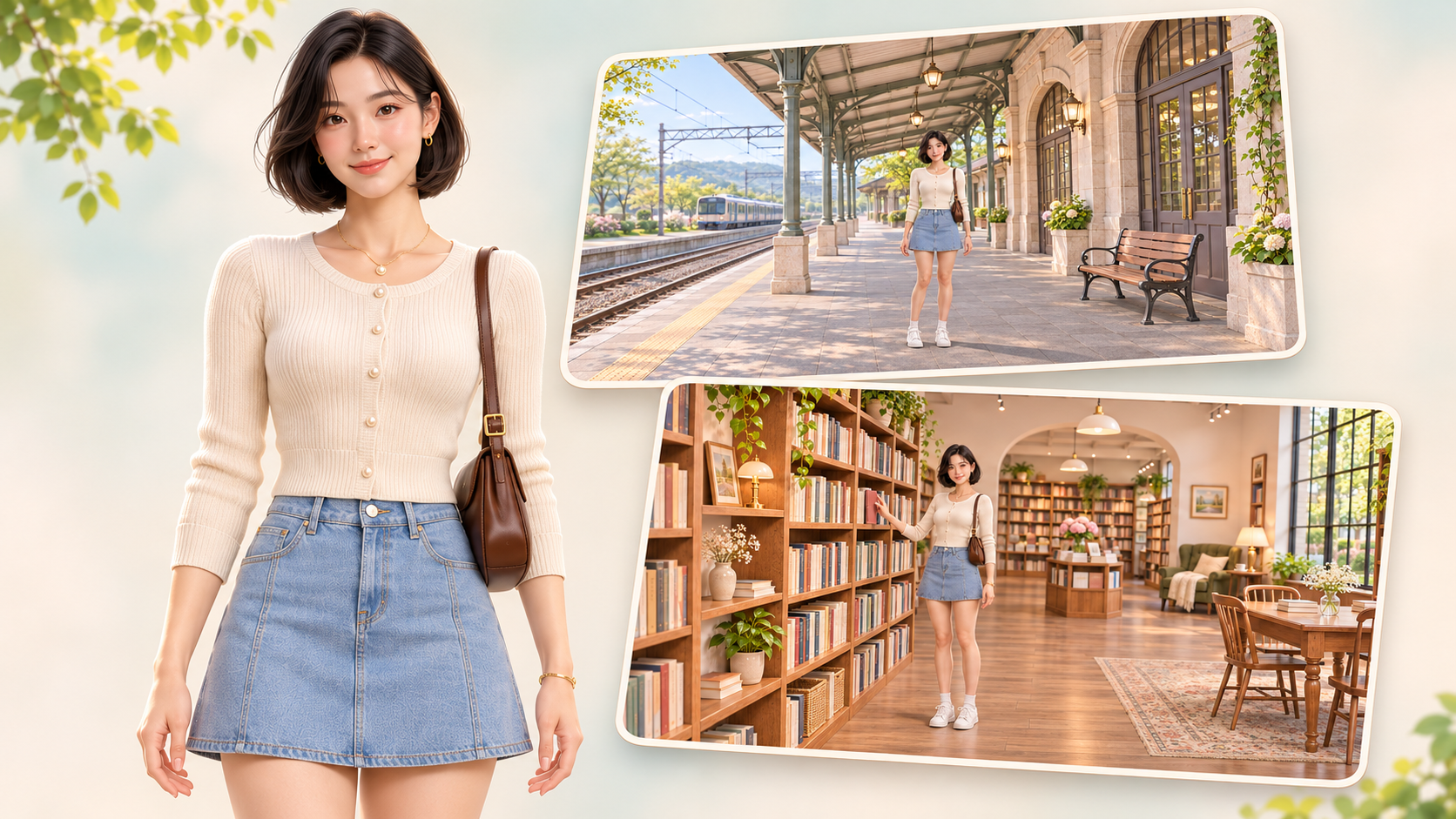
Your character looks right in the first image. In the next scene, the haircut changes, the jacket loses its details, and the face belongs to someone else. Repeating the same written description does not always give a model enough information to reproduce the design you intended.
A character reference provides a visual starting point. It helps you communicate which person or fictional character should appear while the setting, pose, or action changes.
This guide explains what a character reference is, how to prepare one, and how to use it in an image-to-video workflow on RunningHub. A simple traveler character connects the examples, so you can explore the process with one reference and two scene images.
What Is a Character Reference in AI?
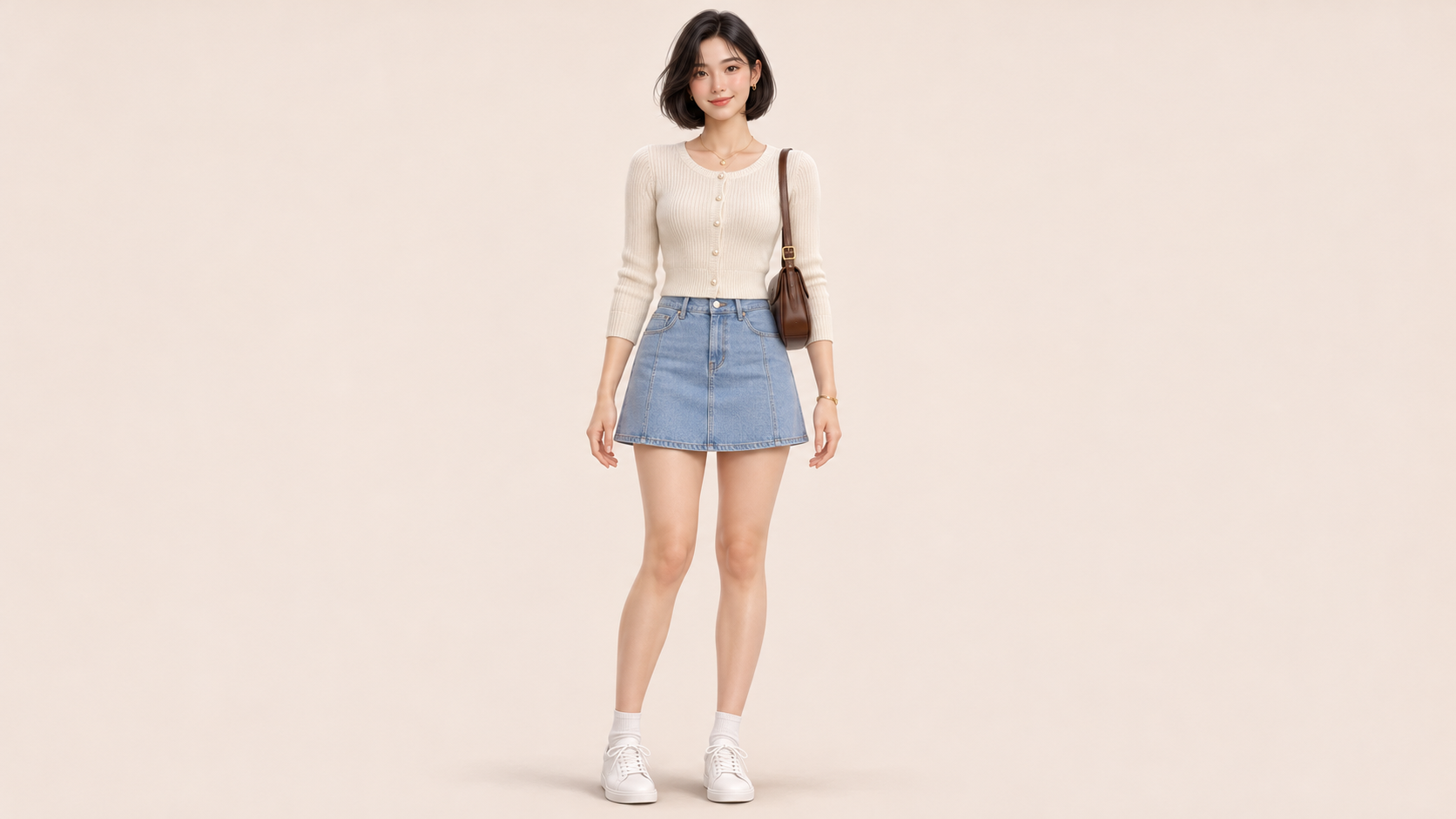
A character reference is an image, or a small set of images, used to guide a model toward a particular character's appearance. It can show facial features, hairstyle, body proportions, clothing, accessories, and other recognizable details.
The reference might be a photograph, an original illustration, an AI-generated character image, or a character sheet. Its usefulness depends on what is visible and how the selected model handles image inputs.
For example, “a traveler with short black hair and a teal jacket” leaves many possible faces and designs open. A reference image supplies a specific visual example. The prompt can then explain what should remain consistent and what should change.
Reference types have different jobs:
| Reference type | Main purpose | Example |
| Character reference | Guide identity and recognizable appearance | Preserve a particular face and hairstyle |
| Style reference | Guide visual treatment | Use a soft 3D illustration style |
| Pose reference | Guide body position or action | Show someone reaching toward a shelf |
| First frame | Establish the opening image of a video | Begin with the character standing on a platform |
One image can serve more than one purpose, but those purposes should be stated clearly. A recognizable face can still appear in an inconsistent art style. Matching the colors alone does not establish the same character.
Consistency also depends on the brief. A character may intentionally change clothes between scenes, so matching every garment is not always the goal. Decide whether you are preserving identity, a particular costume, or the entire design. That decision makes the result easier to evaluate.
What's a Character Reference Used For?
Character references are useful whenever a project needs a recurring subject.
In illustrated stories, they help carry a protagonist between locations and compositions. You can change the scene without redefining the character from a broad text description each time.
For social content and marketing, a reference can support a recurring presenter, mascot, or fictional spokesperson. You may want the same outfit for a campaign, while another project deliberately changes clothing and preserves only identity.
In storyboards, references help separate the character design from the shot design. The person stays recognizable while camera distance, background, and action vary.
For video creation, character images can support the preparation of scene frames or provide subject references in compatible video modes. They are visual guidance, not a guarantee that every frame will remain identical. Faces, accessories, and proportions still need review as movement introduces new angles and occlusion.
What Makes a Good Character Reference Image?
Choose a reference that makes the important features easy to inspect. An unobstructed face, readable silhouette, and clear clothing details are more useful than dramatic lighting that hides half the design.
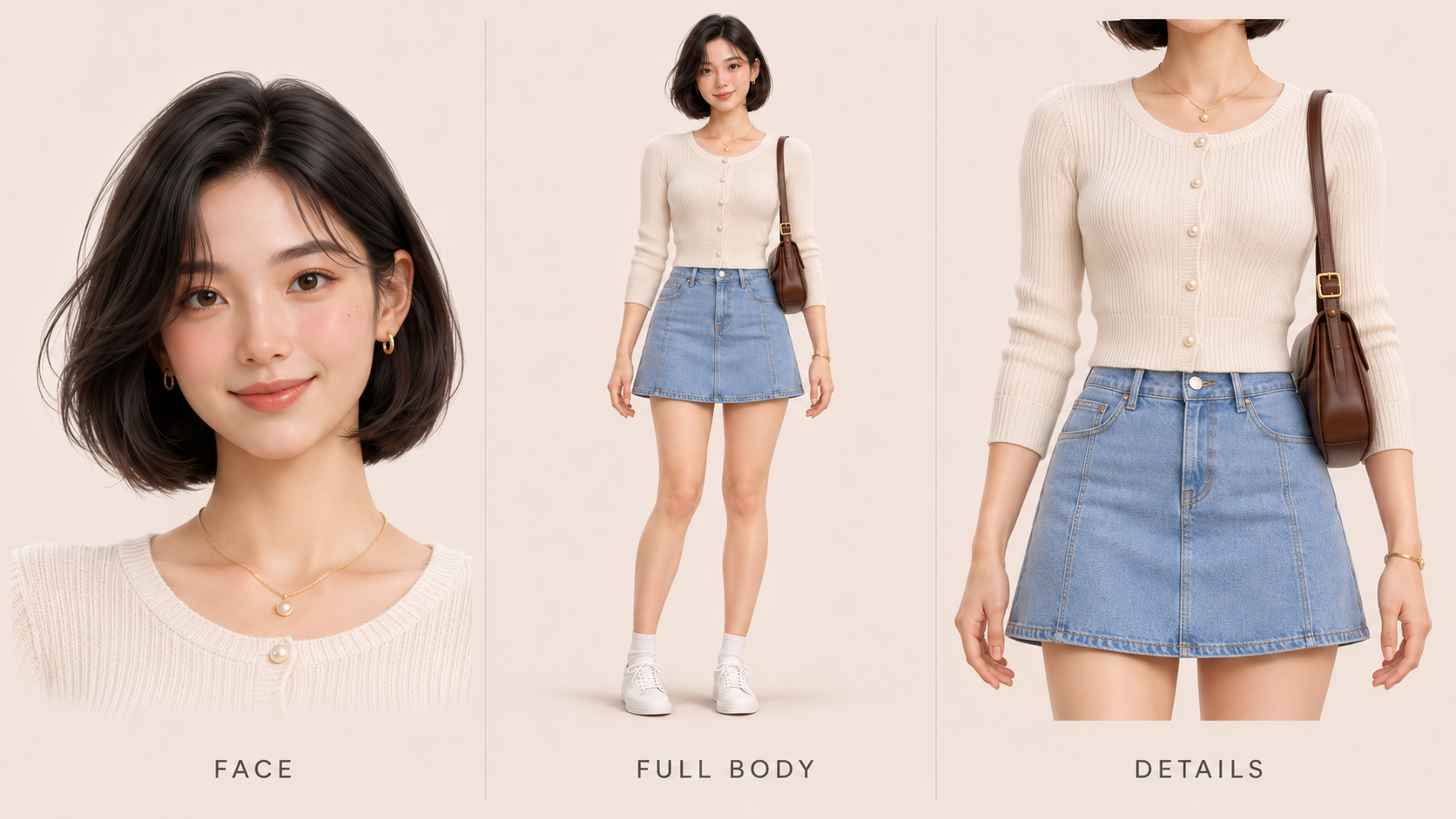
Match the framing to the task. A portrait provides facial information; a full-body image shows proportions, shoes, and outfit construction. You do not need every angle for every task. Add another view when it supplies information the current image cannot show.
Keep references compatible. If one image has a short bob and another has long hair, the model has conflicting evidence. Differences in lighting are normal, but accidental design changes make your instructions harder to interpret.
For this article, the example character is Mira, an original adult traveler with a chin-length black bob, brown eyes, a teal jacket, cream shirt, navy trousers, white sneakers, and an orange crossbody bag at her left hip. The visual treatment is a soft, semi-realistic 3D illustration.
Write down those fixed features before creating variations. Also decide which elements are flexible: location, pose, expression, and camera framing.
RunningHub's community character card workflow illustrates another preparation option: expanding a source character image into additional views. Inspect each view before accepting it as a reference.
Keep the original high-resolution files for generation. Website thumbnails and compressed blog images are presentation assets; they should not replace the best available source material.
Use natural or evenly distributed lighting when possible, and avoid heavy filters that obscure the face. A dramatic portrait can still be useful, but a simpler source often makes the features you want preserved easier to identify.
How to Use a Character Reference on RunningHub
A character project often moves from a source image to new scenes and then toward motion. Organizing those assets together makes it easier to check whether each stage still represents the same design.
You can use the RHTV canvas to keep references, prompts, and scene results in one project. For a simpler generation task, Quick Create provides another entry point. The available inputs and controls depend on the selected model and mode.
1. Choose the Right Input Mode
Select an image-editing or reference-compatible image route, rather than assuming a text-only generator will use a nearby picture. RunningHub's image-to-image tools provide a starting point for working from uploaded images.
The model catalog includes image-editing options such as Nano Banana 2.1 and Seedream 5.0 Pro. Confirm which option is available in your creation interface and which reference inputs it exposes.
2. Attach the Reference to the Actual Task
Upload or explicitly add the selected character image to the generation task. A file placed somewhere on the canvas does not automatically become an input to every generation.
If you supply several images, state their roles: one for identity, another for style, or another for a pose. Use the reference syntax supported by that interface rather than copying tags from an unrelated model.
3. Describe What Stays and What Changes
Name the appearance features you want preserved, then describe the new scene. Avoid changing the haircut, wardrobe, background, lighting, pose, and style all at once during an initial trial.
The prompt should supplement the reference. Repeating “same character” many times does not resolve conflicting images or an incorrect input mode.
4. Generate and Review
For the examples below, choose 16:9 in the actual output settings and use the same image model while comparing scene variations. Start with the model's supported default settings and record any changes.
Check the face, hair, jacket, bag, proportions, and illustration style. Save accepted images alongside the original reference. Correct a visible identity error before carrying the image into the next stage.
Character Reference Examples for AI Images and Videos
Example 1: The Same Character in Two Image Scenes
Use Mira's approved reference as the identity source for two separate tasks: a railway platform and a bookshop. Each prompt changes the setting and action while retaining the character's fixed appearance and 3D illustration style.
Required material: the original reference image. Its purpose is to guide Mira's identity, outfit, and overall design. Use the same reference file for both scenes.
The platform brief asks for a standing character with visible hands and a readable bag strap. The bookshop brief introduces a different environment and a small reaching action. These variations give you specific details to inspect without requiring a large image set.
【Prompt A】
【Prompt B】
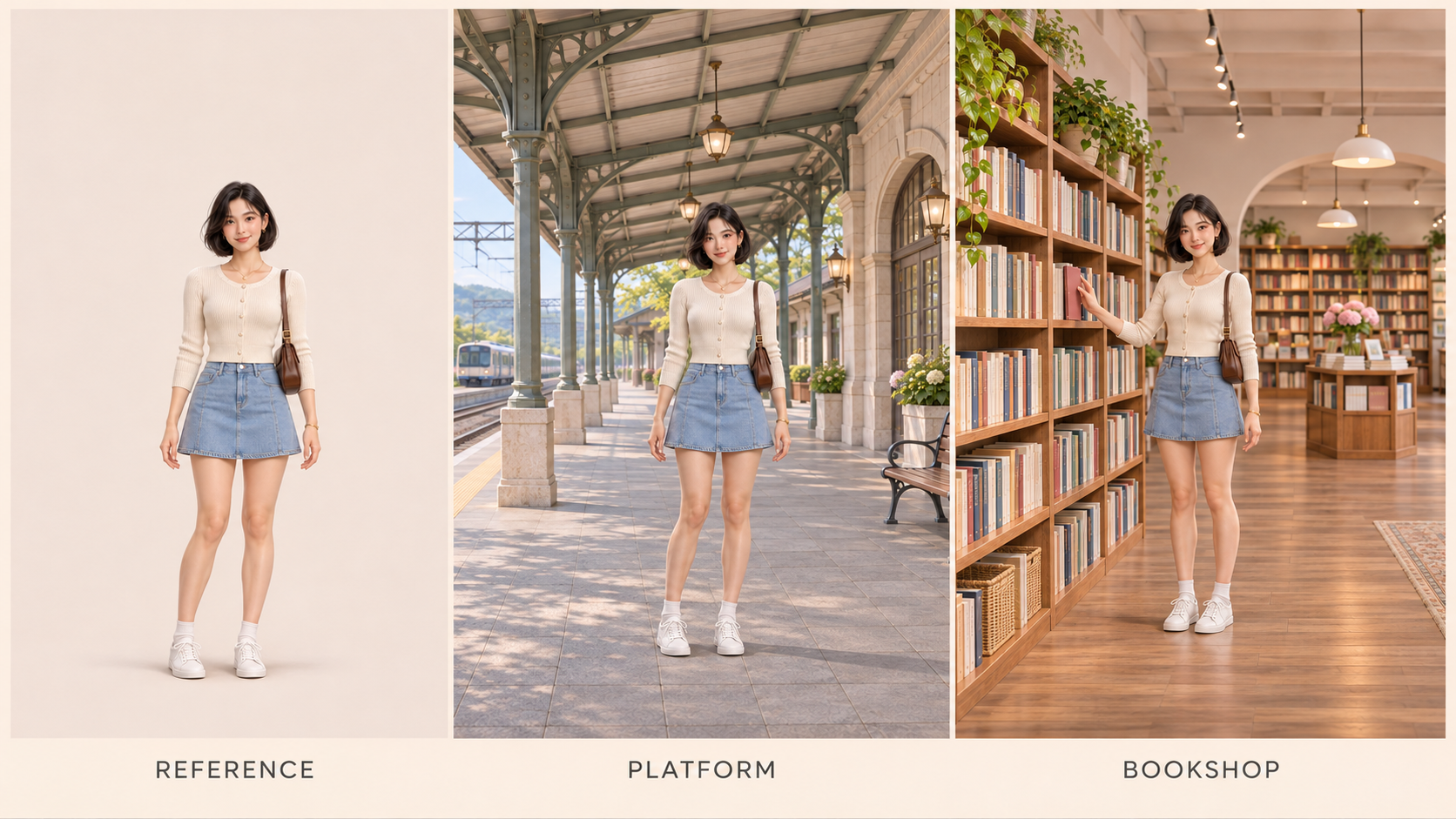
After generation, compare both scenes with the reference rather than only with each other. Check whether the bob has changed length, the jacket has changed color, or the orange bag has moved or disappeared.
You can replace the locations for another story while keeping the identity instructions. If the reaching pose repeatedly causes distortion, simplify the action before adding more complexity. Accept the new scene only after the character and intended visual style are satisfactory.
For a longer project, keep a small approved set instead of collecting every generation. Include the baseline and the clearest accepted scene views. When you add a new image, compare it with the baseline first. This helps prevent an accidental redesign from becoming the reference for the next task.
Example 2: Preparing the Character for AI Video
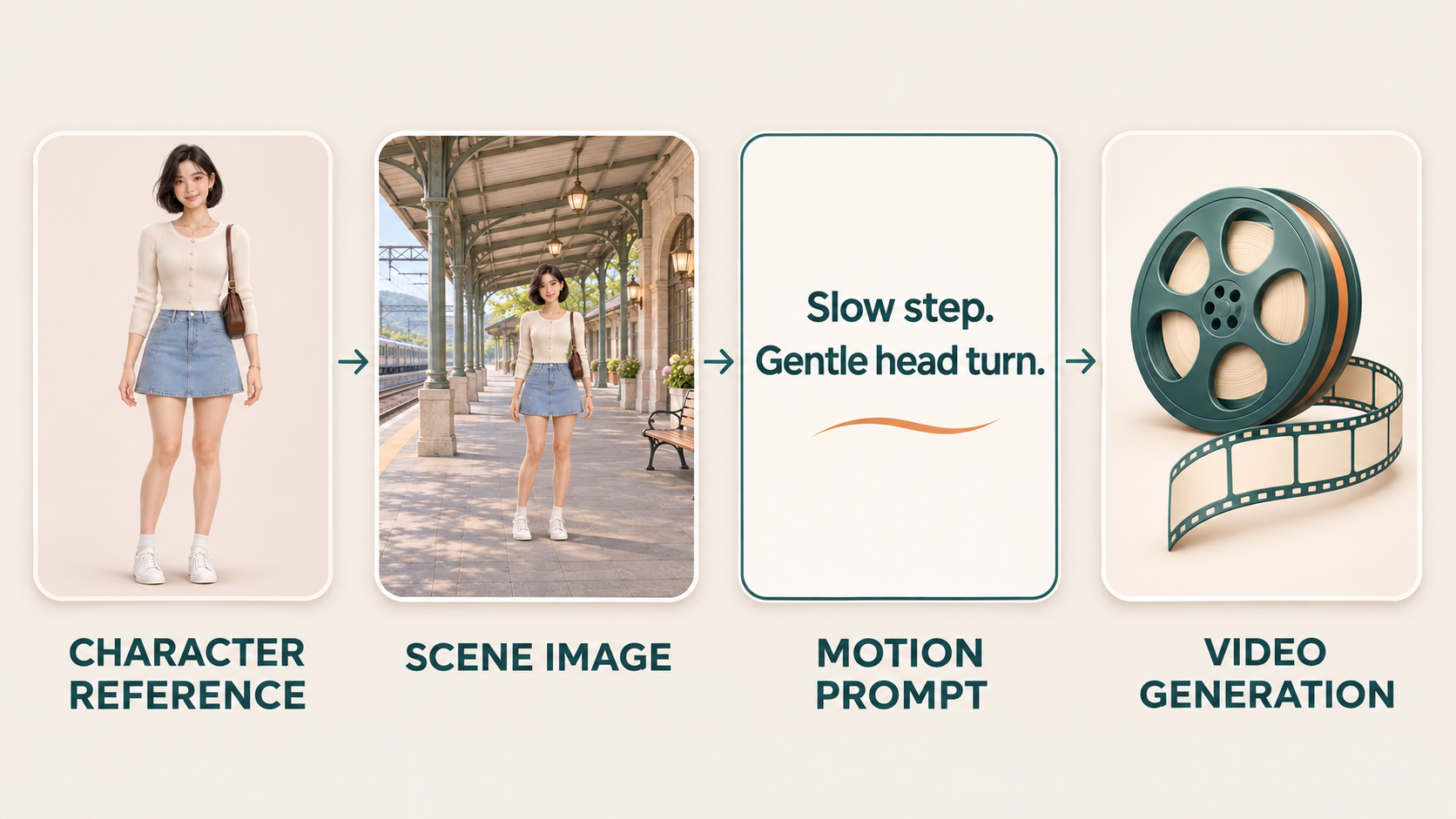
Once a scene image is approved, it can become the visual starting point for image-to-video generation. The scene already establishes the character, surroundings, lighting, and opening composition. A motion prompt adds what happens next.
For the platform image, begin with a small action: Mira takes a slow step, pauses, and looks toward an arriving train outside the frame. Keep camera movement modest so you can inspect the character during motion.
The input here is the approved platform scene, not merely the neutral character reference. This distinction matters: a first frame establishes the opening shot, while a character reference can guide identity without fixing the same opening composition.
A compatible reference-to-video workflow offers another approach, using subject references to guide a newly described scene. Choose that mode intentionally; its input rules are not automatically interchangeable with first-frame generation.
Set duration and resolution using the options available for the selected video model. Review the face, bag strap, jacket edges, and proportions throughout the clip. A correct opening frame does not prove that later frames are equally consistent.
【Motion Prompt】
Why Does Character Consistency Still Break?
A reference reduces ambiguity, but the model still has to interpret the scene and create new visual information.
| Problem | What to check | Practical adjustment |
| Face or hairstyle changes | Source clarity and reference attachment | Use a clearer identity image and verify the input |
| Outfit or accessories drift | Conflicting references or vague instructions | Name the fixed features and remove contradictory inputs |
| Character stays recognizable but style changes | Missing or competing style guidance | Keep the visual treatment explicit and consistent |
| Turning or occlusion changes the face | The reference does not show enough of the new view | Simplify the movement or add a suitable supported reference |
| Later scenes drift further | New references already contain small errors | Return to the approved character baseline |
Change one variable at a time so you can identify what helped. If the interface offers reference strength or similar controls, use its documented behavior; there is no universal setting that guarantees identity across all models.
Recheck both appearance and style after revisions. A sharper image can still have the wrong face, and a matching color palette can still hide changes to clothing or proportions.
FAQ
Can I Use an AI-Generated Image as a Character Reference?
Yes, if the selected model accepts that image input. Inspect the original design first, since unclear features or unwanted artifacts may influence later results. Use images you have the necessary rights to use.
Do I Need More Than One Character Reference Image?
Not always. Start with one clear image, then add another only when it supplies useful information, such as an unseen outfit detail or viewing angle. Check the model's input rules before combining multiple references.
Is a Character Reference the Same as a Style Reference?
No. A character reference guides identity and recognizable appearance. A style reference guides the treatment, such as watercolor or 3D illustration. One image may communicate both, but you should still specify the intended roles.
Can I Use Character References for AI Videos?
Yes, in compatible workflows. You can first create an approved scene image for image-to-video generation, or use a video mode that accepts subject references. Check the selected mode's requirements and review the character throughout the result.
Do I Need to Train a Model for Consistent Characters?
Not necessarily. Reference-compatible models can use uploaded images without a separate training process. Training or specialized workflows may suit some projects, but a clear reference and a simple scene are a practical place to start.
Conclusion
A character reference gives an AI model a visual basis for a particular character. It can help preserve recognizable features while you change scenes, poses, or actions, especially when you clearly separate fixed design elements from flexible ones.
Start with a clear source image, attach it to the correct task, and check identity and style independently. Two scene variations are enough to practice that process before moving into video.
RunningHub brings image and video creation options into a shared workflow. Use accepted scene images as the bridge to motion, review each stage, and build a reusable character reference set from results you have actually checked.