
'%3e %3cg id='Vector'%3e %3c/g%3e %3cpath id='Vector_2' d='M14.504 8.522L12.746 4.49C12.6826 4.34486 12.5783 4.22136 12.4458 4.13463C12.3133 4.0479 12.1584 4.0017 12 4.0017C11.8416 4.0017 11.6867 4.0479 11.5542 4.13463C11.4217 4.22136 11.3174 4.34486 11.254 4.49L9.495 8.522C9.305 8.958 8.958 9.306 8.522 9.495L4.49 11.254C4.34486 11.3174 4.22136 11.4217 4.13463 11.5542C4.0479 11.6867 4.0017 11.8416 4.0017 12C4.0017 12.1584 4.0479 12.3133 4.13463 12.4458C4.22136 12.5783 4.34486 12.6826 4.49 12.746L8.523 14.504C8.959 14.694 9.307 15.042 9.496 15.478L11.255 19.511C11.3184 19.6561 11.4227 19.7796 11.5552 19.8664C11.6877 19.9531 11.8426 19.9993 12.001 19.9993C12.1594 19.9993 12.3143 19.9531 12.4468 19.8664C12.5793 19.7796 12.6836 19.6561 12.747 19.511L14.505 15.478C14.695 15.042 15.043 14.694 15.479 14.504L19.512 12.746C19.6571 12.6826 19.7806 12.5783 19.8674 12.4458C19.9541 12.3133 20.0003 12.1584 20.0003 12C20.0003 11.8416 19.9541 11.6867 19.8674 11.5542C19.7806 11.4217 19.6571 11.3174 19.512 11.254L15.479 9.495C15.043 9.30549 14.695 8.95782 14.505 8.522' stroke='var(--stroke-0%2c white)' stroke-width='1.25' stroke-linecap='round' stroke-linejoin='round'/%3e %3cpath id='Vector_3' d='M3 3L5 5' stroke='var(--stroke-0%2c white)' stroke-width='1.25' stroke-linecap='round' stroke-linejoin='round'/%3e %3cpath id='Vector_4' d='M21 3L19 5' stroke='var(--stroke-0%2c white)' stroke-width='1.25' stroke-linecap='round' stroke-linejoin='round'/%3e %3cpath id='Vector_5' d='M3 21L5 19' stroke='var(--stroke-0%2c white)' stroke-width='1.25' stroke-linecap='round' stroke-linejoin='round'/%3e %3cpath id='Vector_6' d='M21 21L19 19' stroke='var(--stroke-0%2c white)' stroke-width='1.25' stroke-linecap='round' stroke-linejoin='round'/%3e %3c/g%3e %3cdefs%3e %3cclipPath id='clip0_0_55'%3e %3crect width='24' height='24' fill='white'/%3e %3c/clipPath%3e %3c/defs%3e %3c/svg%3e)
'%3e %3cg id='Vector'%3e %3c/g%3e %3cpath id='Vector_2' d='M14.375 7.66667H14.385' stroke='var(--stroke-0%2c white)' stroke-width='1.25' stroke-linecap='round' stroke-linejoin='round'/%3e %3cpath id='Vector_3' d='M11.9792 20.125H5.75C4.9875 20.125 4.25624 19.8221 3.71707 19.2829C3.1779 18.7438 2.875 18.0125 2.875 17.25V5.75C2.875 4.9875 3.1779 4.25624 3.71707 3.71707C4.25624 3.1779 4.9875 2.875 5.75 2.875H17.25C18.0125 2.875 18.7438 3.1779 19.2829 3.71707C19.8221 4.25624 20.125 4.9875 20.125 5.75V11.9792' stroke='var(--stroke-0%2c white)' stroke-width='1.25' stroke-linecap='round' stroke-linejoin='round'/%3e %3cpath id='Vector_4' d='M2.875 15.3333L7.66667 10.5417C8.556 9.68587 9.65233 9.68587 10.5417 10.5417L14.375 14.375' stroke='var(--stroke-0%2c white)' stroke-width='1.25' stroke-linecap='round' stroke-linejoin='round'/%3e %3cpath id='Vector_5' d='M13.4167 13.4167L14.375 12.4583C15.0171 11.8412 15.7646 11.6687 16.4661 11.9408' stroke='var(--stroke-0%2c white)' stroke-width='1.25' stroke-linecap='round' stroke-linejoin='round'/%3e %3cpath id='Vector_6' d='M15.3333 18.2083H21.0833' stroke='var(--stroke-0%2c white)' stroke-width='1.25' stroke-linecap='round' stroke-linejoin='round'/%3e %3cpath id='Vector_7' d='M18.2083 15.3333V21.0833' stroke='var(--stroke-0%2c white)' stroke-width='1.25' stroke-linecap='round' stroke-linejoin='round'/%3e %3c/g%3e %3cdefs%3e %3cclipPath id='clip0_0_4'%3e %3crect width='23' height='23' fill='white'/%3e %3c/clipPath%3e %3c/defs%3e %3c/svg%3e)


'%3e %3cg id='Vector'%3e %3c/g%3e %3cpath id='Vector_2' d='M18.3333 10.5001V6.66667C18.3333 5.78261 17.9821 4.93477 17.357 4.30964C16.7319 3.68452 15.8841 3.33333 15 3.33333H5C4.11594 3.33333 3.2681 3.68452 2.64298 4.30964C2.01786 4.93477 1.66667 5.78261 1.66667 6.66667V13.3333C1.66667 14.2174 2.01786 15.0652 2.64298 15.6904C3.2681 16.3155 4.11594 16.6667 5 16.6667H11.6667M15.5 17.0001V12.0001M13 14.5001L15.5 12.0001L18 14.5001' stroke='var(--stroke-0%2c white)' stroke-linecap='round' stroke-linejoin='round'/%3e %3cpath id='Vector_3' d='M8.33333 7.5L12.5 10L8.33333 12.5V7.5Z' stroke='var(--stroke-0%2c white)' stroke-linecap='round' stroke-linejoin='round'/%3e %3c/g%3e %3cdefs%3e %3cclipPath id='clip0_0_4'%3e %3crect width='20' height='20' fill='white'/%3e %3c/clipPath%3e %3c/defs%3e %3c/svg%3e)
'%3e %3cg id='Vector'%3e %3c/g%3e %3cpath id='Vector_2' d='M16.25 10.8333L21.1824 8.36767C21.3475 8.28515 21.531 8.2462 21.7154 8.25451C21.8998 8.26281 22.079 8.3181 22.2361 8.41512C22.3931 8.51214 22.5228 8.64768 22.6127 8.80888C22.7026 8.97007 22.7499 9.15158 22.75 9.33617V16.6638C22.7499 16.8484 22.7026 17.0299 22.6127 17.1911C22.5228 17.3523 22.3931 17.4879 22.2361 17.5849C22.079 17.6819 21.8998 17.7372 21.7154 17.7455C21.531 17.7538 21.3475 17.7148 21.1824 17.6323L16.25 15.1667V10.8333Z' stroke='var(--stroke-0%2c white)' stroke-width='1.25' stroke-linecap='round' stroke-linejoin='round'/%3e %3cpath id='Vector_3' d='M3.25 8.66667C3.25 8.09203 3.47827 7.54093 3.8846 7.1346C4.29093 6.72827 4.84203 6.5 5.41667 6.5H14.0833C14.658 6.5 15.2091 6.72827 15.6154 7.1346C16.0217 7.54093 16.25 8.09203 16.25 8.66667V17.3333C16.25 17.908 16.0217 18.4591 15.6154 18.8654C15.2091 19.2717 14.658 19.5 14.0833 19.5H5.41667C4.84203 19.5 4.29093 19.2717 3.8846 18.8654C3.47827 18.4591 3.25 17.908 3.25 17.3333V8.66667Z' stroke='var(--stroke-0%2c white)' stroke-width='1.25' stroke-linecap='round' stroke-linejoin='round'/%3e %3cpath id='Vector_4' d='M7.58333 13H11.9167' stroke='var(--stroke-0%2c white)' stroke-width='1.25' stroke-linecap='round' stroke-linejoin='round'/%3e %3cpath id='Vector_5' d='M9.75 10.8333V15.1667' stroke='var(--stroke-0%2c white)' stroke-width='1.25' stroke-linecap='round' stroke-linejoin='round'/%3e %3c/g%3e %3cdefs%3e %3cclipPath id='clip0_0_47'%3e %3crect width='26' height='26' fill='white'/%3e %3c/clipPath%3e %3c/defs%3e %3c/svg%3e)
'%3e %3cg id='Vector'%3e %3c/g%3e %3cpath id='Vector_2' d='M4 7H7M11 7H20' stroke='var(--stroke-0%2c white)' stroke-width='1.25' stroke-linecap='round' stroke-linejoin='round'/%3e %3cpath id='Vector_3' d='M4 17H20' stroke='var(--stroke-0%2c white)' stroke-width='1.25' stroke-linecap='round' stroke-linejoin='round'/%3e %3cpath id='Vector_4' d='M7 4L7 20' stroke='var(--stroke-0%2c white)' stroke-width='1.25' stroke-linecap='round' stroke-linejoin='round'/%3e %3cpath id='Vector_5' d='M17 4V13M17 17V20' stroke='var(--stroke-0%2c white)' stroke-width='1.25' stroke-linecap='round' stroke-linejoin='round'/%3e %3c/g%3e %3cdefs%3e %3cclipPath id='clip0_0_60'%3e %3crect width='24' height='24' fill='white'/%3e %3c/clipPath%3e %3c/defs%3e %3c/svg%3e)
'%3e %3cg id='Vector'%3e %3c/g%3e %3cpath id='Vector_2' d='M6 10L4 11L12 15L20 11L18 10' stroke='var(--stroke-0%2c white)' stroke-width='1.25' stroke-linecap='round' stroke-linejoin='round'/%3e %3cpath id='Vector_3' d='M4 15L12 19L20 15' stroke='var(--stroke-0%2c white)' stroke-width='1.25' stroke-linecap='round' stroke-linejoin='round'/%3e %3cpath id='Vector_4' d='M12 4V11' stroke='var(--stroke-0%2c white)' stroke-width='1.25' stroke-linecap='round' stroke-linejoin='round'/%3e %3cpath id='Vector_5' d='M15 8L12 11L9 8' stroke='var(--stroke-0%2c white)' stroke-width='1.25' stroke-linecap='round' stroke-linejoin='round'/%3e %3c/g%3e %3cdefs%3e %3cclipPath id='clip0_0_9'%3e %3crect width='24' height='24' fill='white'/%3e %3c/clipPath%3e %3c/defs%3e %3c/svg%3e)


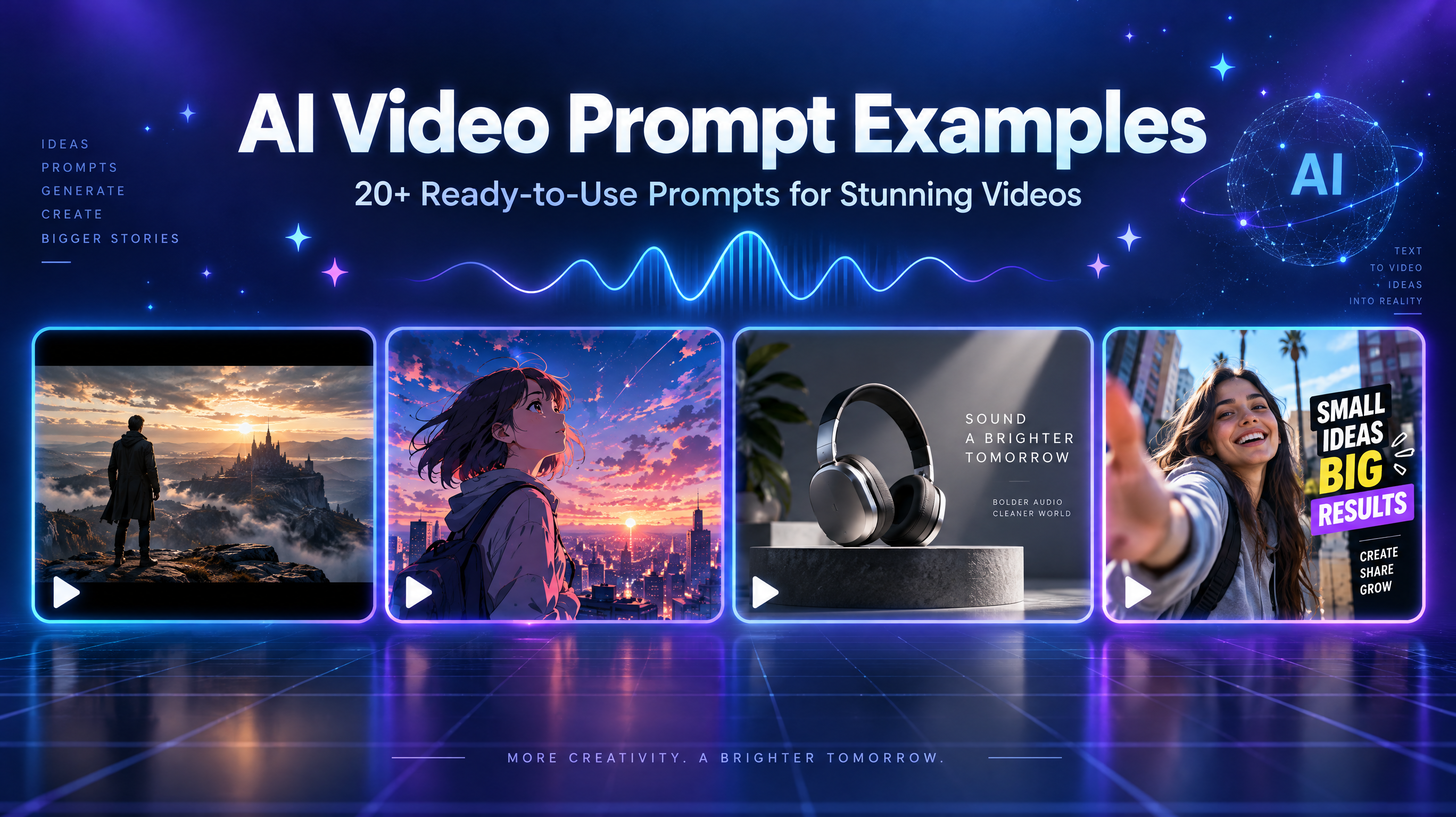
AI Video Prompt Examples: 20+ Ready-to-Use Prompts for Stunning Videos
Explore 20+ AI video prompt examples for cinematic scenes, anime, product ads, and social media. Learn to write better prompts and recreate video styles.
Introduction: Why Are Good AI Video Prompts Important?
A prompt like "a woman walking in a city" may generate a video, but the result might lack realistic movement, clear composition, or the atmosphere you imagined.
Effective AI video prompt examples go beyond describing a subject. They explain what happens, where it happens, how the camera captures it, and what the final scene should look like.
A well-structured prompt typically includes the subject, action, environment, camera movement, lighting, visual style, and motion details.
In this guide, you'll find 50+ ready-to-use prompts covering cinematic videos, realistic scenes, anime, funny clips, product advertisements, social media content, and fantasy worlds. You'll also learn how to generate prompts from reference videos and use RunningHub to explore AI video creation.
What Makes a Good AI Video Prompt?
A useful prompt gives the video generator clear visual and motion instructions.
1. Subject and Action
Identify the main subject and describe exactly what it does.
Weak: A cat in a room.
Better: A fluffy orange cat walks across a sunlit living room, pauses beside a sofa, and looks directly at the camera.
2. Scene and Environment
Describe the location, background, weather, and surrounding objects.
Example: A young woman stands on a quiet Tokyo street at night, surrounded by glowing neon signs and reflections on wet pavement.
3. Camera Movement and Composition
Camera instructions help control the viewer's perspective.
Common terms include:
- Close-up: Highlights facial expressions or product details.
- Wide shot: Shows the entire environment.
- Tracking shot: Follows a moving subject.
- Dolly-in / Dolly-out: Moves closer to or farther from the subject.
- Pan / Tilt: Moves horizontally or vertically.
- Low-angle shot: Makes a subject appear more imposing.
- Aerial shot: Captures an overhead perspective.
4. Lighting and Visual Style
Lighting establishes atmosphere, while visual style defines the overall appearance.
Try soft daylight, golden-hour lighting, dramatic shadows, neon illumination, or cinematic low-key lighting. You can also specify photorealistic, anime, 3D animation, or vintage film aesthetics.
5. Motion and Temporal Consistency
Describe movements in a logical order. For example, a clothing transformation should explain the starting outfit, movement, transition, and final appearance.
Longer prompts are not necessarily better. Clear and consistent instructions matter more than word count.
20+ AI Video Prompt Examples for Different Creative Styles
The following ai video generator prompt examples are designed as starting points. Adjust their wording according to your selected model and generation settings.
1. Cinematic AI Video Prompt Examples
1. Neon City at Night
A cinematic nighttime view of a futuristic city filled with glowing neon billboards and towering skyscrapers. The camera slowly pushes forward between buildings as flying vehicles pass through the streets. Colorful reflections shimmer on wet surfaces, with atmospheric fog and dramatic blue and magenta lighting. Photorealistic science-fiction cinematography.
Use for: Futuristic trailers and cinematic backgrounds.
2. Walking in the Rain
A young woman walks alone along a narrow city street during heavy rain, holding a transparent umbrella. The camera follows her from behind in a smooth tracking shot. Streetlights reflect across the wet pavement, creating a moody cinematic atmosphere. Natural walking motion, realistic rain particles, shallow depth of field.
Use for: Emotional short films and music videos.
3. Mountain Adventure
A lone traveler stands on the edge of a dramatic mountain cliff overlooking endless snow-covered peaks. The camera begins with a medium shot and slowly pulls back into a wide aerial view. Clouds drift between the mountains as golden sunrise light illuminates the landscape. Epic cinematic composition.
Use for: Travel introductions and inspirational videos.
2. Realistic and Photorealistic AI Video Prompts
4. Morning Coffee
A close-up of freshly brewed coffee being poured into a ceramic cup beside a sunlit kitchen window. Steam rises naturally from the surface as sunlight illuminates the liquid. The camera slowly moves closer, capturing realistic reflections, coffee textures, and gentle pouring motion.
Use for: Lifestyle and food content.
5. Tokyo Street Scene
A realistic street scene in Tokyo during a busy afternoon. Pedestrians cross at a traffic light while bicycles pass along the sidewalk. The camera remains at eye level with subtle handheld movement, natural daylight, realistic clothing textures, and documentary-style photography.
Use for: Travel and city videos.
6. Natural Portrait
A young woman sits beside a large window, gently turning her head toward the sunlight and smiling naturally. The camera captures a close-up with subtle movement. Soft daylight reveals realistic skin texture, natural facial expressions, and delicate hair movement.
Use for: Portrait and beauty content.
3. Anime and Cartoon AI Video Prompt Examples
7. Anime School Morning
A Japanese anime schoolgirl walks along a tree-lined street on a bright spring morning. Cherry blossom petals drift around her as she adjusts her schoolbag and smiles. The camera follows from a medium distance, with soft pastel colors, detailed backgrounds, and fluid 2D anime animation.
Use for: Anime lifestyle scenes.
8. Fantasy Anime Forest
A young adventurer enters an enchanted forest filled with glowing flowers and floating magical particles. The camera slowly moves behind the character as mysterious lights illuminate the trees. Rich fantasy colors, detailed anime backgrounds, and smooth character animation.
Use for: Fantasy storytelling.
9. Cute Cartoon Cat
A small cartoon cat wearing a yellow raincoat jumps into a puddle on a colorful neighborhood street. Water splashes around its feet as it looks surprised. Bouncy character movement, expressive facial animation, and a playful 3D cartoon aesthetic.
Use for: Cute social media videos.
4. Funny AI Video Prompts
These funny ai video prompts focus on visual contrast, unexpected actions, and clear comedic timing.
10. Office Cat
An orange cat sits behind an office desk wearing a tiny business suit. It aggressively types on a laptop, pauses, and slowly looks at the camera with a serious expression. The camera captures a medium shot in a realistic modern office. Deadpan comedy and natural feline movements.
Use for: Funny TikTok clips.
11. Dog at a Meeting
A golden retriever sits around a conference table with several human colleagues. The dog suddenly places one paw on a presentation document as if making an important business decision. Realistic office lighting, expressive animal behavior, and perfectly timed visual comedy.
Use for: Relatable workplace humor.
12. Tiny Person, Giant Breakfast
A miniature person stands beside an enormous pancake on a breakfast table. They climb the pancake using a tiny ladder and slide down the syrup-covered surface. Macro photography, exaggerated scale contrast, and playful cinematic movement.
Use for: Surreal comedy.
5. Product and Commercial AI Video Prompts
13. Skincare Advertisement
A premium skincare bottle stands on a smooth cream-colored platform surrounded by delicate water droplets. The camera slowly moves closer as soft light highlights the transparent glass and elegant packaging. Subtle reflections, minimal studio background, and refined luxury beauty advertising.
Use for: Skincare commercials.
14. Perfume Commercial
An elegant perfume bottle stands among dark flowers and floating mist. The camera makes a slow circular movement around the bottle as a narrow beam of light reveals its glass texture and metallic cap. Dramatic shadows and luxurious cinematic lighting.
Use for: Fragrance campaigns.
15. Beverage Advertisement
A chilled glass bottle of sparkling fruit drink rotates slowly against a bright summer background. Water droplets cover the bottle while fresh fruit slices float around it. The camera captures a close-up as the beverage is poured into a transparent glass. Fresh commercial photography.
Use for: Beverage promotions.
6. Social Media and Viral AI Video Prompts
16. Outfit Transformation
A young woman stands in front of a plain bedroom mirror wearing casual everyday clothes. She raises one hand toward the camera, briefly covering the lens. When her hand moves away, she appears in a stylish evening outfit. Smooth transition, consistent framing, and realistic fabric movement.
Use for: TikTok fashion transitions.
17. Before-and-After Room
A messy bedroom gradually transforms into a clean, modern minimalist space. Furniture moves into position, decorations appear, and warm lighting turns on. Use a fixed wide camera angle and smooth time-lapse motion to show the complete transformation.
Use for: Home makeover videos.
18. Dance Challenge
A young dancer performs a short energetic dance routine in a colorful studio. The camera stays centered on the full body, capturing clear hand gestures, footwork, and rhythmic movement. Bright lighting, smooth motion, and vibrant social media aesthetics.
Use for: Dance content.
7. Fantasy and Sci-Fi AI Video Prompts
19. Magical Forest
A mysterious forest glows under a deep blue night sky. Tiny luminous creatures fly between ancient trees while magical flowers open slowly. The camera glides forward along a narrow path, revealing layers of glowing vegetation and atmospheric mist.
Use for: Fantasy environments.
20. Floating City
A magnificent futuristic city floats above a sea of clouds. Waterfalls flow from the edges of enormous islands while airships travel between towering structures. The camera makes a slow aerial approach in warm sunrise lighting.
Use for: Sci-fi worldbuilding.
21. Futuristic Vehicle
A sleek futuristic electric vehicle drives through a neon-lit underground tunnel. The camera tracks beside the vehicle as reflections move across its metallic surface. Dynamic lighting, realistic wheel motion, and high-end automotive commercial aesthetics.
Use for: Concept advertisements.
Best AI Video Prompts: How to Customize Examples for Better Results
Copying prompts is useful, but adapting them to your creative goal often produces more relevant results.
1. Start with One Clear Action
Avoid combining unrelated actions.
Instead of "a woman dancing, running, changing clothes, and jumping," focus on one primary movement and build the scene around it.
2. Add Camera Movement
Compare:
Basic: A woman walking through a garden.
Improved: A woman walks slowly through a blooming garden. The camera follows her from behind in a smooth tracking shot, with soft morning sunlight filtering through the trees.
3. Define Lighting and Style
Use specific instructions such as soft daylight, warm golden-hour lighting, dramatic shadows, or photorealistic commercial photography.
4. Describe Transitions in Order
For transformation videos, organize instructions into five stages:
- Starting appearance.
- Initial movement.
- Transition trigger.
- Transformation process.
- Final appearance.
Complex sequences may require multiple generations and video editing rather than a single prompt.
How to Generate Prompt from Video: A Practical Tutorial
The search phrase "video to promt" is sometimes used by people looking for ways to recreate an existing video.
Video-to-prompt analysis means translating visible content into written instructions. It cannot recover the original prompt exactly.
Step 1. Identify the Main Subject
Record the visible person, animal, product, or object. Note clothing, colors, and recognizable features without guessing hidden details.
Step 2. Break Down the Action Sequence
Divide the video into beginning, middle, and ending stages. Record gestures, interactions, movements, and transformations.
Step 3. Analyze Camera Movement
Identify close-ups, wide shots, tracking shots, zooms, pans, and static compositions. Note approximate timing when necessary.
Step 4. Describe Lighting and Background
Record the environment, color palette, light direction, shadows, and overall aesthetic.
Step 5. Combine Everything into a Prompt
Use this reusable structure:
Create a [video duration and aspect ratio] video featuring [main subject] in [environment]. The subject [specific action and movement sequence]. The camera uses [shot type and camera movement]. The scene features [lighting, atmosphere, and visual details]. The overall style is [visual style], with [motion quality and texture].
Example:
Reference video: A woman stands in a bedroom, covers the camera with her hand, and reveals a new outfit.
Reconstructed prompt:
Create a vertical 9:16 fashion transformation video featuring a young woman standing in a bright modern bedroom. She begins wearing casual everyday clothing and looks directly into the camera. She slowly raises one hand until her palm completely covers the lens. As her hand moves away, reveal her wearing an elegant black evening outfit. Maintain the same position, facial appearance, bedroom background, and camera framing throughout the transition. Natural body movement, realistic fabric details, smooth timing, and smartphone-style social media cinematography.
This process helps generate prompt from video by describing observable visual information. The result is an informed reconstruction, not the recovery of the original production instructions.
How to Use RunningHub for AI Video Creation
From prompt preparation to organized creative workflows
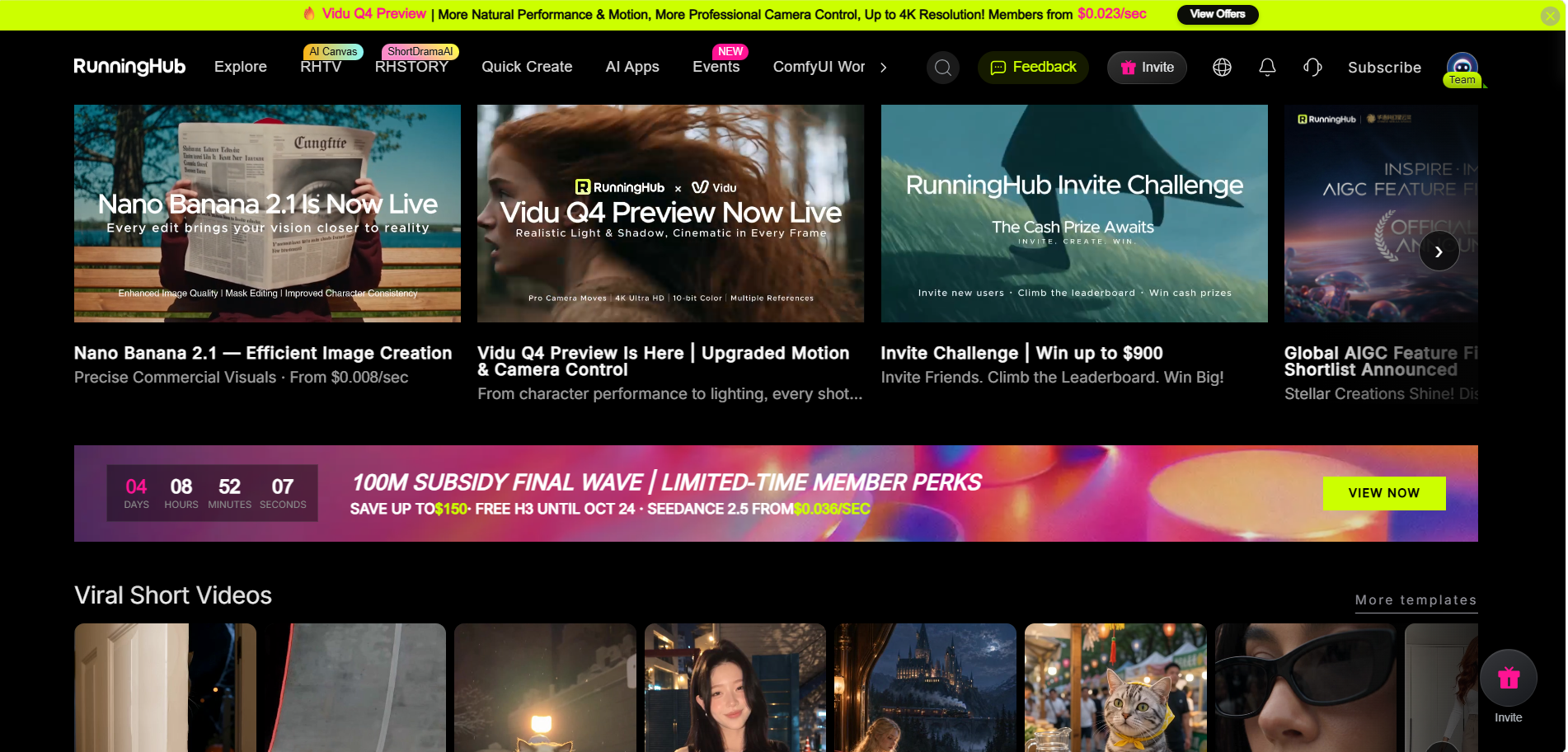
RunningHub is an AI creation platform that brings together cloud-based AI tools, models, applications, and workflows. Its ecosystem includes AI image and video resources, ComfyUI workflows, model libraries, and RHTV infinite canvas.
Step 1. Choose a Creation Entry
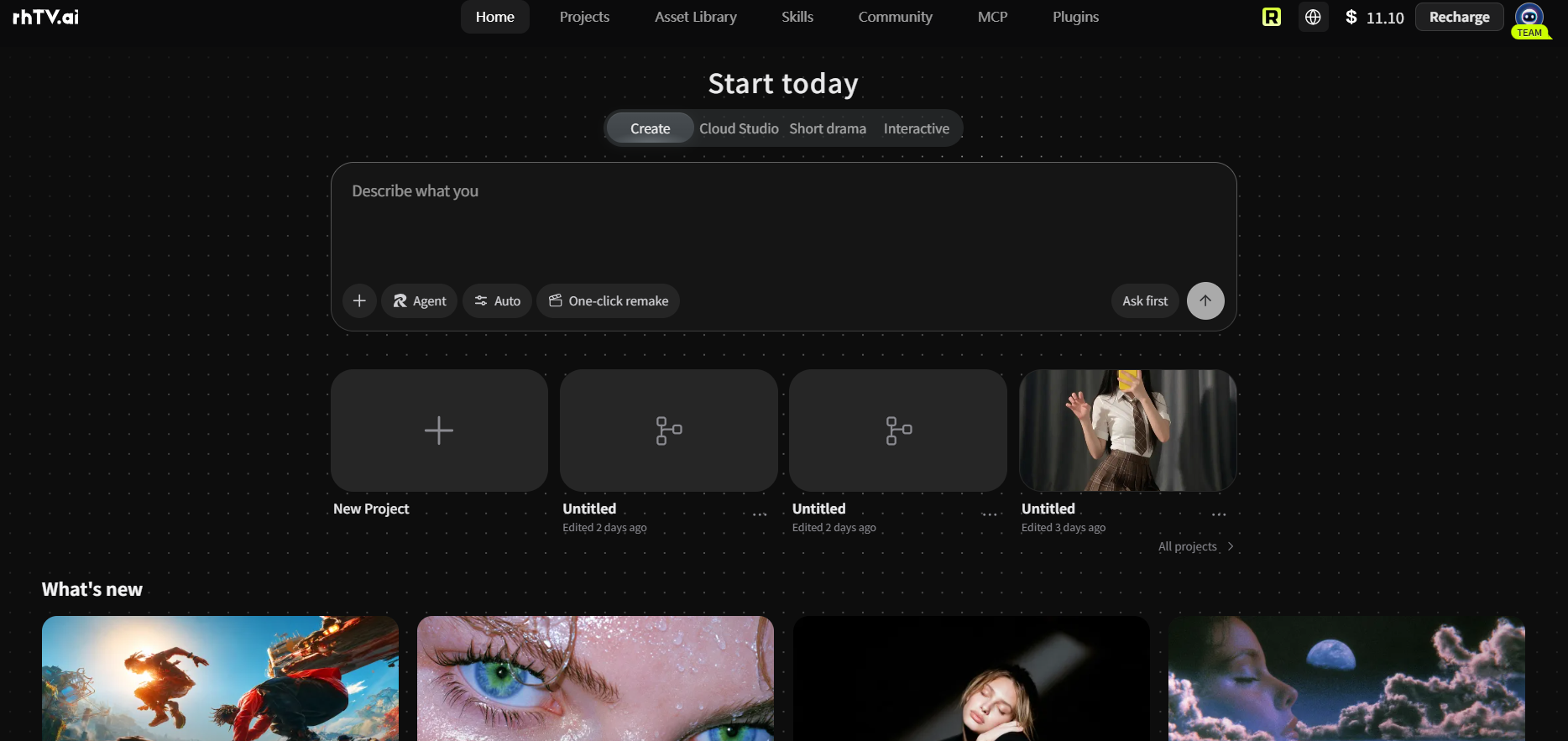
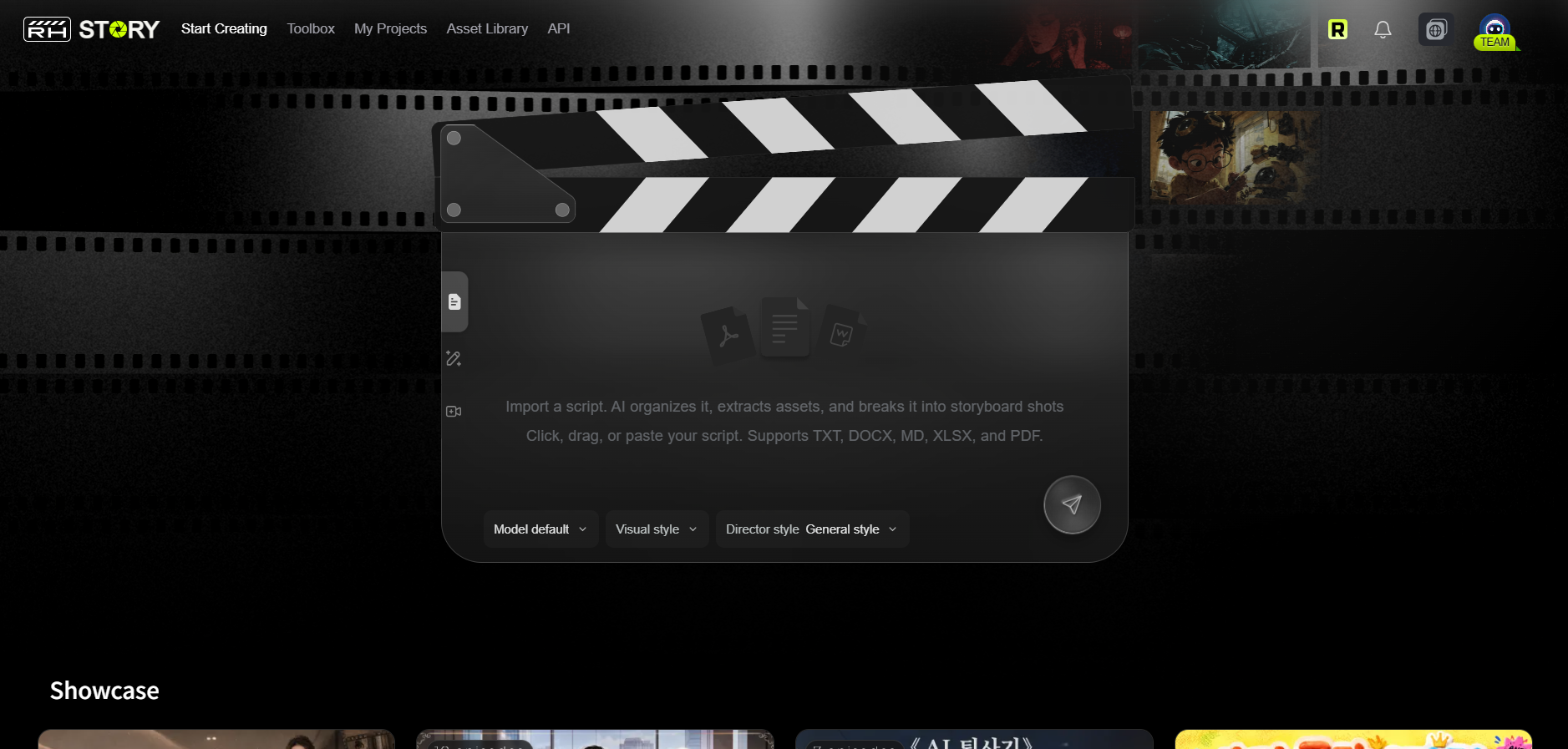
Visit RunningHub or explore the RHTV and RHSTORY
Choose an appropriate application, model, or workflow according to your project and currently available options.
Step 2. Prepare Your Prompt
For a skincare advertisement, you might start with:
Create a premium skincare product video featuring a glass serum bottle on a minimalist cream-colored platform. Water droplets gently slide across the bottle while soft golden light highlights its transparent material. The camera slowly pushes toward the product, revealing its packaging details. Elegant studio composition, realistic reflections, and luxury beauty advertising style.
Include the subject, action, camera movement, lighting, and visual style. Specify duration and aspect ratio when supported.
Step 3. Organize Assets with RHTV Canvas
Explore RHTV Projects.
The RHTV infinite canvas provides a visual workspace for organizing creative assets and exploring image and video projects.
For a skincare campaign, you could organize product reference images, brand visual references, generated scene concepts, video assets, and different creative versions in one project.
Depending on available features, you can also explore multiple image and video layers, background creation, scene effects, character consistency, and multi-scene workflows.
Step 4. Review and Refine
After generation, check whether the subject, action, camera movement, lighting, and overall composition match your goal.
If the result is unsatisfactory, adjust one or two prompt elements at a time rather than rewriting everything.
Display of premium skincare product video with RHTV:
Common AI Video Prompt Mistakes and How to Fix Them
1. The Prompt Is Too Vague
Problem: "Make a beautiful video."
Fix: Describe the subject, action, setting, camera, and lighting.
2. Too Many Actions Are Included
Multiple unrelated actions can produce confusing motion. Break complex scenes into separate shots or stages.
3. Camera Instructions Are Missing
Specify whether you want a close-up, tracking shot, wide shot, or static camera to guide composition.
4. Visual Details Are Contradictory
Instructions such as "bright daylight with a completely dark nighttime atmosphere" may confuse the intended look. Prioritize one consistent lighting direction and visual style.
5. The Result Does Not Match the Reference
A prompt cannot guarantee an exact recreation. Describe visible details more accurately, use reference images when supported, and refine the result through repeated generations.
FAQ About AI Video Prompt Examples
1. What are AI video prompts?
AI video prompts are written instructions describing the subjects, actions, environments, camera movements, and visual styles used to guide AI video generation.
2. How do I write a good prompt for an AI video generator?
Start with a clear subject and action. Then add the environment, camera movement, lighting, and visual style. Keep instructions consistent and specific.
3. Can I use the same AI video prompt in different generators?
Yes. Basic prompts can often be reused, but different models interpret instructions differently. You may need to adjust wording and settings.
4. How can I generate a prompt from a video?
Analyze the reference video's subject, actions, camera movements, environment, lighting, and visual style. Combine these observations into a structured prompt.
5. What are the best AI video prompts for social media?
Effective prompts often feature strong opening visuals, recognizable actions, short transformations, funny scenarios, and clear visual contrasts.
6. How do I make AI-generated videos look more realistic?
Use believable movements, consistent lighting, realistic textures, coherent environments, and natural camera instructions.
7. Are longer AI video prompts always better?
No. Detailed prompts are useful, but excessive or contradictory instructions can reduce clarity. Prioritize relevant visual information.
Conclusion: Find the Right AI Video Prompt Examples for Your Next Project
The best AI video prompt examples do more than describe an attractive scene. They communicate what should happen, how the subject should move, and how the camera should capture the action.
Remember three principles:
- Describe both the subject and its movement.
- Adapt prompts to different creative styles and scenarios.
- Analyze reference videos and refine your instructions through experimentation.
Once your prompt is ready, you can explore RunningHub's available AI creation tools and RHTV canvas to develop visual concepts, organize creative assets, and experiment with different AI video workflows.
Start creating your next AI video project with RunningHub.